We build CalcTree alongside the engineers who use it every day, and a lot of what follows came straight from what you told us was getting in the way. Here’s what shipped in August and September.
August was the biggest month yet for the calculation library: 41 new templates across Eurocode 2 concrete design, Eurocode 1 loading, fire safety engineering, structural analysis and cold-formed steel. September brought the LLM Skill — your CalcTree pages as callable AI tools — plus folders, folder-level reports and the Excel add-in in the Microsoft Store. Everything below is live and free to use.
New templates
Eurocode 2 concrete design (11 pages). Bending design of rectangular and T-sections, shear design, shear resistance without links, shear reinforcement design, punching shear at an internal, edge and corner column, crack width control, combined bending, shear and torsion, and concrete design properties.
Eurocode 1 loading (3 pages). Snow load on a roof, snow drift on a lower roof, and the EN 1991-1-2 nominal fire curves.
Fire safety engineering (8 pages). BR 187 external fire spread and boundary distance, MQH hot gas temperature, point source thermal radiation, flame height for wall, line and corner fires, time to ignition for thermally thick and thin materials, smoke exhaust flow rate and visibility, stairwell pressurisation and door opening force, and escape stair capacity and required width.
Structural analysis with OpenSees (9 pages). 2D frame, 2D truss and continuous beam analysis, frame modal analysis, frame buckling, moving loads and influence lines, reinforced concrete moment-curvature, and plane stress analysis of a deep beam and a shear wall with openings. Every model runs in the page, so you can change a span or a section and watch the results update.
Cold-formed steel with pyCUFSM (10 pages). Signature curve of a lipped channel, local, distortional and global buckling separated, buckling mode shapes, DSM compression capacity to AS/NZS 4600, thin-walled section properties, Z-section buckling, a lip length study for distortional buckling, the effect of a web stiffener, end restraint and buckling, and a section shape comparison.
New
- CalcTree LLM Skill: load the skill into your AI assistant and it can build, run and export CalcTree pages without leaving the conversation. Your calculation pages become callable tools — the AI finds the right calculator, sets inputs and reads back results. Every number is computed by CalcTree’s engine, not the LLM. Read the release note.
- Folders: group your pages into folders in the sidebar. Nest sub-folders, create pages inside them from the template library, and hit Build Report on a folder to generate a combined document covering every page in it. Watch the video.
- Solver block: write the equations that have to hold, name the unknowns, and CalcTree solves the system. It tries a symbolic solve first, names the method that produced your answer, and says when there is more than one. Read the release note.
- Paginated view: turn it on in Page Settings and your document lays out on paper sheets as you type, so page breaks and table widths match the PDF you export. Read the write-up.
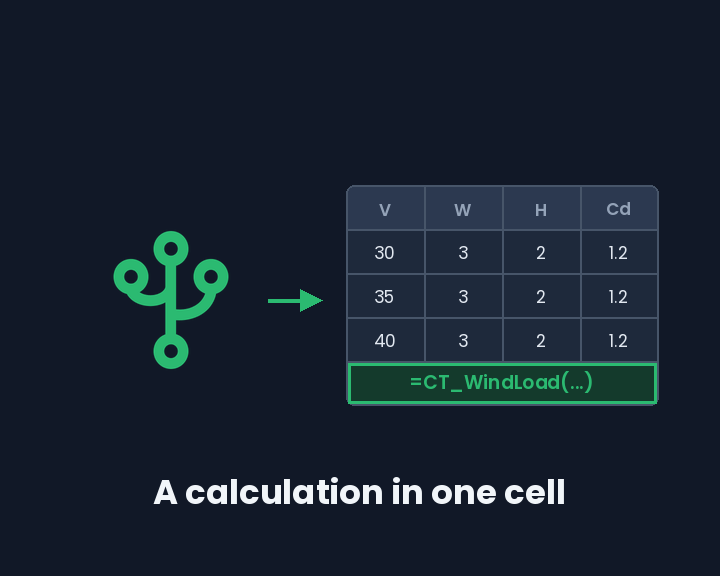
- CalcTree pages as Excel formulas (Excel add-in): the Excel add-in can install a page into your workbook as a named formula, so a whole calculation becomes one function call with its inputs as the arguments. The task pane also previews and generates the page’s PDF report, and the variables table now shows each value’s type and links back to the page it came from. View Usage lists every place in the workbook that calls a calculation, with the range it wrote into and when it last ran, so you can re-run them when the calculation changes. The add-in is now available in the Microsoft Office Add-in Store — search “CalcTree” under Insert → Get Add-ins. Read the write-up.
- Publish versions of your own templates: saving a page you have already made a template from now creates a new version of that template rather than asking whether to overwrite it. If a name is taken by a different template, CalcTree says so instead of silently replacing it.
- See which version is published, and whether the page has moved on: a template’s card in the Templates panel shows its version number, and flags “Source edited” once the source page’s calculations have changed past what that version was published from. That flag is your cue to republish.
- Template pages are marked in the page tree: a page that publishes a template now carries a marker in the sidebar, so you can see the relationship without opening the Templates panel.
- Workspace-level report settings: set your report configuration once for the whole workspace and reuse it, instead of defining it on every page.
- Preview a linked page without leaving the one you’re on: a page-calculation import can now open its source page in a tile, so you can check where a value came from in place.
Improved
- Large pages load and respond faster: the editor no longer serialises the whole document on every keystroke to build errors it then discards.
- Faster formatting across table selections: selecting and formatting several cells at once no longer recomputes the entire cell grid each time.
- See the full list of linked variables on a node card: truncated in and out lists now expand.
- See what a page import left behind: a page-calculation import’s node card now lists the variables it could not bring in, instead of leaving you to work out what is missing.
- Clearer labels and readable values on page imports: the panel for adding a page as a source reads in plain language, and shows values rather than raw internal data.
- Know when an imported page has changed: an import is now marked when the page it reads from has moved on.
- A clearer warning when a page cannot be saved as a template: if two variables on the page share a name, CalcTree explains that rather than failing at the end.
Fixed
- Browser translation no longer crashes the app: letting Chrome translate a page used to take the whole session down.
- Steadier maths block editing: the edit overlay lines up with the text underneath, and reference badges no longer ghost or overlap.
- Inline equations are no longer clipped: long inline maths renders in full.
- Temperatures and unit arrays work in Python cells: the Python engine in your browser now ships the current engineering unit library.
- Copy variable name copies the variable name, not the node name.
- Adding a document header fills in the standard fields again.
- Dark mode polish: the sign-in logo, member status dots in the invite modal, and block drag handles all render properly.
- Duplicated pages keep their name and appear sooner, and duplication now warns you when referenced pages would be left behind.
- Page references survive copying a page to another workspace.
- Save as template reliably captures your page’s content: it could previously produce an empty template without saying so.
- Template deletion tells you when it fails instead of appearing to succeed.
- Inserting a template no longer leaves a blank line behind.
- Page imports no longer break on chart or series data: arrays the maths engine cannot represent are now skipped rather than failing the import.
- AI wording suggestions no longer come back blank.
- PDF previews load reliably right after upload.
- Input table settings buttons appear as they should.
- The cursor no longer jumps while typing in a maths input.
- The dependency graph no longer freezes on large calculations.
- Paginated view fixes: tables break at the right point, the cursor stays put on a slow connection, and table row hover works.
Deep dives
- CalcTree LLM Skill: your pages as AI tools: load the skill into any AI coding assistant. It finds a calculator in your workspace, sets inputs, reads back results and exports a report — every number computed by CalcTree, not the LLM.
- AI assistants that can calculate: why the combination of an LLM with a deterministic calculation engine matters, and how CalcTree pages plug into the AI workflow without replacing the engineer.
- Folders: organise your workspace and build reports across pages: group pages into folders, nest them as deep as you need, and generate a single combined report from a folder.
- CalcTree for Excel: run a whole calculation from one cell: browse your workspace from a task pane in Excel, install a calculation as a named formula, and run it against your sheet. One call for a single row, or one request for a whole table of load cases.
- Solver block now available: symbolic solving inside your calculation: write the constraints as they stand, name the unknowns, and it solves the system. Symbolic where a closed form exists, and it tells you when the answer is not unique.
- Paginated view: see exactly what will print: turn on paginated view in Page Settings and your document lays out on paper sheets as you type, so page breaks, table widths and line breaks match the PDF you export.
- Testing CalcTree AI on structural scheme design against the IStructE CM exam: we set CalcTree AI all five questions of the January 2026 IStructE CM exam. Each answer came back as eleven to thirteen connected pages: calculations, GA plans, sections, connection details, appraisal, client letter and method statement.