If you've landed here, you've already decided Mathcad is too expensive, too clunky, or both. The question is whether one of the free options can actually do the job, or whether you'll waste a month on a free tool, hit a wall, and pay for something else anyway. This is an honest guide. We make CalcTree, so we're biased, but we're not going to pretend a paid tool is the right answer for every reader.
Is Mathcad free?
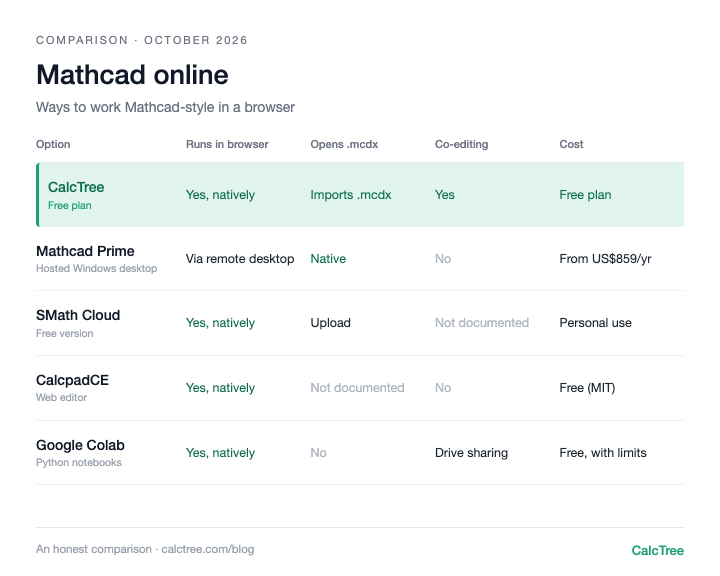
No. PTC sells Mathcad Prime as an annual subscription (the PTC store listed it from about US$859 per user per year, checked October 2026). There is a free 30-day trial of the full product, and when it ends it reverts to Mathcad Express, a limited-functionality version. PTC's own comparison page says Express "is not usable for commercial purposes", and it's Windows only, like Prime.
So for paid engineering work, there is no free Mathcad. There are free Mathcad alternatives, and that's what the rest of this guide covers. CalcTree's free plan is one of them, and it runs in a browser, so it works on a Mac too (Mathcad for Mac, Mathcad online).
The free Mathcad alternatives at a glance
| Tool | Cost | Platform | Math input | Python integration | Real-time collab | Cloud | AI generation | Markdown import/export |
|---|---|---|---|---|---|---|---|---|
| CalcTree (free tier) | Free | Web (any OS) | Math notation and Python | Yes, inline with the maths | Yes | Yes | Yes (capped) | Yes |
| SMath Studio | Free (personal) | Windows / Linux (Mono) | Math notation only | No | No | No | No | No |
| Calcpad | CE edition free / open source; main version paid (terms unclear) | Windows / Web | Code-style only | No | No | Partial (web viewer) | No | No |
| Jupyter Notebooks | Free / open source | Anywhere | Python only | Yes (Python only, no math notation) | Limited (paid hosting) | With hosting | No | No (notebook format) |
| Mathcad Express | Free (limited) | Windows | Math notation only | No | No | No | No | No |
Four patterns stand out. First, every truly-free tool forces you into one paradigm: either point-and-click math notation or code. None let you mix the two on the same page. Second, every truly-free tool is desktop and file-based. Third, none have AI generation. Fourth, none support markdown, which means your work is locked in a proprietary format and can't be easily moved into or out of the modern documentation tools your team probably already uses.
SMath Studio: the Mathcad lookalike
SMath is the closest thing to Mathcad you can download for free. Same "math notation on the page, results update live" model. For solo engineers who want Mathcad-style readability without the licence cost, it's the best free option.
The catch: the UI looks like it was built in 2008, because most of it was. Plugin discovery is a forum scavenger hunt. Sharing means emailing a .sm file and hoping the recipient has the same plugins and version. Two engineers cannot edit the same calc at once. Mac support is via Mono, which works but feels like Windows software in costume. And you can't drop into Python when math notation runs out. SMath is one paradigm only.
Use it if: You're a solo engineer or student doing calcs only you need to read.Skip it if: You work on a team or care what your output looks like.
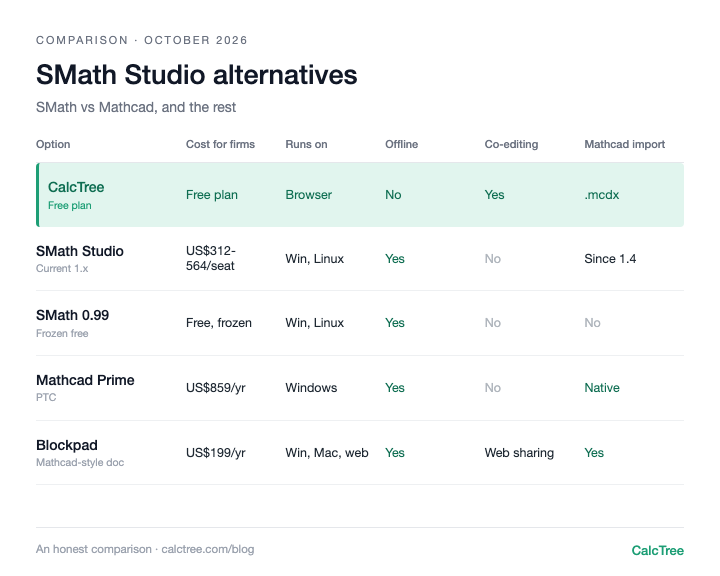
For the free-version licence change and the paid options, see our SMath Studio alternatives guide.
Calcpad: the newer contender (free in its CE edition)
Calcpad is more modern in feel than SMath, with both a Windows desktop app and a browser-based viewer. The catch: it's text-based input. You write equations as code and it renders them as math, a real learning curve coming from Mathcad. Only the Community Edition (Calcpad CE) is free and open source. The main version is maintained by a single developer and isn't free, and its commercial licensing terms aren't clearly published, so check before using it on paid work.
The library of pre-built engineering functions is much smaller than Mathcad or SMath. The web viewer is read-only, not multiplayer. Documentation is sparse. And like SMath, you're locked into one input style, with no Python escape hatch.
Use it if: You're comfortable with code-style input and want a free, modern-feeling tool for personal use.Skip it if: You want a polished ecosystem or your team needs to actively collaborate.
Jupyter Notebooks: free, powerful, and not really a Mathcad alternative
Jupyter is genuinely free, runs everywhere, and is what a lot of younger engineers reach for instead of Mathcad. But know what you're signing up for: you're writing Python, and there is no equation editor. Math notation goes in markdown cells as LaTeX, which is read-only. Units handling is whatever library you pick (pint, astropy.units) and you have to set it up yourself. Real-time collaboration only works through paid hosting layers like Deepnote or Hex. The output looks like a notebook, not an engineering report. Onboarding a new engineer means teaching them Python, pandas, NumPy, and your team's conventions before they can contribute.
Use it if: You're already coding, in R&D, or the calc is the deliverable.Skip it if: Your team includes engineers who don't code, or non-engineers need to read the output.
Mathcad Express: free, but not for work
Worth mentioning because it shows up in searches. Express is what the 30-day Mathcad Prime trial reverts to if you don't buy, and PTC describes it as limited functionality and not usable for commercial purposes. It's useful for opening and lightly editing existing .mcdx files on a Windows PC for personal use. For anything else, it's a sales funnel rather than a free Mathcad. If you're weighing up Prime itself, see the Mathcad vs CalcTree comparison below.
A note on Maxima and Scilab: Both are powerful and free, but neither is really a Mathcad alternative. Maxima is a computer algebra system; Scilab is a free MATLAB equivalent. If those are what you actually need, they're good, but they don't replace Mathcad's document-style workflow.
When "free" stops being free
Every truly-free tool above shares the same limitations, and they all become serious as soon as you stop being a solo user:
One paradigm only. SMath gives you math notation. Calcpad gives you text-based syntax. Jupyter gives you Python. None let you mix simple math notation with Python on the same page. The moment your calc outgrows the tool's paradigm, you start over in a different tool.
Sharing is a manual chore. Email a file, hope the recipient has the right software version, hope the plugins match. There is no "send a link, they see live calcs" in any of the free options.
No real-time collaboration. Two engineers cannot work on the same calc at the same time.
No AI. Not "limited AI": none. AI can generate a first-pass calc against a standard, sanity-check inputs, and review work against design documents in seconds. None of that exists in any free Mathcad alternative.
Locked-in file formats. None support markdown import or export. Your calcs can't move easily into or out of the documentation tools your team probably already uses (Notion, Confluence, GitHub, ChatGPT outputs). Once it's in the tool, it stays there.
For a solo engineer, none of this matters much. For a team, every limitation compounds into real lost hours every week.
Mathcad vs CalcTree
If you're weighing up paying for Mathcad Prime rather than going free, here's how it compares with CalcTree. Both give you readable maths with real units. Mathcad is a desktop worksheet for one engineer; CalcTree is where calcs get written, checked and signed off by a team, in the browser. It also turns your team's existing calcs into tools AI can use: an LLM can run a CalcTree page with its own inputs and get a checked, unit-aware answer back, instead of guessing the maths.
| Mathcad Prime | CalcTree | |
|---|---|---|
| Price (Oct 2026) | From about US$859 per user per year (PTC store) | Free plan; paid plans US$14 to US$34 per user per month |
| Where it runs | Windows desktop only (Windows 11) | Any desktop browser: Windows, Mac, Linux |
| How you write calcs | Maths notation on a worksheet | Maths notation and Python cells on the same page |
| Units | Yes, built in | Yes, carried through maths and Python |
| Working together | One person in one file; share by sending the file or a PDF | Live co-editing, comments and mentions; share a link |
| Checking and history | Outside the file: markups, PDFs, folders | Review in the workspace, version history, audit trail of who checked what |
| Built-in reviews | No; reviews happen outside Mathcad | Yes; checkers review and sign off calcs on the page itself |
| AI | None built in | Built in for drafting, debugging and reviewing; LLM plugins for Claude and others; any page can be run by an LLM as a calculation tool |
| Excel and other software | Excel component inside worksheets | Excel add-in and API run any calc from your other software |
| Templates | Your own worksheets, copied per project | 100+ built-in templates plus versioned workspace templates |
| Mathcad files | Native .mcdx | Imports Prime .mcdx into live pages |
| Offline use | Yes | Not yet (coming soon) |
Mathcad is still the better choice if you must deliver Mathcad files or work fully offline. If your calcs get checked, reused, shared or put to work by AI, CalcTree is built for that, and it imports Prime .mcdx files so you can test it on your own work (how the converter works).
Mathcad vs Excel
Plenty of engineers weighing up Mathcad are really weighing it against Excel. Excel wins on familiarity and running many cases; Mathcad wins on a calc a checker can actually read. CalcTree gives you both: readable maths with units on the page, and the Excel add-in to run the same calc across a spreadsheet of cases. More in engineering calculations online vs spreadsheets.
Where CalcTree fits
We make CalcTree, so weigh this accordingly. We built it for what happens after the number: someone checks it, someone reuses it, and the firm knows which version went out.
CalcTree runs in any desktop browser, nothing to install:
- AI native. AI is built in for drafting, debugging and reviewing calcs, and an admin can switch it off. Claude and other AI tools can also build and run your calcs through LLM plugins.
- Review and history. Review calcs in the shared workspace, with version history and an audit trail of who checked what.
- Real-time collaboration. Co-editing, comments and mentions on the same page.
- Python, natively. Python cells sit inline with the maths, units carried through, with numpy, scipy and plotting libraries pre-installed. Nothing to install per user.
- Connected to your other software. The Excel add-in and API let anything that can call an API run a calc.
- Governance. Three lock modes and role permissions, and versioned workspace templates that flag pages when the source changes.
- Templates out of the box. 100+ built-in templates across disciplines and jurisdictions, including AS, ACI and Eurocode, to insert or reference, plus your own workspace templates.
- Linked calcs. Pages link to each other, pinned to a revision and flagged when the source changes.
- Reports. Company headers and document elements set once for the whole firm, and a Report Builder that binds multi-page reports with contents and page numbers.
- A generous free plan. Python, the Excel add-in, the API and an AI allowance are all on the free plan. Paid plans are US$14 to US$34 per user per month.
- Your data. You own your IP and can export any time.
- Mathcad converter. Import Prime .mcdx files into live pages (how it works).
Where others are still ahead: native Word export, and fully offline use (offline is coming soon).
Want to see how it looks with your own work? Request a calc and we'll build it for you, or send us a Mathcad or SMath file and we'll convert it for you.
More on moving off Mathcad
- Mathcad Prime vs Mathcad 15: what changed and what broke in the upgrade.
- Can't open old Mathcad files?: how to recover them.
- How to convert Mathcad files to CalcTree.
- Mathcad online and Mathcad for Mac: your options without Windows.
- SMath Studio alternatives.
Decision tree
- Solo engineer, occasional personal use, Mathcad muscle memory → SMath Studio or CalcTree
- Engineer comfortable with Python, working solo or in R&D → Jupyter or CalcTree Python nodes
- Team of 2+ engineers who need to share live calcs → CalcTree
- Solo engineer who wants AI to speed up calc generation and review → CalcTree free tier (upgrade later if you need more AI tokens)
- You need multi-page calc reports with your firm's headers, contents and page numbers, set up once for everyone → CalcTree
- You have Mathcad Prime files to keep working on, and it has to be free → CalcTree's Mathcad converter (Mathcad Express opens them too, but not for commercial work)
- You need to review and sign off calcs, with a history of who checked what → CalcTree
Frequently asked questions
Is Mathcad free?
No. Mathcad Prime is a paid annual subscription. The free 30-day trial reverts to Mathcad Express, which PTC says is limited and not usable for commercial purposes. For free Mathcad-style work, SMath Studio (personal use), Calcpad CE and CalcTree's free plan are the main options.
Is there a free version of Mathcad?
Only Mathcad Express, the limited version the Prime trial reverts to. It's Windows only and not for commercial use.
Mathcad vs CalcTree: which is better?
If you need genuine Mathcad files and fully offline work on Windows, Mathcad. If your calcs get checked, reused or shared, or you want AI, Python and Excel working on the same calc in a browser, CalcTree. CalcTree imports Prime .mcdx files and has a free plan, so you can test it on your own calcs.
Can SMath Studio open Mathcad files?
Recent versions can. SMath 1.4 (June 2026) added import of Mathcad .xmcd and .mcdx files. The frozen free 0.99 version cannot.
What's the best free Mathcad alternative for Mac?
SMath via Mono works but feels rough. Jupyter is fully cross-platform. CalcTree runs in any desktop browser, so it works the same on Mac, Windows or Linux.
Is CalcTree free?
Yes. The free plan includes maths notation and Python on the same page, real-time collaboration, the Excel add-in, the API and an AI allowance. Paid plans are US$14 to US$34 per user per month.
Can CalcTree open Mathcad files?
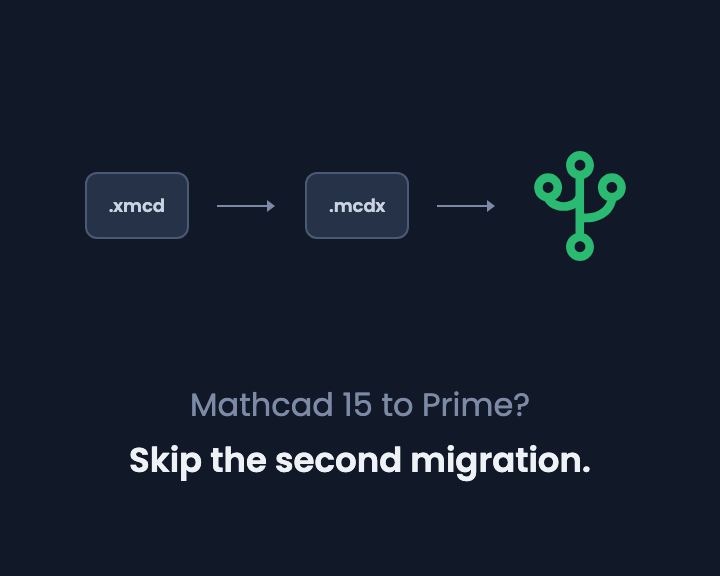
Yes, Mathcad Prime .mcdx files, through the built-in converter on the free plan. Mathcad 15 .xmcd and .mcd files need re-saving as .mcdx in Prime first.
Prices are list prices from each vendor's website, checked October 2026, and may have changed. Source: Mathcad Prime (PTC store).