Short answer: no. As of October 2026 there is no official online or browser version of Mathcad. PTC Mathcad Prime 12 is a Windows desktop application, and the only way to run the real thing from a browser is to run it on a Windows machine somewhere else and connect to that machine remotely.
If you're on a Mac or Chromebook, away from your work PC, or just don't want to install anything, there are still several ways to work Mathcad-style in a browser, and some are free. We make CalcTree, one of them, so we're biased. We've tried to be straight about where each option wins, including Mathcad.
The ways to use Mathcad online at a glance
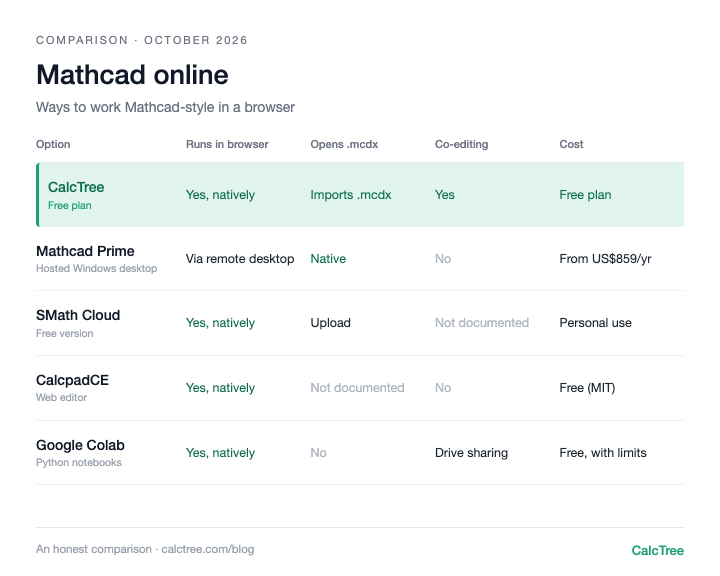
| Option | Cost (Oct 2026) | Runs in a browser | Opens Mathcad files | How you write calcs | Live co-editing |
|---|---|---|---|---|---|
| Mathcad Prime on a hosted Windows desktop | Prime from about US$859 per user per year (PTC store, checked Oct 2026), plus the hosted desktop | Through a remote desktop web client | Yes, natively | Mathcad worksheet | No |
| Mathcad Express | Free, personal use only (PTC, checked Oct 2026) | No, Windows desktop | Yes | Mathcad worksheet, limited features | No |
| CalcTree | Free plan; paid plans US$14-34/user/month (CalcTree pricing) | Yes, natively | Imports Mathcad Prime .mcdx into a live page | Maths notation and Python on one page | Yes |
| SMath Cloud | Free version for personal use; paid plans for firms (SMath pricing, checked Oct 2026) | Yes, natively | Accepts .mcdx and .xmcd uploads | Mathcad-style worksheet | We couldn't find it documented |
| CalcpadCE web editor | Free, MIT licence (GitHub) | Yes, natively | We couldn't find Mathcad import documented | Code-style text | We couldn't find it documented |
| Jupyter / Google Colab | Free with usage limits (Colab FAQ, checked Oct 2026) | Yes, natively | No | Python | Sharing through Google Drive |
Two patterns stand out. The only way to get genuine Mathcad in a browser is a remote Windows desktop, which you pay for twice (Mathcad plus the desktop). And every native browser option asks you to move to a different worksheet, so the real question is which one feels closest to how you work.
Mathcad Prime on a hosted Windows desktop: the real thing, remotely
PTC lists Windows 11 (64-bit) as the operating system for Mathcad Prime 12. There's no Mac, Linux or ChromeOS build. So "Mathcad online" in practice means installing Prime on a Windows machine you reach through a browser: your firm's Citrix or remote desktop set-up, or a cloud PC such as Windows 365, whose web client runs in Chrome, Safari, Edge or Firefox on Windows, macOS, ChromeOS and Linux.
This is the right answer if you need Mathcad itself: you get the full product and your files open natively.
The costs are real, though. You pay for a Mathcad licence (the PTC store listed Prime at US$859 per user per year for a locked licence, checked October 2026) and for the hosted desktop. Licensing on virtual machines has its own rules, and we couldn't find PTC documentation endorsing a specific browser or virtual desktop set-up, so check with PTC or your reseller before you build one. And it's still one person in one file at a time.
PTC announced Mathcad Gateway in 2016, a server for running approved worksheets from a browser. Its old product URL now redirects to the main Mathcad page, and we couldn't find it offered (checked October 2026).
Use it if: You need genuine Mathcad, your firm already runs remote Windows desktops, or contracts require Mathcad files.
Skip it if: You want something free, or you want to share a live calc with someone by sending a link.
Mathcad Express: free, but not online
Mathcad Express is what the free 30-day Prime trial reverts to if you don't buy. PTC describes it as a limited-functionality version, and its own comparison page says Express "is not usable for commercial purposes". It's the same Windows desktop app, so it doesn't help on a Mac or Chromebook.
Use it if: You need to open and lightly edit Mathcad files on a Windows PC for personal use.
Skip it if: You need it for paid work, or you're not on Windows.
CalcTree: a calc platform built for the browser
CalcTree runs in the browser with nothing to install, on Windows, Mac or Linux. You write maths in normal notation with units carried through every step, and drop into native Python cells on the same page when the logic gets heavy. Several engineers can edit the same page at once, comment and mention each other, and a calc can be shared as a link. Checkers review calcs in the same workspace, so the review sits with the calc rather than in a marked-up PDF. Built-in AI helps you build calcs and checks new work against your templates and references, and plugins connect CalcTree to LLM tools like Claude so you can run and build calcs from there.
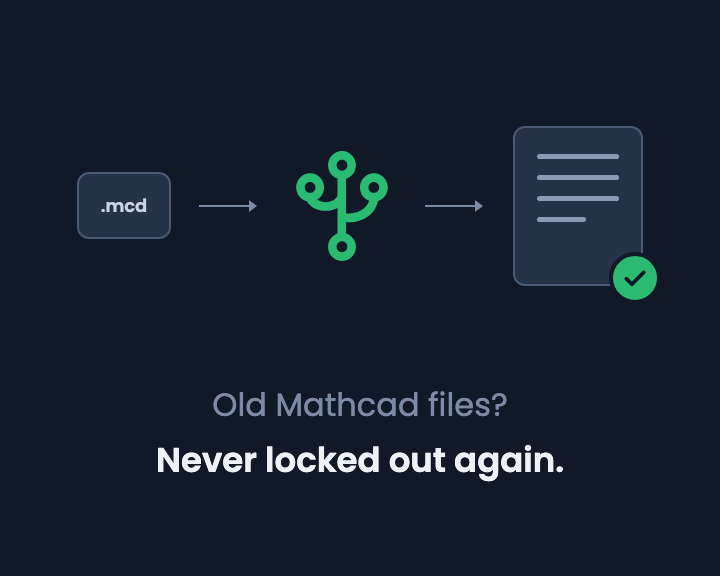
For Mathcad users there's a built-in converter: create a new page, choose Import from Mathcad and select a Mathcad Prime .mcdx file, and it becomes a live, editable CalcTree page. Older .mcd and .xmcd files need re-saving in Prime first. We walk through what to check after converting in how to convert Mathcad files to CalcTree.
Use it if: your calcs get checked, reused or shared, or you want AI, Python and your other software working on the same calc.
Skip it if: you need native Word export, or fully offline work today (offline use is coming soon).
SMath Cloud: the closest look and feel
SMath Studio, the free Mathcad lookalike, also runs in a browser as SMath Studio in the Cloud. You can start a blank worksheet or upload a file; the upload page lists .sm, .smz, .mcdx, .xmcd, .xls and .xlsx. It's the most Mathcad-like experience in a browser.
The free cloud version has limits on stored data and on the number of worksheets per account, and worksheets created without registering become public, with no access control or versioning. SMath's free Personal plan and its Advanced plan both state they can't be used in organisations, so firms need a paid organisation plan. We've covered the desktop side in our free Mathcad alternatives review.
Use it if: You want something that looks and feels like Mathcad in a browser, for personal use.
Skip it if: You're using it for work at a firm and don't want to buy SMath licences, or your calcs are confidential.
CalcpadCE web editor: free and open source
CalcpadCE, the open-source community fork of Calcpad, has an online editor at calcpad-ce.org alongside its desktop app and VS Code extension. You type equations as text and it renders a formatted calc with units, plots and results. It's MIT-licensed, so it's free for work.
It isn't point-and-click like Mathcad, so expect a learning curve. We couldn't find Mathcad file import or multi-user editing documented, and it's maintained by volunteers.
Use it if: You're comfortable writing calcs as text and want something free you can use at work.
Skip it if: You want Mathcad-style worksheet editing, or need to bring existing Mathcad files across.
Jupyter and Google Colab: the Python route
Google Colab is a hosted Jupyter notebook service: free, nothing to install, and shared through Google Drive. It's powerful if you code. But it's Python, not maths notation, units are whatever library you set up, and Google says free resources are not guaranteed, with notebooks running for at most 12 hours.
Use it if: You already write Python and the calc doesn't need to read like a hand calc, and you don't need a no-code document others can follow.
Skip it if: Engineers who don't code need to check or edit the work.
When "online" isn't enough on its own
A browser solves the install problem. It doesn't solve what happens once calcs move through a team:
- Files still get copied. A remote desktop is still Mathcad on a file system. Someone saves "beam_v3_final.mcdx" and the checker reviews the wrong one.
- Checking happens outside the calc. Markups live in PDFs and emails, not on the worksheet.
- Sharing needs a licence. If the person checking your work doesn't have Mathcad, they get a PDF, not the live calc.
Where CalcTree fits
We make CalcTree, so weigh this accordingly. We built it for what happens after the number: someone checks it, someone reuses it, and the firm knows which version went out.
CalcTree runs in any desktop browser, nothing to install:
- AI native. AI is built in for drafting, debugging and reviewing calcs, and an admin can switch it off. Claude and other AI tools can also build and run your calcs through LLM plugins.
- Review and history. Review calcs in the shared workspace, with version history and an audit trail of who checked what.
- Real-time collaboration. Co-editing, comments and mentions on the same page.
- Python, natively. Python cells sit inline with the maths, units carried through, with numpy, scipy and plotting libraries pre-installed. Parametric sketches and heavy maths use a language AI tools already write well.
- Connected to your other software. The Excel add-in and API let anything that can call an API run a calc.
- Governance. Three lock modes and role permissions, and versioned workspace templates that flag pages when the source changes.
- Templates out of the box. 100+ built-in templates across disciplines and jurisdictions, including AS, ACI and Eurocode, to insert or reference, plus your own workspace templates.
- Linked calcs. Pages link to each other, pinned to a revision and flagged when the source changes.
- Reports. Company headers and document elements set once for the whole firm, and a Report Builder that binds multi-page reports with contents and page numbers.
- A generous free plan. Python, the Excel add-in, the API and an AI allowance are all on the free plan. Paid plans are US$14 to US$34 per user per month.
- Mathcad converter. Import Prime .mcdx files into live pages (how it works).
Where others are still ahead: native Word export, and fully offline use (offline is coming soon).
If you're moving a team off Mathcad, see how Mathcad compares with CalcTree.
Want to see how it looks and feels with your own work? Request a calc and we'll build it for you, or send us a Mathcad or SMath file and we'll convert it for you.
Decision tree
- Need genuine Mathcad and your firm runs remote Windows desktops → Mathcad Prime on a hosted desktop
- Want the closest Mathcad look and feel in a browser, personal use only → SMath Cloud
- Comfortable writing calcs as code, for personal projects → CalcpadCE web editor
- Already write Python and work alone → Google Colab
- On a Mac or Chromebook and want Mathcad-style calcs with nothing to install → CalcTree
- Have Mathcad Prime files to keep editing in a browser → CalcTree's Mathcad converter
- Need to review and sign off calcs, with a history of who checked what → CalcTree
- Want to build and work on calcs with AI built in → CalcTree
- Want calcs that plug into Excel, other software and AI tools like Claude → CalcTree
- Team that shares, co-edits and reuses calcs → CalcTree
Frequently asked questions
Mathcad vs CalcTree: which is better for working online?
If you need genuine Mathcad files and work offline on Windows, Mathcad. If you want calcs in a browser that a team can co-edit, review and reuse, with AI, Python and an API built in, CalcTree. CalcTree imports Prime .mcdx files and has a free plan, so you can test it on your own calcs.
Is there an online version of Mathcad?
No. As of October 2026, PTC offers Mathcad Prime only as a Windows desktop application. To use it from a browser you need to run it on a remote Windows machine, such as a Citrix desktop or a Windows 365 cloud PC.
Can I use Mathcad in a browser for free?
Not genuine Mathcad. The free Mathcad Express is a Windows desktop app and not for commercial use. Free browser-based alternatives include CalcTree's free plan, SMath Cloud's free version (personal use) and the CalcpadCE web editor.
Can I open .mcdx files online?
Yes, with two options we found. CalcTree imports Mathcad Prime .mcdx files into live, editable pages on the free plan. SMath Cloud accepts .mcdx and .xmcd uploads. How faithfully any converter handles a complex worksheet varies, so check results against the original.
Does Mathcad work on Chromebook?
Not natively. Mathcad Prime needs Windows 11. On a Chromebook you can reach Mathcad on a remote Windows desktop through a browser, or use a browser-native option such as CalcTree or SMath Cloud.
Is there a Mathcad online compiler?
No, Mathcad doesn't have an online compiler or web editor. If you want to type and run Mathcad-style calcs in a browser, SMath Cloud, the CalcpadCE web editor and CalcTree all do that.
Prices are list prices from each vendor's website, checked October 2026, and may have changed. Sources: Mathcad Prime (PTC store); SMath Studio plans.