

If you've decided to leave Mathcad, you've hit the next problem: years of .mcdx worksheets that only Mathcad can open. The files don't render anywhere else. Free alternatives like SMath and Calcpad can't read them. Excel can't read them. Even most "Mathcad alternative" tools quietly expect you to rebuild every calc by hand.
That's the moat PTC built. We thought it was a stupid moat, so we knocked it down.
Calctree now has a built-in Mathcad converter. Drop in your .mcdx file, click once, and it becomes a live CalcTree calculation. This post walks through exactly how it works, what to expect, and what you should do once your worksheets are across.
What the converter does
The CalcTree Mathcad converter takes a Mathcad Prime .mcdx file and turns it into a working CalcTree calculation page. Variables, equations, units, and results all come across. You don't rebuild anything, you open the converted page and your calc is live, editable, and shareable as a link. Charts and more complex functions will even be converted to Python for you.
It works on Mathcad Prime files specifically. The .mcdx format used by Prime 1.0 onwards. If you're on the older Mathcad 15 (or earlier) which uses .mcd or .xmcd, you'll need to open those in Mathcad Prime first and re-save as .mcdx before bringing them into CalcTree . PTC's Prime has a built-in converter for the older formats.
How to convert a Mathcad file to CalcTree
The converter is a button on every new CalcTree page, so there's nothing extra to install or set up:
- Sign in to CalcTree (or create a free account — no credit card needed)
- Create a new page
- Click Import from Mathcad on the new page 'get started' banner
.png)
- Or select 'Mathcad' from the command menu
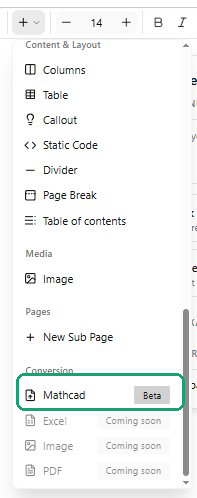
- Select your
.mcdxfile - The converter parses the worksheet and renders it as a live CalcTree page
That's the whole flow. It runs in the browser, no desktop install, works the same on Mac, Windows, or Linux.
What you can expect to come across cleanly
- Variables and constants — your defined values come across with their assignments intact
- Equations — math notation renders the same in CalcTree's editor
- Units — CalcTree has native units handling, so unit-aware calcs stay unit-aware
- Calculation results — recomputed live in CalcTree , so you can verify nothing changed
- Worksheet structure — the order and flow of your calc is preserved
Under the hood, .mcdx files are ZIP archives containing the worksheet XML — CalcTree reads that XML directly, so the conversion is lossless on the calculation logic itself.
What to check after conversion
The converter gets you 95% of the way there. A few things are worth a quick eyeball before you trust the converted version for production work:
- Plots and charts — Mathcad's plotting is idiosyncratic. Recreate visualisations using CalcTree's Python nodes and matplotlib
- Embedded images — verify any inserted figures came across at the right size and position
- Custom Mathcad functions — if you used unusual built-in functions, double-check the CalcTree equivalent behaves identically
- Programming blocks — Mathcad's programming syntax converts to readable form, but for complex logic you may want to rewrite using CalcTree's native Python support, which is far more powerful. The convertor will do this automatically in some cases, but others may need your input.
Run the converted calc with the same inputs you used in Mathcad and check the outputs match. If anything's off, the original Mathcad file isn't going anywhere, you can re-import or adjust manually.
Why this matters more than it sounds
The technical mechanics of file conversion are the boring half of this. The interesting half is what becomes possible once your calcs are out of Mathcad:
Share with anyone via a link. Send a calc to a client or contractor and they open it in a browser. No Mathcad licence required, no PDF export workaround, no version mismatch.
Real-time collaboration. Two engineers can edit the same calc at the same time. Mathcad has never offered this and probably never will.
AI calculation review. Drop a design document or standard PDF next to your converted calc and have CalcTree's AI check the calc against it. This is genuinely a different way of working — flagged inconsistencies in seconds instead of a manual review pass.
Markdown export. Move calc content into Notion, Confluence, GitHub, or wherever your team actually documents work. .mcdx is a dead-end format; markdown is portable forever.
Python where you need it. When math notation runs out, drop into Python on the same page. No tool-switching, no exporting to MATLAB or Jupyter for the hard parts.
None of this is possible while your work is locked in .mcdx. The converter is the one-time step that opens all of it up.
Migrating a whole library: practical advice
If you've got dozens of worksheets to bring across, a few things worth knowing:
Don't convert everything at once. Start with the 5–10 calcs your team uses most often. Get them working, get the team comfortable, then work down the priority list. The remaining files aren't going anywhere.
Keep the originals. Leave your .mcdx files where they are during the transition. CalcTree doesn't modify the source file, but having the originals as a fallback is just sensible.
Consolidate while you migrate. A lot of engineering teams have multiple slightly-different versions of the same calc scattered across folders. Migration is a natural moment to pick the canonical one, bring just that into CalcTree, and link to it from a shared template.
Use templates. Once a calc is in CalcTree , you can save it as a team template — anyone on the team can spin up a new instance from it. This is much cleaner than the Mathcad pattern of copying a worksheet file every time.
Frequently asked questions
Does CalcTree open .mcd or .xmcd files (Mathcad 15)?
Not directly. Open them in Mathcad Prime first and re-save as .mcdx, then import into CalcTree.
Does the converter work without a CalcTree account?
You need a free account to create pages. Sign-up takes about 30 seconds and the free tier covers everything you need to convert and run worksheets.
Will my Mathcad file be modified?
No. The converter reads your .mcdx and creates a new CalcTree page from it. The original file is untouched.
What if the conversion isn't perfect?
You can edit anything in the converted page just like a normal CalcTree calc. For complex worksheets where something doesn't come across cleanly, our team can help — book a 30-minute migration call and we'll walk through your specific files.
Can I convert files in bulk?
The current flow is one file per import. For teams migrating large libraries, get in touch and we'll help you plan the migration.
Does the convetor tool use AI?
No, out team has built a finite algorithm to perform the conversion. No risk of AI hallucinations breaking the calculation or causing the need for re-verification.



