.png)
AI is starting to show up everywhere in engineering workflows.
But there’s still a fundamental gap:
- You can generate text.
- You can generate static calculations.
- You can generate code
But:
- where did it come from?
- how was it derived?
- what context was used?
- and can you actually use it in real project work?
- How do I execute the code?
The Problem: AI Without Context or Accountability
Most AI tools today operate outside of the actual calculation environment.
They generate outputs, but:
- the logic isn’t connected to your inputs
- assumptions are unclear
- results aren’t editable or reusable
- and there’s no clear link to your design basis or documentation
For engineers, that makes them hard to trust and even harder to adopt.
Our Approach: AI Inside the Calculation Environment
With CalcTree AI, we’ve taken a different approach.
Instead of generating isolated outputs, AI works directly inside your calculation pages, alongside your inputs, data, and reports.
This means:
- calculations are grounded in your actual engineering logic
- your inputs and page context shape the result
- reasoning is tracked alongside the calculation
- and everything remains fully editable and functional
1. Generate Fully Editable Calculations
AI can build complete calculation pages, which you can take over and edit right there, not just static outputs.
These pages:
- follow structured engineering logic
- include inputs, equations, and outputs
- and can be edited, extended, and reused like any other CalcTree calculation
This shifts AI from:
“generate something once”
to:
“build something you can actually use, review and share with others”
2. Extend Calculations with Python
Engineering workflows don’t stop at equations.
With CalcTree AI, you can layer Python-based analysis directly into your calculations.
Start with an existing calc (or generate one), and ask AI to extend it.
It will:
- work with your existing inputs and outputs
- use relevant engineering libraries
- generate clean, functional Python scripts
- and integrate them directly into your page
Instead of building separate scripts or tools, you can keep everything in one place — connected to your calculation and report.
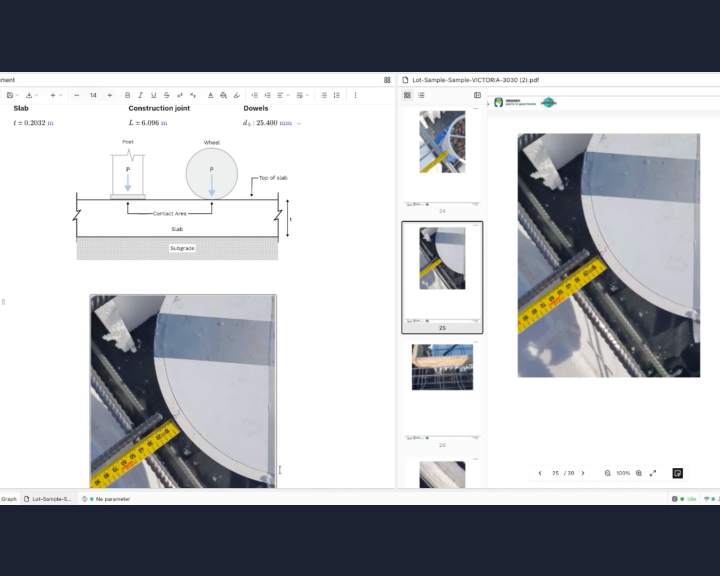
3. Review Calculations Against Design Documents
One of the most time-consuming parts of engineering work is reviewing calculations against design documentation.
- Site reports.
- Standards.
- Manufacturer specs.
This usually means manually going back and forth between PDFs and calculations to verify:
- assumptions
- loads
- equations
- design criteria
With CalcTree AI, this can now be done in seconds.
Upload your design basis or reference documents to a page, and ask AI to review your calculation against them.
It will:
- cross-check assumptions, equations, and criteria
- identify inconsistencies
- and flag potential issues before they make it into your design
This makes first-pass technical reviews faster — and ensures they actually happen.
From Generation → Analysis → Review
Taken together, these capabilities form a new workflow:
- Generate calculations grounded in engineering logic
- Extend them with Python-based analysis
- Review them against real project documentation
All within the same environment.
What’s Next
We’re continuing to build on this foundation, including:
- workspace-level knowledge bases
- deeper integration into structured review workflows
- and tighter connections between data, calculations, and standards
CalcTree AI is just getting started, but it’s already changing how engineering calculations are built, extended, and verified.
If you’re interested in using AI with your team’s existing data, workflows, and IP, get in touch or try it out in the platform.