
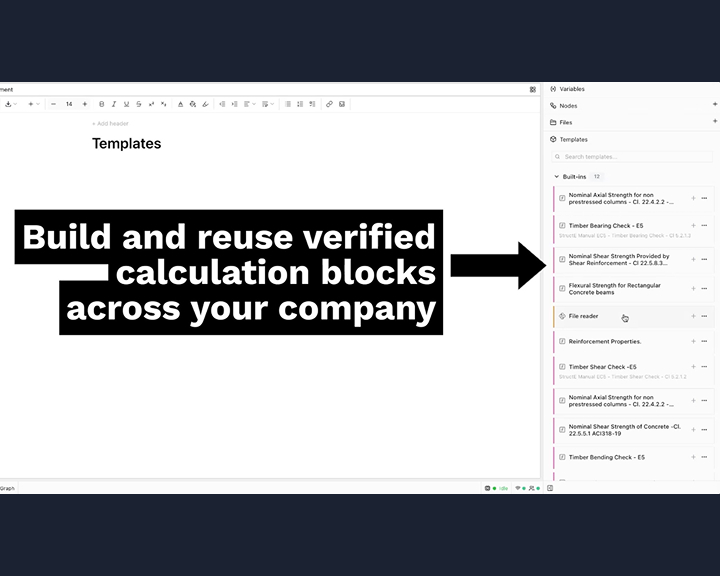
In engineering design, we often find ourselves solving the same fundamental problems across different projects. Yesterday’s "one-off" calculation is today’s standard procedure.
We recognized that while engineers love the flexibility of a blank canvas, they need the efficiency of standardized components.
Templates 2.0 is our answer to that need. We’ve moved beyond simple file duplication to a modular system where every piece of your calculation can be "templated" and reused.

Three Ways to Standardize Your Workflow
1. Math Block Templates
If you’ve derived a complex set of formulas according to a specific code (like ACI 318 or Eurocode), you shouldn't have to type it again. You can now right-click any math block and "Save as Template" to your workspace.
2. Python Node Templates
For the power users running custom Python scripts for data processing or complex iterations, you can now save those specific nodes. This allows your team to leverage custom code without needing to write a single line themselves.
3. Full-Page Templates
When you’ve perfected a page layout—complete with diagrams, tables, and checks—you can save the entire page structure. This is ideal for standard reports like beam designs, column checks, or foundation pads.
Why It Matters
By building a centralized library of verified blocks, your firm ensures that "the right way" is also "the easiest way."
Using templates in CalcTree makes it easy to standardise:
- Design checks you repeat across projects
- Common load combinations and code checks
- Post-processing and plotting scripts in Python
- Internal “best practice” routines and QA checks
Instead of copy-pasting from old projects, you now have a single place to:
- Maintain and improve your core calculation logic
- Keep teams aligned on the latest approved versions
- Onboard new engineers by pointing them to your shared template library
You can start creating templates from your existing pages today and build out your own internal library over time. Try it today.





