SMath Studio has probably served you well for years, and something has changed. Maybe IT has asked what licence you run it under, or current seats came back pricier than expected.
As of October 2026, the last free-for-firms release, SMath 0.99, dates from May 2021. Releases since 1.0 are free for personal use, but organisations pay per seat. So you can stay on a frozen version, pay for current SMath, or move.
We make CalcTree, so we're biased. We'll still tell you where SMath, and everything else on this list, is the better pick.
The SMath Studio alternatives at a glance
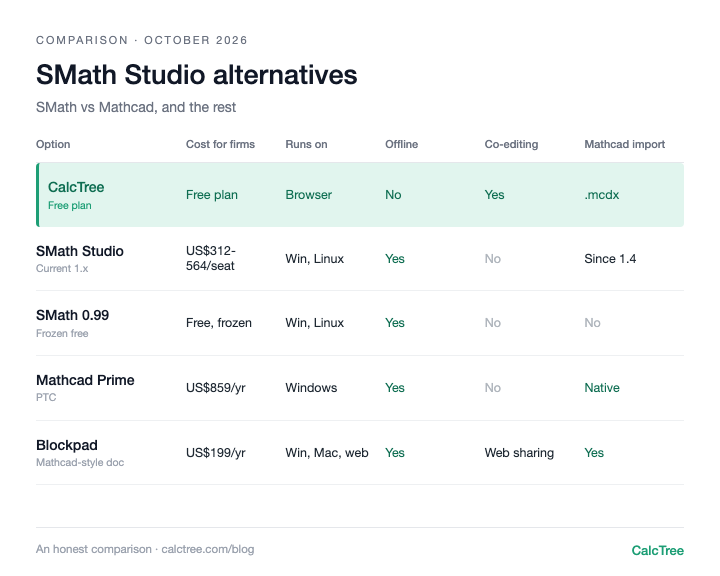
| Option | Cost (as of Oct 2026) | Runs on | Works offline | Real-time collaboration | Imports Mathcad files |
|---|---|---|---|---|---|
| SMath Studio (current, 1.x) | Free for personal use only. Firms: US$564 per seat per year, down to US$312 at 100+ seats (SMath price list, checked Oct 2026) | Windows, Linux | Yes | No | Yes, .xmcd and .mcdx since 1.4 (June 2026) |
| SMath 0.99 (frozen free) | Free, including commercial use (SMath forum) | Windows, Linux | Yes | No | No |
| CalcTree | Free plan; paid plans US$14-34/user/month (CalcTree pricing) | Desktop browser (Windows, Mac, Linux) | No | Yes | Yes, .mcdx |
| Mathcad Prime | About US$859 per year (individual); limited free Express (PTC store, checked Oct 2026) | Windows | Yes | None documented | Yes (native) |
| Blockpad | US$199 per year single user, US$180 for 5+, US$950 lifetime (Blockpad pricing, checked Oct 2026) | Windows, Mac, web | Yes (desktop) | Web sharing | Yes |
| CalcpadCE | Free, open source, MIT (GitHub) | Windows, Linux, web editor | Yes | No | None found |
| Maple Flow | US$749 per year, or US$1,495 perpetual (Maplesoft store, checked Oct 2026) | Windows, macOS | Yes | None documented | Yes, via Migration Assistant |
Three patterns stand out. Only frozen SMath 0.99 and CalcpadCE cost a firm nothing, and both leave you to support yourself. Current SMath is no longer the cheap option for small teams: at 1 to 4 seats it costs more per seat than Blockpad. And Mathcad import is now common, so old Mathcad files aren't a reason to stay put.
SMath Studio (current version): the same worksheet, now paid for firms
Current SMath is still SMath: the familiar Mathcad-style canvas, solid units, native Greek letters and matrices, and a desktop app that runs fully offline on Windows and Linux. Version 1.4 (June 2026) added Mathcad .xmcd and .mcdx import. If your engineers know SMath and your calcs work, paying for current seats is the least disruptive path.
The trade-offs are the old ones. There are no automatic contents. Python comes through a community IronPython plugin whose developer didn't expect numpy or scipy to work. Protecting a verified calc means password-locking worksheet areas. The batch calculation service and local licence servers need the Enterprise edition. There's no approval workflow or shared template library, and the project has been largely one developer's work. SMath is developed by LLC SMath in Saint Petersburg, Russia, according to its contacts page, so check your firm's software procurement policy before standardising on it.
Use it if: your team knows SMath, works offline, and the per-seat price fits.
Skip it if: you need Python with real engineering libraries, review and sign-off in the software, or calcs that several people work on at once.
SMath 0.99: free, frozen, and fine for now
The developer confirmed in March 2022 that 0.99.7822 and earlier "still can be used for commercial purposes for free as they have the previous version of license agreement built-in".
But it's frozen: no fixes, no Mathcad import, and every year further from the systems your IT team supports. It's a sensible place to wait while you decide, and a weak place to build a firm's calc library.
Use it if: you're a small team that needs to keep existing .sm files running while you evaluate.
Skip it if: you're planning more than a year or two ahead.
CalcTree: the forward-looking, AI-native option
If frozen SMath 0.99 is where calcs have been, CalcTree is where they're going. You write maths in readable notation with units carried through, and drop into native Python (numpy, scipy and engineering libraries pre-installed) when the logic outgrows equations. AI is built in for drafting, debugging and reviewing, and Claude and other AI tools can run your calcs through LLM plugins. Several people can edit a page live, review it in the same workspace, and see the history of who checked what.
Where SMath is still ahead: fully offline desktop work today (CalcTree's offline use is coming soon), and a canvas SMath users already know.
Use it if: your calcs get checked, reused or shared, or you want AI, Python and your other software working on the same calc.
Skip it if: you need native Word export, or fully offline work today (offline use is coming soon).
Mathcad Prime: the incumbent SMath was copying
Mathcad Prime is the reference point: mature and known by checkers and clients. PTC lists it at about US$859 per year for an individual locked licence; after a 30-day trial it drops to Mathcad Express, without programming and advanced functions. If you left Mathcad for SMath on price, nothing has changed. We cover Mathcad's own baggage in Mathcad Prime vs Mathcad 15.
Use it if: you need Mathcad-native files for clients or checkers.
Skip it if: cost pushed you to SMath in the first place.
Blockpad: the closest like-for-like
Blockpad is a Mathcad-style document with a shared library, on Windows, Mac and web. It runs each user's local Python, has an Excel add-in, imports Mathcad files and added Word export in 1.9. It's cheaper than current SMath for small teams.
We couldn't find an API, page locking or an approval workflow documented, and it's a small self-funded team.
Use it if: you want a polished desktop document that feels like Mathcad, plus Word output.
Skip it if: you need an API, governance across a firm, or live co-editing.
CalcpadCE: free, code-first, and yours to maintain
CalcpadCE is the community fork of Calcpad 7.6.2, MIT-licensed, on Windows, Linux and a web editor. You write calcs as plain text and it renders them as formatted maths, with units and native Word export. It's genuinely free for firms.
The catch is ownership: it's maintained by volunteers, so your firm carries support. There's no real-time collaboration, and code-style input is the biggest jump for SMath users.
Use it if: your engineers are comfortable writing code-style calcs and you want zero licence cost.
Skip it if: non-coding engineers need to build and check calcs.
Maple Flow: Maplesoft's Mathcad-style worksheet
Maple Flow is a free-form worksheet for design calcs from Maplesoft, on Windows and macOS. Its Migration Assistant brings Mathcad worksheets across, and you can buy it perpetual or annual: Maplesoft's US store lists US$749 a year, or US$1,495 for a perpetual licence. We couldn't find built-in collaboration documented.
Use it if: you want an established vendor and a free-form canvas, and budget isn't the driver.
Skip it if: you left Mathcad on price.
When desktop SMath stops working
Whichever version you run, these limits bite once you're a team:
- Files get copied, not reused. A verified beam check ends up in fifty project folders, and fixing it means finding all fifty.
- Checking happens outside the software. Mark-ups and emails, with nothing tying the approval to the exact calc approved.
- One person at a time. Designer and checker can't work in the same calc at once.
- Python is bolted on. Load-case loops or section libraries mean a plugin.
For a solo engineer none of this matters much. For a firm, it adds up.
Where CalcTree fits
We make CalcTree, so weigh this accordingly. It's built for the teams in that last section:
- AI native. AI is built in for drafting, debugging and reviewing calcs, and an admin can switch it off. Claude and other AI tools can also build and run your calcs through LLM plugins.
- Review and history. Review calcs in the shared workspace, with version history and an audit trail of who checked what.
- Real-time collaboration. Co-editing, comments and mentions on the same page.
- Python, natively. Python cells sit inline with the maths, units carried through, with numpy, scipy and plotting libraries pre-installed. No plugin needed.
- Connected to your other software. The Excel add-in and API let anything that can call an API run a calc.
- Governance. Three lock modes and role permissions, and versioned workspace templates that flag pages when the source changes.
- Templates out of the box. 100+ built-in templates across disciplines and jurisdictions, including AS, ACI and Eurocode, to insert or reference, plus your own workspace templates.
- Linked calcs. Pages link to each other, pinned to a revision and flagged when the source changes.
- Reports. Company headers and document elements set once for the whole firm, and a Report Builder that binds multi-page reports with contents and page numbers.
- A generous free plan. Python, the Excel add-in, the API and an AI allowance are all on the free plan. Paid plans are US$14 to US$34 per user per month.
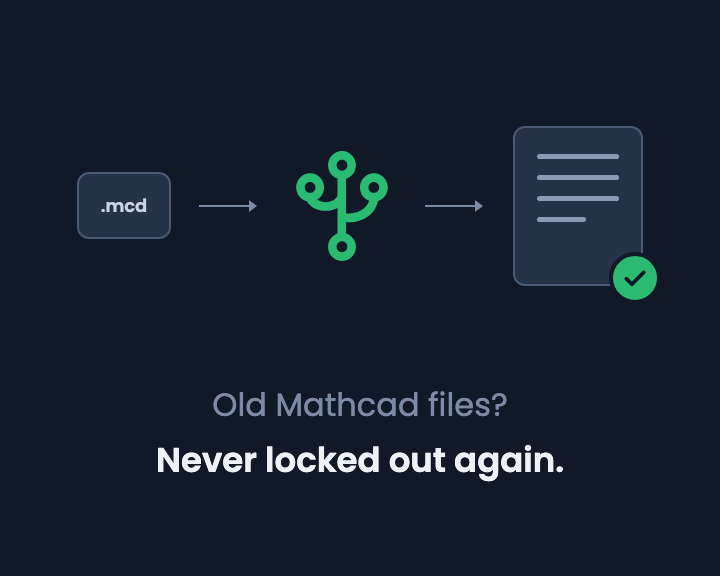
- Mathcad converter. Import Prime .mcdx files into live pages (how it works). SMath file conversion is available on enterprise plans.
Where others are still ahead: native Word export, and fully offline use (offline is coming soon).
Want to see how it looks and feels with your own work? Request a calc and we'll build it for you, or send us a Mathcad or SMath file and we'll convert it for you.
There's a free plan, so rebuild one of your SMath calcs and compare. Try CalcTree free, or if you're replacing SMath across a firm, book a call.
Decision tree
- Small team, existing .sm files, no budget yet → stay on SMath 0.99 while you evaluate, knowing it won't change
- Team knows SMath, works offline, price fits → current SMath Studio
- Clients and checkers expect Mathcad files → Mathcad Prime
- Need Word export from a desktop document → Blockpad
- Hobbyist comfortable writing calcs as code → CalcpadCE
- Several engineers sharing, checking and reusing calcs, or need real Python → CalcTree
- Need to review and sign off calcs, with a history of who checked what → CalcTree
- Want to build and work on calcs with AI built in → CalcTree
- Want calcs that plug into Excel, other software and AI tools like Claude → CalcTree
For more free options, see our honest review of free Mathcad alternatives.
Frequently asked questions
SMath vs CalcTree: which is better?
For a solo engineer happy on a frozen 2021 version, offline, SMath 0.99 still works. For a firm choosing what to standardise on next, CalcTree: co-editing and review with history, Python and AI built in, LLM plugins, 100+ built-in templates and an API, with a free plan instead of per-seat SMath licences.
Is there still a free version of SMath Studio?
Yes, two kinds. The current Personal plan is free for personal use but not for organisations. And SMath 0.99 (last stable build May 2021) can still be used commercially for free, according to the developer, because it carries the old licence agreement. It no longer receives updates.
Do I need an SMath licence to use it at work?
For current versions, yes. As of October 2026, SMath's price list puts a 12-month organisation licence at US$564 per seat for 1 to 4 seats, falling to US$312 at 100+ seats, with floating licences from 5 seats. Frozen 0.99 needs no licence.
SMath vs Mathcad: what's the difference?
SMath was built to feel like Mathcad: maths on a free-form page, units, live results. Mathcad Prime is the more mature product with native files; SMath is lighter, also runs on Linux, and is cheaper per seat.
Can SMath open Mathcad files?
Current SMath can, since version 1.4 (June 2026), through an import plugin for .xmcd and .mcdx. SMath 0.99 can't.
Prices are list prices from each vendor's website, checked October 2026, and may have changed. Sources: SMath Studio price list; SMath Studio plans; Mathcad Prime (PTC store); Blockpad pricing; Maple Flow (Maplesoft store).