Short answer: no, there is no Mathcad for Mac. PTC builds Mathcad Prime for Windows only (Prime 12 needs 64-bit Windows 11), and there's no macOS, Linux or iPad version. If you're on a Mac, your choices are to run Prime inside a Windows virtual machine such as Parallels, or to use something that runs natively on macOS or in the browser.
We make CalcTree, one of the options below, so we're biased. We'll still say when a VM or a different app is the better call.
Everything below is from each vendor's own public pages, as of October 2026.
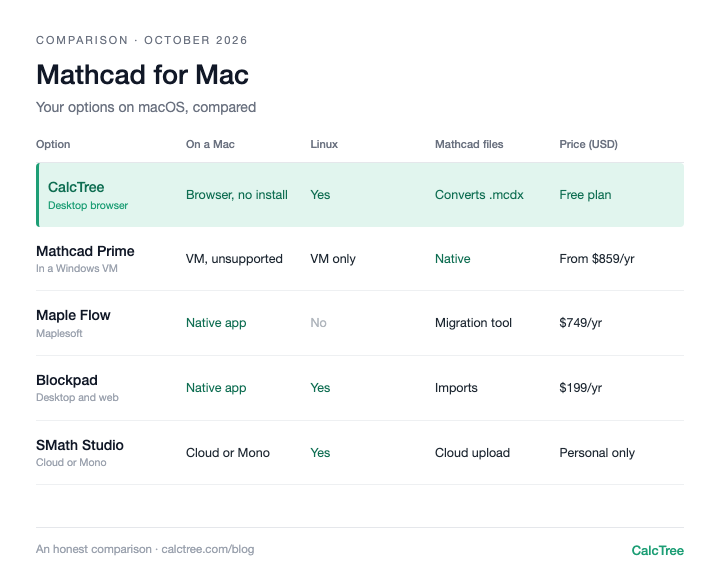
Mathcad on a Mac: your options at a glance
| Option | How it runs on a Mac | Linux | Price (USD, Oct 2026) | Opens Mathcad files | Best for |
|---|---|---|---|---|---|
| Mathcad Prime in a Windows VM | Windows 11 in Parallels or similar; not on PTC's published requirements | VM only | From $859/yr for Prime (PTC store, checked Oct 2026), plus Windows and VM licences | Native | Firms locked into .mcdx |
| CalcTree | Browser, nothing to install | Browser | Free plan; paid plans $14-34/user/month (CalcTree pricing) | Converts Prime .mcdx | Teams that share and check calcs |
| Maple Flow | Native macOS app | No | $749/yr, or $1,495 perpetual (Maplesoft store, checked Oct 2026) | Migration Assistant (installer documented as a Windows .exe) | Solo engineers who want deep maths |
| Blockpad | Native Mac app for Apple silicon and Intel, plus web app | Yes (AppImage) | $199/yr, or $950 lifetime (Blockpad pricing, checked Oct 2026) | Imports Mathcad files | A Mathcad-style document at a lower price |
| SMath Studio | Browser (SMath Cloud); desktop via Mono is hit and miss on Apple silicon | Yes, native | Free for personal use only; paid for firms (SMath pricing, checked Oct 2026) | Cloud accepts .mcdx and .xmcd uploads | Mathcad 15 look and feel |
| Jupyter / Colab | Native install, or Colab in the browser | Yes | Free | No | Engineers who already code in Python |
Mathcad only reaches a Mac through Windows. Maple Flow and Blockpad are the native Mac desktop apps. The rest run in a browser, which also covers Linux. CalcTree runs in desktop browsers only, not on iPad or mobile.
Mathcad Prime in Parallels: works, but you're on your own
If your firm's library is all .mcdx and your clients expect Mathcad files, running Prime in a Windows virtual machine is the honest answer. Parallels Desktop is the usual pick on Apple silicon Macs. Microsoft lists Parallels as an authorised way to run the Arm version of Windows 11 on M-series Macs, and x64 apps like Prime run under Windows' built-in emulation.
What PTC says is less clear. Its public system requirements list only Windows 11 64-bit (versions 23H2, 24H2 and 25H2). PTC's knowledge base has articles on whether Prime runs on a Mac or in Parallels, but the answers sit behind a login, and we couldn't find any public PTC statement that a Mac VM or Windows on Arm is a supported setup. Users in PTC's own community do report installing Prime in Parallels on M-series Macs. Treat it as works-but-unsupported: if something breaks, PTC may not help.
Budget for a Prime licence, a Windows 11 licence and a Parallels subscription, plus the RAM to run two operating systems.
Use it if: You need native .mcdx files, your team stays on Mathcad, and you're the one Mac user in a Windows office.
Skip it if: You're choosing software fresh, or you'd rather not pay three licences to run one app.
CalcTree: Mathcad-style calcs in the browser, with a free tier
CalcTree runs in the browser, so it works the same on a Mac, Windows or Linux with nothing to install. A page mixes maths notation, text, tables and native Python cells, with units carried through every step. Several engineers can edit a page at once.
For Mac users leaving Mathcad, the useful bit is the Mathcad converter: create a page, click Import from Mathcad, pick a Prime .mcdx file, and it becomes a live CalcTree calculation. It handles Prime files only, so older .xmcd files need re-saving as .mcdx in Prime first. We walk through it in how to convert Mathcad files to CalcTree.
Use it if: your calcs get checked, reused or shared, or you want AI, Python and your other software working on the same calc, on any operating system.
Skip it if: you need native Word export, or fully offline work today (offline use is coming soon).
Maple Flow: a native Mac app, but paid and single-user
Maple Flow is Maplesoft's free-form calculation canvas, built on the Maple maths engine, and Maplesoft lists it for Windows and macOS. Its symbolic maths goes further than Prime's. It isn't cheap, though: the Maplesoft store lists US$749 a year, or US$1,495 for a perpetual licence plus US$300 a year for maintenance (checked October 2026). There's a 15-day trial but no free version.
One thing to check before you buy on a Mac: the Mathcad Migration Assistant's install steps describe running a Windows .exe, and we couldn't find Mac support for it documented. If converting an old library matters, ask Maplesoft or test it in the 15-day trial. There's no Linux version of Maple Flow, and we couldn't find real-time co-editing documented. It's a desktop app working on files, so sharing with a checker means sending a file or a PDF, not a live link.
Use it if: You're a solo engineer on a Mac who wants a Mathcad-like canvas with a stronger symbolic maths engine.
Skip it if: You want something free, your team needs to share and check calcs together, or anyone on the team uses Linux.
Blockpad: cheaper than Prime, but still a paid file-based app
Blockpad combines maths, spreadsheets and word processing in one document. Its download page has separate Mac builds for Apple silicon and Intel, plus a Linux AppImage, and every paid licence includes the Windows, Mac and web apps. Version 1.9 (October 2026) improved Mathcad import and added Word export. The Mac app doesn't auto-update yet.
There's no free option for work. The pricing page lists US$199 a year or US$950 lifetime for a single commercial licence; the free tiers are education-only or view-only (checked October 2026). We couldn't find real-time co-editing documented, so checking a calc still means passing files around, and you're relying on a converter to bring Mathcad work across.
Use it if: You want a native Mac app that feels like a Mathcad document, with Word output, at about a quarter of Prime's price.
Skip it if: You want something free for work, or your team needs to share, co-edit and check calcs in one place.
SMath Studio: free for personal use only, and rough on a modern Mac
SMath looks the most like Mathcad 15, and it has native Linux builds. On a Mac it's harder. There's no macOS download; the official route is the Mono package, and SMath forum users report crashes on Apple silicon. The cleaner option is SMath Studio in the Cloud, which runs in the browser and accepts .mcdx and .xmcd uploads. The free version is for personal use only: SMath's pricing page says its Personal and Advanced plans can't be used in organisations, so professional use needs a paid licence.
Use it if: You're a student or hobbyist who wants a Mathcad 15 feel for free, or you're on Linux.
Skip it if: You're using it for work at a firm, or you need the desktop plugins on an M-series Mac.
Jupyter and Colab: free and everywhere, if you code
Jupyter installs natively on macOS and Linux, and Google Colab runs notebooks in the browser with no setup. Both are free. But there's no equation editor, units are whatever library you set up, and the output is a notebook, not a calc sheet a checker expects.
Use it if: You already work in Python and the calc is for you or your R&D team.
Skip it if: Non-coders need to read, check or reuse your work.
When the workaround stops working
A VM gets one Mac user running Mathcad. It doesn't fix the team problems:
- Every reader needs the same setup. A checker on a Mac needs their own VM and Prime licence just to open your file.
- The file is the unit of work. Checking means emailing .mcdx files or PDFs back and forth, and two people can't edit the same calc at once.
- Reuse means copying. A verified calc gets duplicated into the next job and drifts from the original.
Where CalcTree fits
We make CalcTree, so weigh this accordingly. We built it so the operating system stops mattering.
- Any operating system. Runs in any desktop browser on Mac, Windows or Linux, with nothing to install.
- AI native. AI is built in for drafting, debugging and reviewing calcs, and an admin can switch it off. Claude and other AI tools can also build and run your calcs through LLM plugins.
- Review and history. Review calcs in the shared workspace, with version history and an audit trail of who checked what.
- Real-time collaboration. Co-editing, comments and mentions on the same page.
- Python, natively. Python cells sit inline with the maths, units carried through, with numpy, scipy and plotting libraries pre-installed. Parametric sketches and heavy maths use a language AI tools already write well.
- Connected to your other software. The Excel add-in and API let anything that can call an API run a calc.
- Governance. Three lock modes and role permissions, and versioned workspace templates that flag pages when the source changes.
- Templates out of the box. 100+ built-in templates across disciplines and jurisdictions, including AS, ACI and Eurocode, to insert or reference, plus your own workspace templates.
- Linked calcs. Pages link to each other, pinned to a revision and flagged when the source changes.
- Reports. Company headers and document elements set once for the whole firm, and a Report Builder that binds multi-page reports with contents and page numbers.
- A generous free plan. Python, the Excel add-in, the API and an AI allowance are all on the free plan. Paid plans are US$14 to US$34 per user per month.
- Mathcad converter. Import Prime .mcdx files into live pages (how it works).
Where others are still ahead: native Word export, and fully offline use (offline is coming soon).
If you're comparing free options more widely, see our free Mathcad alternatives review, which also compares Mathcad with CalcTree.
Want to see how it looks and feels with your own work? Request a calc and we'll build it for you, or send us a Mathcad or SMath file and we'll convert it for you.
Try CalcTree free, or if you're moving a whole firm off Mathcad, book a call.
Decision tree
- One Mac user in a Mathcad firm, clients expect .mcdx → Mathcad Prime in Parallels
- Solo engineer on a Mac, working alone on desktop files → Maple Flow or Blockpad
- Student or hobbyist, want free and Mathcad 15 style → SMath Studio Cloud
- Already code in Python, working alone → Jupyter or Colab
- Mixed Mac, Windows and Linux team that shares and checks calcs → CalcTree
- Need to review and sign off calcs, with a history of who checked what → CalcTree
- Want to build and work on calcs with AI built in → CalcTree
- Want calcs that plug into Excel, other software and AI tools like Claude → CalcTree
Frequently asked questions
Mathcad vs CalcTree on a Mac: which is better?
On a Mac, Mathcad means paying for Prime, Windows and a virtual machine, with no support promise from PTC. CalcTree runs in any desktop browser on a Mac, imports Prime .mcdx files, and adds co-editing, review, AI and Python. Keep Mathcad only if your clients insist on .mcdx files.
Is Mathcad available for Mac?
No. Mathcad Prime runs only on Windows; Prime 12 requires 64-bit Windows 11. Mathcad 15 was Windows only as well, and PTC stopped selling it at the end of 2021. To use Mathcad on a Mac you need Windows running in a virtual machine.
Can I run Mathcad Prime on an M-series Mac?
Usually, through Parallels running the Arm version of Windows 11, which Microsoft authorises on Apple silicon. Prime then runs under Windows' x64 emulation. Users report it working, but Windows on Arm isn't on PTC's published requirements, so it isn't a setup PTC promises to support. Boot Camp isn't an option: it only works on Intel Macs and officially covers Windows 10, while Prime 12 needs Windows 11.
Does Mathcad run in Parallels?
In practice, yes, for many users. PTC's public requirements list only Windows 11 64-bit, and we couldn't find a public PTC statement that it supports Parallels. Try the free trial in your VM before buying.
Is there Mathcad for Linux?
No. There's no Linux build of Mathcad Prime, so you'd need a Windows VM. Native Linux alternatives include SMath Studio and Blockpad, and anything browser-based (CalcTree, Colab, SMath Cloud) works on Linux too.
Is there Mathcad for iPad?
No. PTC doesn't make a tablet version. SMath Cloud and Colab open in a tablet browser. CalcTree runs in desktop browsers only, so it isn't an option on iPad or mobile today.
Can I open .mcdx files on a Mac?
Not in Mathcad itself without a VM. On a Mac you can convert Prime .mcdx files into CalcTree in the browser, upload .mcdx or .xmcd files to SMath Cloud, or import Mathcad files into Blockpad's Mac app. Check any converted calc against the original results before relying on it.
Prices are list prices from each vendor's website, checked October 2026, and may have changed. Sources: Mathcad Prime (PTC store); Maple Flow (Maplesoft store); Blockpad pricing; SMath Studio plans.