If you're reading this, you're probably leaving Mathcad and Maple Flow is on your shortlist. This guide compares Maple Flow vs Mathcad and the best Maple Flow alternatives. Maplesoft built it for exactly that switch: a free-form calculation canvas with a Mathcad migration assistant and the Maple maths engine underneath. (Not to be confused with plain Maple, Maplesoft's computer algebra system aimed at maths and academic work. This post is about Maple Flow.)
We make CalcTree, so we're biased. We'll still tell you where Maple Flow is the better pick, because for some readers it is.
Prices and features below are from each vendor's own public pages, as of October 2026.
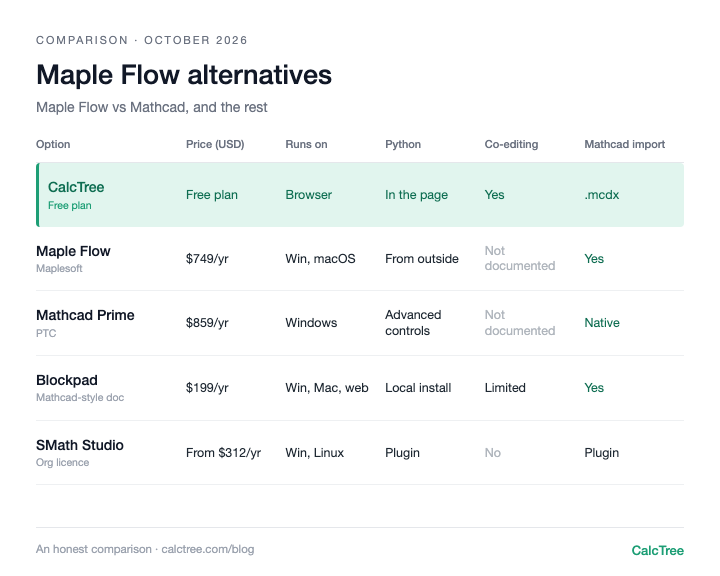
The Maple Flow alternatives at a glance
| Option | Price (USD, Oct 2026) | Runs on | Input style | Python | Live co-editing | Opens Mathcad files | AI |
|---|---|---|---|---|---|---|---|
| Maple Flow | $749/yr subscription, or $1,495 perpetual then $300/yr maintenance (Maplesoft store, checked Oct 2026) | Windows, macOS | Free-form maths canvas | Run worksheets from Python; generates Python code | Not documented | Yes: Mathcad 13 to 15 and Prime | Formula search; worksheet drafting via your own Claude Code or Codex |
| CalcTree | Free plan; paid plans $14-34/user/month (CalcTree pricing) | Desktop browser (any OS) | Maths notation plus Python on one page | Native Python cells, units carried through | Yes | Yes: Prime .mcdx | Built in: drafting, chat, debugging, review (can be switched off) |
| Mathcad Prime | $859/yr locked, $2,520/yr floating (PTC store, checked Oct 2026) | Windows | Maths notation | Python for advanced controls (Prime 11+) | Not documented | Native | None found |
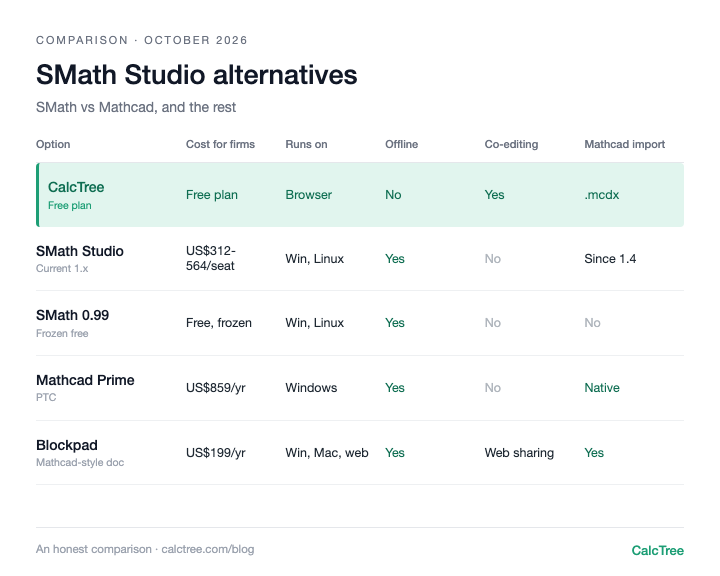
| SMath Studio | Free plan not for organisations; org seats from about $312/yr at 100+ (SMath pricing, checked Oct 2026) | Windows, Linux | Maths notation | IronPython plugin | No | Yes, via plugin | None found |
| Blockpad | $199/yr single, $180/yr at 5+, $950 lifetime (Blockpad pricing, checked Oct 2026) | Windows, Mac, Web | Document with maths, sheets and notes | Runs your local Python | Limited (web sharing) | Yes | Exploring, not shipped |
| CalcpadCE | Free (MIT licence) (GitHub) | Windows, Linux, web editor | Code-style text | Driven from Python | No | No | None found |
A few patterns stand out. Maple Flow has deep symbolic maths built in through the Maple engine. CalcTree reaches similar depth through hosted Python, with numpy, scipy and other libraries ready to use. Every option except CalcTree is built around a file on one engineer's machine, so sharing still means sending files. And if anyone on your team uses a Mac, Mathcad Prime is out: it's Windows only, while Maple Flow and Blockpad have native Mac apps and CalcTree runs in the browser.
Maple Flow: deep symbolic maths, on a single-user desktop
Maple Flow's pitch is a whiteboard-style canvas. You place maths, text, plots and images anywhere on the page, drag things around, and everything recalculates. Mathcad users feel at home quickly. Underneath sits the Maple engine, with a broader set of symbolic and numeric solvers than Mathcad Prime. It's still a proprietary engine, though, and the Python ecosystem that CalcTree and Jupyter run natively covers far more ground, from scientific libraries to the code AI tools write best.
The Migration Assistant converts Mathcad 13, 14, 15 and Prime worksheets (.xmcd and .mcdx), and the 2026 release can turn Mathcad programs into Maple Flow's new inline programs. Units are tracked alongside variables. There's an Excel add-in, you can call one worksheet from another, and since 2025.2 you can run worksheets from a Python script, including parallel parameter sweeps. And you can still buy a perpetual licence, which is rare now.
The gaps are mostly about teams and governance. It's a desktop app for Windows and macOS (no Linux), and we couldn't find real-time co-editing or comments documented; sharing is through PDF reports or by deploying a worksheet as a web or desktop app. We also couldn't find calc locking, role permissions, review sign-off or version history documented, so governance comes down to your file system and your own process. Python drives Maple Flow from the outside rather than living in the worksheet. And the AI story is external: Maplesoft provides skill files so your own Claude Code or Codex subscription can generate worksheets, with a local Maple install recommended (Maple isn't included in a Maple Flow licence).
Use it if: You work on your own, on a Windows or Mac desktop, and your calcs don't need to be shared, co-edited or reviewed inside the tool. Within that, you get Mathcad's free-form canvas with a stronger symbolic engine, a perpetual licence option, and an automated path for an old Mathcad library.
Skip it if: Your calcs need to be edited, checked and commented on by several people at once, or you want Python inside the calc rather than around it.
CalcTree: calcs as shared, reviewed pages
CalcTree runs in the browser. A page mixes maths notation, tables, text and native Python cells (numpy, scipy and other engineering libraries pre-installed), with units carried through every step. Several engineers can edit the same page at once and leave comments where the discussion belongs. A Mathcad Prime converter brings .mcdx files across.
On maths depth, CalcTree runs on a symbolic and numeric maths engine plus Python, so the libraries engineers already use (numpy, scipy and more) sit inside the calc. Where others are still ahead: native Word export, and fully offline use (offline is coming soon).
Use it if: your calcs get checked, reused or shared, or you want AI, Python and your other software working on the same calc.
Skip it if: you need native Word export, or fully offline work today (offline use is coming soon).
Mathcad Prime: the incumbent you're comparing against
Staying put is a real option. Prime 12 is Windows only and sold as a subscription (locked or floating licences). Prime 11 added custom unit systems and Python for advanced controls. Your existing .mcdx files just work, and every engineer you hire has probably used it.
Use it if: Your library is large, your clients expect Mathcad files, and the price isn't the problem.
Skip it if: You need a Mac, a perpetual licence, or anything beyond file-by-file sharing.
For the wider field, see our Mathcad alternatives comparison.
SMath Studio: the Mathcad lookalike that stopped being free for firms
SMath feels closest to classic Mathcad and runs on Windows and Linux. A plugin imports Mathcad .xmcd and .mcdx files. The catch for firms: the free plan can't be used in organisations, so commercial use means paid seats.
Use it if: You want something that looks like Mathcad 15 and you're happy paying per seat for a desktop app.
Skip it if: You were choosing it because it was free for your firm.
Blockpad: a cheaper desktop document
Blockpad combines maths, spreadsheets and notes in one document, with Windows, Mac and web apps. Version 1.9 improved Mathcad import and added Word export, and it has formula-driven 2D sketches. Python runs from each user's own local install, and AI is still at the exploring stage.
Use it if: You want a Mathcad-style document at a lower price than Maple Flow, with Word output.
Skip it if: You want hosted Python or an API for running calcs in batches.
CalcpadCE: free, open and code-first
CalcpadCE is the volunteer-maintained MIT fork of Calcpad 7.6.2, built from the last open release after the original's public repository went offline in March 2026. You write equations as readable text and it renders formatted output, with native Word export. Free is hard to argue with. The trade-off is that your firm carries support itself, and there's no Mathcad import or collaboration.
Use it if: You're comfortable with code-style input and want something free you can control.
Skip it if: You're migrating a Mathcad library or need a vendor behind it.
When a desktop calc app stops working
Maple Flow, Mathcad, SMath, Blockpad and CalcpadCE are all good at the same thing: one engineer producing one calc file. The limits show up once a team is involved.
- The file is the unit of work. Checking means emailing a file or PDF back and forth. Two people can't work on the same calc at once.
- Reuse means copying. A verified calc gets duplicated into the next project and drifts from the original.
- Review happens outside the software. Who checked what, against which inputs, lives in emails and stamped PDFs.
If you work alone, none of this matters much. For a team, it adds up.
Where CalcTree fits
We make CalcTree, so weigh this accordingly. We built it for the team problem above.
- AI native. AI is built in for drafting, debugging and reviewing calcs, and an admin can switch it off. Claude and other AI tools can also build and run your calcs through LLM plugins.
- Review and history. Review calcs in the shared workspace, with version history and an audit trail of who checked what.
- Real-time collaboration. Co-editing, comments and mentions on the same page.
- Python, natively. Python cells sit inside the calc, units carried through, with numpy, scipy and plotting libraries pre-installed.
- Connected to your other software. The Excel add-in and API let anything that can call an API run a calc.
- Governance. Three lock modes and role permissions, and versioned workspace templates that flag pages when the source changes.
- Templates out of the box. 100+ built-in templates across disciplines and jurisdictions, including AS, ACI and Eurocode, to insert or reference, plus your own workspace templates.
- Linked calcs. Pages link to each other, pinned to a revision and flagged when the source changes.
- Reports. Company headers and document elements set once for the whole firm, and a Report Builder that binds multi-page reports with contents and page numbers.
- A generous free plan. Python, the Excel add-in, the API and an AI allowance are all on the free plan. Paid plans are US$14 to US$34 per user per month.
- Mathcad converter. Import Prime .mcdx files into live pages (how it works), and export to Markdown so your work stays portable.
Where others are still ahead: native Word export, and fully offline use (offline is coming soon). If you're a solo engineer weighing free options, our free Mathcad alternatives review goes deeper.
Want to see how it looks and feels with your own work? Request a calc and we'll build it for you, or send us a Mathcad or SMath file and we'll convert it for you.
Try CalcTree free, or if you're evaluating for a firm, book a call.
Decision tree
- Solo engineer, heavy symbolic maths, working alone on a desktop → Maple Flow
- Large Mathcad library, clients expect Mathcad files → stay on Mathcad Prime
- Want a Mathcad 15 look and feel, happy to pay per seat → SMath Studio
- Need Word export from a desktop document → Blockpad
- Hobbyist comfortable writing calcs as code → CalcpadCE
- Team that shares, checks and reuses calcs, or wants Python in the calc → CalcTree
- Need to review and sign off calcs, with a history of who checked what → CalcTree
- Want to build and work on calcs with AI built in → CalcTree
- Want calcs that plug into Excel, other software and AI tools like Claude → CalcTree
Frequently asked questions
Maple Flow vs CalcTree: which is better?
For a solo engineer on a desktop who wants a free-form canvas and a perpetual licence, Maple Flow. For anyone whose calcs get checked, shared or reused, CalcTree: co-editing and review in one workspace, Python inside the calc, AI built in, 100+ built-in templates and an API, with a free plan instead of a US$749 a year licence.
Is Maple Flow better than Mathcad?
On maths depth, yes: Maple Flow has broader symbolic and numeric capability, plus a perpetual licence option and macOS support. Mathcad Prime wins on familiarity and native .mcdx files. Neither is built for real-time collaboration.
How much does Maple Flow cost?
As of October 2026, Maplesoft's US store lists Maple Flow Professional at US$749 a year as a subscription, or US$1,495 for a perpetual licence with a year of maintenance, then US$300 a year to keep receiving updates. A student edition is US$75 a year. There's a 15-day free trial.
Can Maple Flow open Mathcad files?
Yes, through Maplesoft's Migration Assistant, which converts Mathcad 13, 14, 15 and Prime worksheets (.xmcd and .mcdx). Check converted calcs before relying on them, as with any migration. If you're moving to CalcTree instead, here's how the Mathcad converter works.
Does Maple Flow run on Mac, Linux or in a browser?
Maple Flow runs on Windows and macOS. Maplesoft lists Linux for Maple but not for Maple Flow. It's a desktop app, though worksheets can be deployed as web or desktop applications for others to use.
Is Maple Flow the same as Maple?
No. Maple is Maplesoft's computer algebra system, used mostly in teaching and research. Maple Flow is a separate engineering calculation product built on the Maple engine. A Maple Flow licence doesn't include Maple.
Does Maple Flow support Python?
Partly. Since 2025.2 you can run Maple Flow worksheets from a Python script, and Maple Flow can generate Python code from your analysis. We couldn't find Python cells inside the worksheet itself documented; the 2026 release added inline programming in Maple Flow's own language.
Prices are list prices from each vendor's website, checked October 2026, and may have changed. Sources: Maple Flow (Maplesoft store); Maple Flow student (Maplesoft store); Mathcad Prime (PTC store); SMath Studio price list; SMath Studio plans; Blockpad pricing.