If you're looking at Calcpad alternatives, it probably isn't because Calcpad is expensive. It's free, and it's good. More likely you're one of two people: an engineer who heard the original Calcpad went closed source in 2026 and wants to know what that means, or someone at a firm being asked whether Calcpad can become the standard for a whole office.
This guide covers both, as of October 2026. We make CalcTree, so we're biased, but we won't pretend Calcpad is a bad choice. For plenty of engineers it's the right one.
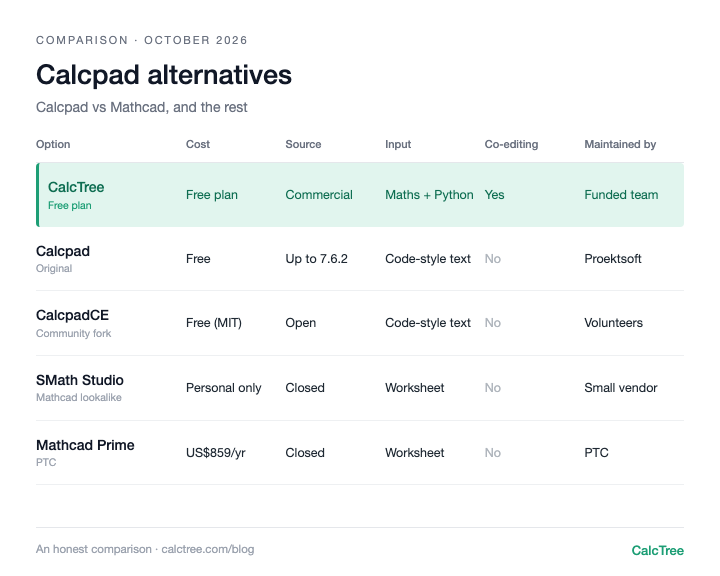
The Calcpad alternatives at a glance
| Option | Cost (Oct 2026) | Source | Runs on | How you write calcs | Real-time co-editing | Who maintains it |
|---|---|---|---|---|---|---|
| Calcpad (original) | Free (Calcpad licensing, checked Oct 2026) | Source published up to 7.6.2; we couldn't find source for later releases | Windows, Linux, web | Code-style text | No | Founder's company (Proektsoft) |
| CalcpadCE | Free, MIT licence (GitHub) | Open (GitHub) | Windows, Linux, web, VS Code | Code-style text | No | Volunteer community |
| CalcTree | Free plan; paid plans US$14-34/user/month (CalcTree pricing) | Commercial | Desktop browser (any OS) | Maths notation and Python on one page | Yes | Funded team with support |
| SMath Studio | Free for personal use only; paid for organisations (SMath pricing, checked Oct 2026) | Closed | Windows, Linux | Mathcad-style worksheet | No | Small vendor |
| Jupyter + handcalcs | Free, open source | Open | Anywhere Python runs | Python | Only with paid hosting | Open-source communities |
| Mathcad Prime | From about US$859 per user per year (PTC store, checked Oct 2026) | Closed | Windows | Mathcad worksheet | No | PTC |
Two patterns stand out. Calcpad, CalcpadCE and Jupyter keep calcs as plain text you can diff and version with an external tool like Git, which is a real strength if your team already works that way. And everything except CalcTree assumes calcs are files: one person edits, then the file gets passed on.
Calcpad (original): fast and free, for engineers who like code
Calcpad is a text-based calculation language. You type r = 5 cm, V = π*r^2*h, and it renders a formatted calc with substituted values and units. It's fast, it runs offline, it handles units, matrices, plots and SVG drawings, and it exports native Word documents with editable equations.
It's best suited to hobbyists and enthusiasts who are happy to get their hands dirty with code and sort out their own set-up. Most engineers just need to get calcs done, and a text syntax is a learning curve many won't take on. That makes it hard to roll out as a Mathcad replacement across a whole team.
What changed in 2026: in March, the public GitHub repository for Calcpad was taken offline and, according to the community that forked it, development moved to a closed-source model. Calcpad's own licensing page still describes it as MIT-licensed and free for commercial and non-commercial use, and points to the source for version 7.6.2. Newer releases (7.7.x, from August 2026) are still free downloads from calcpad.eu, but we couldn't find published source code for them.
So the short answer to "is Calcpad still free?" is yes. What you've lost with the original is the ability to see and modify the code of the current version.
Use it if: You're comfortable writing calcs as code, want a free, fast, offline calc writer, and you're happy with the founder's company steering it.
Skip it if: You need something a whole team of engineers can pick up without learning a syntax, open source is a requirement, or your firm needs governance and review built in.
CalcpadCE: the open-source continuation
CalcpadCE is a community fork of Calcpad 7.6.2, released under the MIT licence. It isn't a stale archive. It has shipped regular releases since April 2026 and put out an 8.0 beta in late September, with a new desktop app, a web editor and a VS Code extension. You can drive its engine from Python through a wrapper, and run a local server with an API for tooling.
The README is upfront that CalcpadCE is "entirely maintained by volunteers". On GitHub, almost all of the recent commits come from two contributors. That's impressive work, and it's what a firm should think about: if your office standardises on it, nobody owes you a fix. In practice someone on your team becomes the maintainer: checking each release before it goes out, keeping the shared library of modules on a drive, writing the CSS for your report style, and answering colleagues' questions. That's a real cost, it just doesn't show up on an invoice.
Use it if: You want the open, MIT-licensed version and you're comfortable owning support in-house.
Skip it if: Your firm needs a vendor to call when something breaks before a deadline.
CalcTree: collaborative calcs with review and governance
CalcTree is a browser-based calculation platform. You write maths in normal notation with units carried through, and drop into native Python cells on the same page when the logic gets heavy. Several engineers can edit the same page at once and comment on it. A verified calc can become a versioned workspace template, and pages built from it are flagged when the source changes.
It's built for teams, not just individuals:
- AI native. AI is built in for drafting, debugging and checking calcs, and admins can switch it off.
- Review in the workspace. Checkers review calcs where they live, alongside comments and mentions, not in marked-up PDFs.
- Connects to other software. A GraphQL API and an Excel add-in run calcs from other tools, and LLM plugins let AI tools like Claude drive them.
- Enterprise report styling. Custom headers, footers and document elements set once for the whole workspace, and a Report Builder that binds multiple pages into one report with a title page, contents and page numbers.
Where Calcpad wins: CalcTree is cloud-first, it doesn't run offline yet (offline use is coming soon), and it doesn't export to .docx (PDF today). If you love writing calcs as plain text in an editor, Calcpad will feel more natural.
Use it if: You work in a team where calcs get checked, reused and handed between people, and you need version history, an audit trail and a record of who reviewed what.
Skip it if: you need native Word export, or fully offline work today (offline use is coming soon).
SMath Studio: the Mathcad lookalike
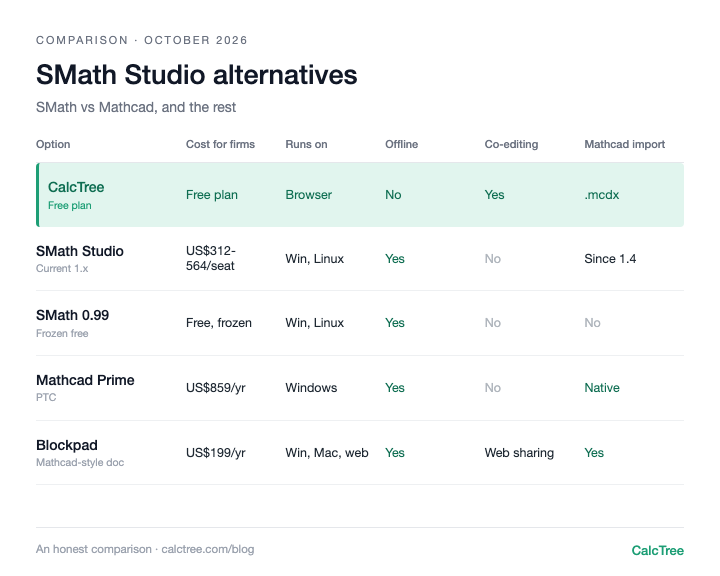
SMath gives you a Mathcad-style worksheet rather than code, which many engineers prefer to read. It runs offline and SMath users already know it. The catch for firms: the free plan "cannot be used in organisations", and commercial licences are paid per seat. We've covered it in more depth in our SMath Studio alternatives post.
Use it if: You want point-and-click maths notation and you're working on your own.
Skip it if: You're a firm hoping for a free option, because the free plan won't cover organisational use.
Jupyter + handcalcs: the Python route
If you already write Python, Jupyter with the handcalcs library renders your code as stepped, hand-calc-style maths. It's free and endlessly extensible. The trade-off is that everyone who touches the calc needs to be comfortable with code and with your environment set-up. We wrote up where Python and handcalcs shine and where they break down.
Use it if: You're already coding and want full control.
Skip it if: Engineers who don't code need to check or edit the work.
Mathcad Prime: the incumbent
Calcpad vs Mathcad comes down to this: Mathcad gives you a mature, supported worksheet that clients and checkers recognise; Calcpad gives you most of the everyday maths for free, as text. Mathcad Prime is listed from about US$859 per user per year.
Use it if: Your clients or contracts expect Mathcad files.
Skip it if: Price is the problem, or you want collaboration.
When free, file-based calcs stop working
For a solo engineer, Calcpad is hard to beat. The limits show up once calcs move through a team:
- Files get copied, not reused. Calcpad's
#includelets you reuse modules, which is useful. But there's no live link that tells you a calc built on an old module is now out of date. - Checking happens outside the software. Calcpad can hide source behind input forms, but version control and sign-off only exist if you set them up yourself (usually git, which most checkers won't use).
- Report styling is per person. Output is styled in HTML and CSS. A firm-wide look means someone maintains that CSS and everyone keeps their copy current.
- No shared editing. One person works on the file at a time. Discussion happens in email.
- Support is whoever you have. With the original, you depend on one company's plans. With CalcpadCE, you depend on volunteers and your own staff.
None of this is a flaw in Calcpad. It's a calc writer, not a system for managing a firm's calcs.
Where CalcTree fits
We make CalcTree, so weigh this accordingly. We built it for what happens after the number is calculated: someone checks it, someone reuses it, and the firm needs to know which version went out.
- AI native. AI is built in for drafting, debugging and reviewing calcs, and an admin can switch it off. Claude and other AI tools can also build and run your calcs through LLM plugins.
- Review and history. Review calcs in the shared workspace, with version history and an audit trail of who checked what. No Git set-up needed.
- Real-time collaboration. Co-editing, comments and mentions on the same page.
- Python, natively. Python cells sit inline with the maths, units carried through, with numpy, scipy and plotting libraries pre-installed.
- Connected to your other software. The Excel add-in and API let anything that can call an API run a calc.
- Governance. Three lock modes and role permissions, and versioned workspace templates that flag pages when the source changes.
- Templates out of the box. 100+ built-in templates across disciplines and jurisdictions, including AS, ACI and Eurocode, to insert or reference, plus your own workspace templates.
- Linked calcs. Pages link to each other, pinned to a revision and flagged when the source changes.
- Reports. Company headers and document elements set once for the whole firm, and a Report Builder that binds multi-page reports with contents and page numbers. No CSS to maintain.
- A generous free plan. Python, the Excel add-in, the API and an AI allowance are all on the free plan. Paid plans are US$14 to US$34 per user per month.
- Your data. You own your work and can export it any time.
Where Calcpad is still ahead: native Word export, and fully offline use (offline is coming soon). If you're weighing up a firm-wide rollout, it's worth a conversation.
Want to see how it looks and feels with your own work? Request a calc and we'll build it for you, or send us a Mathcad or SMath file and we'll convert it for you.
Try CalcTree free or book a call.
Decision tree
- Solo engineer, comfortable writing calcs as code, wants it free and offline → Calcpad or CalcpadCE
- Open source matters to you or your organisation → CalcpadCE
- Firm considering Calcpad as a standard, with someone to own it in-house → CalcpadCE, with a named internal maintainer
- Firm that needs review, shared templates and co-editing → CalcTree
- Need to review and sign off calcs, with version history and an audit trail → CalcTree
- Want to build and work on calcs with AI built in → CalcTree
- Want calcs that plug into Excel, other software or AI tools like Claude → CalcTree
- Prefer Mathcad-style point-and-click maths, working alone → SMath Studio
- Already writing Python and everyone on the team codes → Jupyter + handcalcs
- Contracts or clients expect Mathcad files → Mathcad Prime
Frequently asked questions
Calcpad vs CalcTree: which is better?
For a hobbyist who enjoys writing calcs as code and wants it free and offline, Calcpad. For a team of engineers who need to get calcs done, checked and reused, CalcTree: maths notation and Python on one page, co-editing and review, AI built in, 100+ built-in templates and company report styles, with a free plan to start.
Is Calcpad still free?
Yes. As of October 2026 the original Calcpad is a free download from calcpad.eu, and its licensing page says it's free for commercial and non-commercial use. CalcpadCE is also free, under the MIT licence.
What happened to Calcpad's licence in 2026?
In March 2026 the original Calcpad's public GitHub repository went offline and, according to the CalcpadCE maintainers, it moved to a closed-source model. Source for version 7.6.2 remains available, and the community forked that release as CalcpadCE. We couldn't find published source for the original's later 7.7.x releases.
What's the difference between Calcpad and CalcpadCE?
Calcpad is the original, now steered by its founder's company. CalcpadCE is the open-source community fork of 7.6.2, MIT-licensed and maintained by volunteers, with its own desktop app, web editor and VS Code extension.
Does Calcpad run on Mac or online?
We couldn't find a native Mac build documented for Calcpad or CalcpadCE. CalcpadCE has a web editor that runs in the browser, which is the simplest route on a Mac. CalcTree also runs in any desktop browser, on Mac, Windows or Linux.
Calcpad vs SMath: which is better?
Calcpad if you're happy writing calcs as text and want free use at work. SMath if you prefer a Mathcad-style worksheet, but note its free plan can't be used in organisations.
Calcpad vs Mathcad: can Calcpad replace Mathcad?
For an individual engineer comfortable with code, it can cover a lot of everyday calcs for free. Across a broader team it's a harder sell, because everyone has to learn the text syntax. You give up Mathcad's worksheet editing style and a commercial vendor's support. Neither offers real-time collaboration.
Prices are list prices from each vendor's website, checked October 2026, and may have changed. Sources: Calcpad licensing; Mathcad Prime (PTC store); SMath Studio plans.

.jpg)