Most engineering team leads who try to "standardise calculations" run into the same wall within a year.
They build a template library. Engineers use it for a few months. Then templates start drifting — someone fixes a bug in their copy but not in the master; someone updates a formula but doesn't tell the team; project-specific changes accumulate and the templates stop matching how anyone actually works. Within twelve months, the library is half-abandoned and the team is back to copying last project's calc files.
This isn't a discipline problem. It's a model problem. The way most teams think about calculation organisation conflates three things that need to be kept separate. This post is about the three-layer model that actually works.
Why most engineering calculation libraries decay within a year
If you've watched a calc library fail (or built one and then watched it fail), the pattern is recognisable.
Year zero: the lead engineer puts in real effort building a library of solid templates. Documentation. Examples. A team training session.
Months one to four: engineers use the templates on real projects. They diverge as project realities require — a non-standard loading, a different code section, a client-specific format.
Months five to eight: nobody is using the master templates anymore. They're using last-project's-templates, which were last-project's-templates, which were the master templates a year ago and several engineers removed.
Month twelve: the team is back to where they started, except the lead engineer is now demoralised because they built the library and watched it die.
The root cause isn't that engineers are undisciplined. It's that the concept of "templates" tries to do too many jobs at once. Inputs, reusable logic, and project-specific work all get tangled in the same file, and when one of those needs to change, the others come along for the ride.
The three-layer model: inputs, templates, project work
The model that survives separates these into three explicit layers.
Design inputs — the values specific to this project (wind loads, material grades, geometric dimensions, code sections). These exist per project and change throughout the project.
Reusable templates — the logic that doesn't depend on this project (the formula for a beam bending check, the calculation sequence for a foundation bearing capacity). These exist per company, are versioned, and change rarely.
Project work — the actual calc files that pull from both layers. These exist per element or design decision and are what gets reviewed and signed off.
The connective tissue between these layers — what makes the whole model work — is variable linking with controlled update propagation. Without it, the layers exist on paper but collapse back into one in practice.
Layer 1: design inputs as a single source of truth
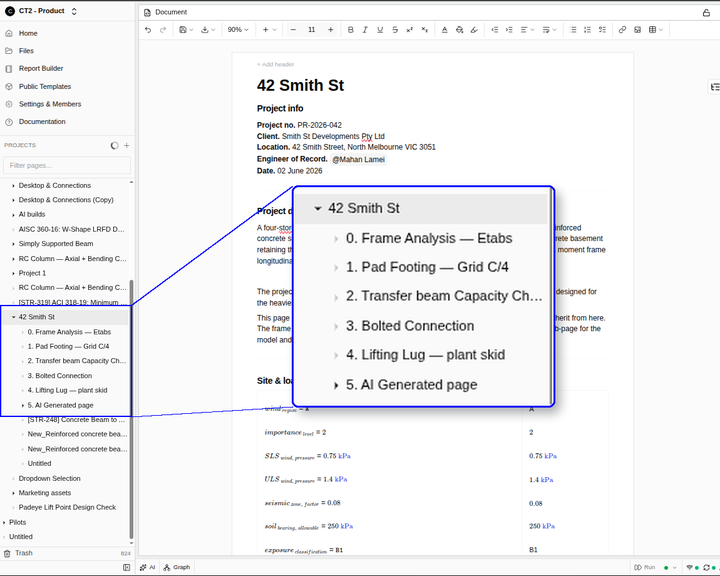
The inputs layer is a single page (or small set of pages) per project where every input value lives. Wind load: 1.4 kPa. Concrete grade: C40/50. Slab span: 8.2 m. Code: AS 3600:2018.
Two properties matter. Every project has its own inputs page — there's no global "company inputs" because most inputs are project-specific. Some inputs (e.g., default load factors per code) might be shared, but they're the minority. And inputs are referenced, not copied — every downstream calc that needs the wind load reads from this page rather than holding its own copy.
In CalcTree, this is what Parameters does: project-level variables defined once, linked to from anywhere in the workspace.
The discipline this layer enforces is that there's exactly one place to update an input. When the client revises the design loads, you change one value. The downstream calcs that depend on it know they need to update.
Layer 2: templates as a living standards library
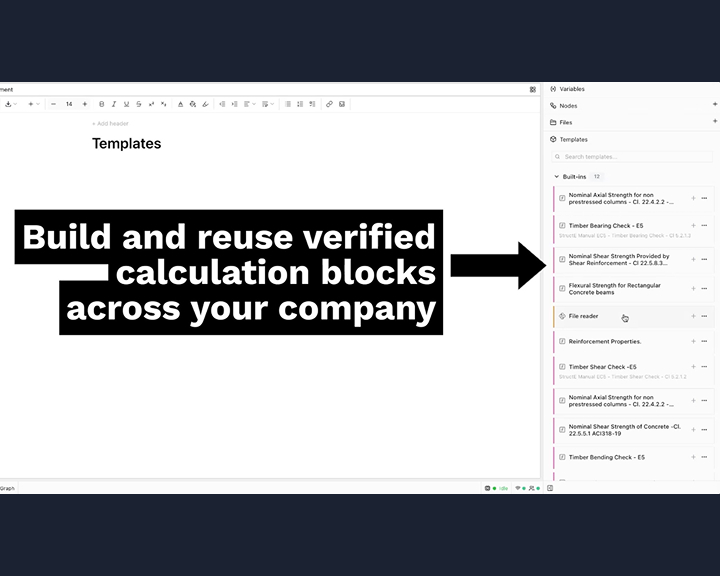
The template layer is where reusable calculation logic lives. A beam bending check. A connection design routine. A wind load calculation per AS 1170.2. These are the formulas and structures that don't change between projects.
The mistake most teams make is putting project-specific values into templates. The template for "concrete column design" shouldn't have a default concrete grade — it should expect a concrete grade to be provided. When the template is used on a project, it pulls the concrete grade from that project's inputs page.
When templates work this way, they survive scope changes. They survive project-to-project variation. They survive engineer-to-engineer differences in working style. Because all the project-specific variation lives upstream, templates only need to change when the underlying engineering logic changes — which is rare.
CalcTree's Templates 2.0 is designed around this principle: templates are versioned, verified, and reference upstream inputs rather than embedding them.
Layer 3: project work that pulls from both
Project work is the actual calc files: this beam, this footing, this connection. These are what gets reviewed, signed, and submitted.
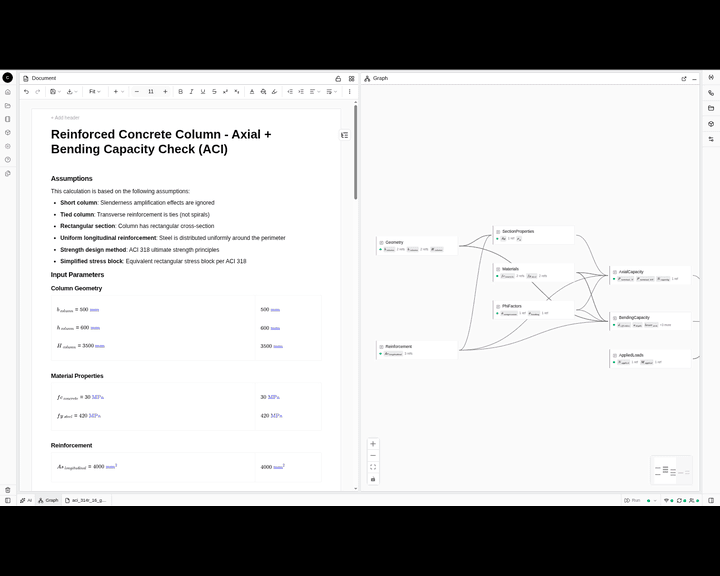
In a three-layer model, each project calc is short. It pulls inputs from Layer 1, applies logic from Layer 2 templates, and produces the result for this specific element. The calc itself is mostly the project-specific framing — element ID, geometry, applied loads — with the heavy lifting done by referenced templates.
The reviewer's job becomes much cleaner. Instead of reading a thirty-page worksheet that embeds formulas, defaults, and project values all mixed together, they read a short project calc that points to a known input set and a known template. The review is faster and the audit trail is clearer.
The connective tissue: linking with controlled propagation
The model collapses without two specific properties of the linking mechanism. There must be real cross-page references, not copied values — when the wind load on the inputs page changes, the project work pages that reference it know they're affected. And there must be controlled propagation — the engineer decides when the downstream calcs actually update, which is essential for engineering review. We've written separately about why automatic propagation is the wrong default in engineering.
Without real references, you're back to copies that drift. Without controlled propagation, you can't trust the review process. Both have to be there.
A practical sequence for setting this up
If you're starting from a typical "templates and copies" setup and want to move to a three-layer model, the sequence we'd recommend is incremental rather than big-bang.
Pick one active project — not the whole team's archive, just the current project everyone is working on. Build the inputs page first; pull every input value the team would otherwise duplicate. Refactor one template to read from the inputs page rather than embed values, and use it on a real calc. Once one template-and-calc loop works, do the next. After two or three weeks of working this way, you'll have enough of the model in place that the next project starts inside it from day one.
The trap to avoid is treating this as a migration project. The model works because each layer is independently useful — even just building the inputs page for one project pays for itself within a week.
What changes for QA and review
The last benefit is the one team leads notice last but find most valuable: QA stops being about catching inconsistencies between files.
When inputs are linked and templates are versioned, the reviewer doesn't have to check whether the wind load in the beam calc matches the wind load in the connection calc — the platform guarantees they do. The reviewer's attention shifts to where it should be: the engineering judgement in the calcs themselves.
This isn't a small productivity gain. It's the difference between QA as defensive paperwork and QA as a real check on engineering quality.
If this model fits how your team thinks about calculations and you want to see it in practice, book a demo here, or email me directly at tim@calctree.com.