If you're reading this, your firm is probably choosing calculation software, and Blockpad is on the shortlist. That's a sensible shortlist to be on. Blockpad borrows Mathcad's document style: readable maths on the page, units, spreadsheets and sketches in one document, at a price well under Mathcad's.
We make CalcTree, so we're biased. To keep this useful for an evaluation panel, every rival claim comes from the vendor's own public pages as of October 2026, and where Blockpad is the better pick we say so.
The Blockpad alternatives at a glance
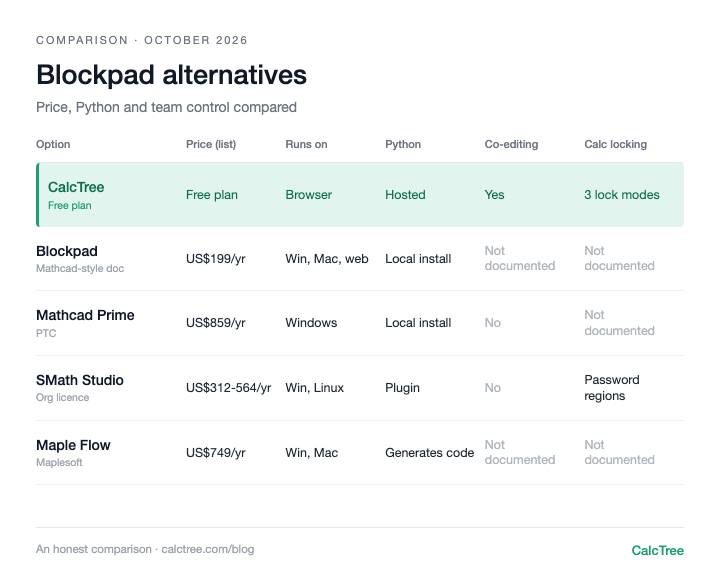
| Price (list, Oct 2026) | Runs on | Python | Live co-editing | Running calcs from other software | Shared library and control | |
|---|---|---|---|---|---|---|
| Blockpad | US$199/user/yr; US$180 at 5+ users; US$440 floating; US$950 lifetime (Blockpad pricing, checked Oct 2026) | Windows, Mac, web; offline desktop | Your own local Python install | Not documented (view sharing) | Excel add-in | Online libraries with read/write/manage permissions |
| CalcTree | Free plan; paid plans US$14-34/user/month (CalcTree pricing) | Browser, any OS | Hosted, numpy and scipy pre-installed (free plan included) | Yes, with comments | GraphQL API and Excel add-in | Three lock modes, roles, versioned workspace templates |
| Mathcad Prime | From US$859/user/yr (PTC store, checked Oct 2026) | Windows desktop | Local Python for advanced controls | No | COM automation API (Windows) | Files on shared drives |
| SMath Studio | Free plan not for organisations; US$312-564/user/yr (SMath pricing, checked Oct 2026) | Windows, Linux, plus a cloud version | Plugin, no numpy | No | Calculation Service, Enterprise only | Files on shared drives |
| CalcpadCE | Free, MIT licence (GitHub) | Windows, Linux, web editor | Python drives Calcpad, not the reverse | No | Python wrapper (.NET) | Files on shared drives |
| Maple Flow | US$749/yr, or US$1,495 perpetual (Maplesoft store, checked Oct 2026) | Windows, Mac | Code generation to Python | No | AI assistant connectivity | Files on shared drives |
Three patterns stand out. First, every option except CalcTree is file-based: a calc is a document that lives on someone's drive and gets copied. Second, of the file-based options here, Blockpad is the one with a documented shared online library and permissions, which is a big part of why it makes shortlists. Third, the price gap between the modern options (Blockpad, CalcTree) and Mathcad is large, so the real decision is which model the firm wants to standardise on for the next ten years.
Blockpad: a Mathcad-style desktop document
Blockpad combines a word processor, spreadsheets and Mathcad-style maths in one document. You type formulas like a spreadsheet cell and they display as maths, with units and a "show steps" view that plugs the numbers in. Blocks package a calc as a reusable module. It's built by a small, self-funded, founder-owned team in New Orleans, shipping since 2018.
Where it's genuinely strong:
- Desktop and offline. Windows and Mac apps that work without an internet connection, plus a web app.
- Word export. Version 1.9 (October 2026) added Export As for Word, Excel, Markdown, LaTeX, HTML and PDF.
- Formula-driven sketches. Dimension labels and text in drawings take formulas, so a 2D sketch updates when the calc changes. Handy if you draw as you calculate, though tools with Python, CalcTree included, can produce parametric diagrams from code too.
- Familiar document. Mathcad users feel at home, and Blockpad imports Mathcad files.
- Price. US$180-199 per user per year, with floating and lifetime options.
The gaps show up once a firm, not an individual, owns the calcs. Python runs on each user's local install, so every machine needs the same Python and packages (Blockpad describes sandboxed, cross-platform Python as future work). Outside Excel, we couldn't find an API or command line for running Blockpad files, and we couldn't find calc locking, a check-and-approve workflow or real-time co-editing documented. On AI, Blockpad's April 2026 update describes concepts (a calc checker, a chatbot) rather than shipped features.
Use it if: you want a Mathcad-style document at a fair price, need offline desktop work or Word output, or lean on parametric sketches.
Skip it if: you want to co-edit calcs live with colleagues, write Python inside your calcs, run them from other software, or need controlled, reviewed calcs shared across a large team.
CalcTree: the hosted, governed, AI-native option
CalcTree runs in the browser. Pages mix maths, text, tables and Python cells, with units carried through. Pages link to each other, so one calc's outputs feed the next, pinned to a revision and flagged when the source changes. AI is built in for drafting, extending and reviewing calcs, and plugins let LLM tools like Claude run and build them.
Use it if: your calcs get checked, reused or shared, or you want AI, Python and your other software working on the same calc.
Skip it if: you need native Word export, or fully offline work today (offline use is coming soon).
Mathcad Prime: the incumbent
Mathcad Prime is still the reference point, with mature maths and a large user base. Prime 11 can use a local Python install for advanced controls, and there's a COM automation API on Windows. But it starts at US$859 per user per year on PTC's store, it's Windows only, and sharing is still files on a drive. If you're on Mathcad already, our Mathcad file conversion guide covers getting old calcs out.
Use it if: you need its advanced maths or your clients demand .mcdx files.
Skip it if: price per seat matters, or you don't run Windows.
SMath Studio: the free option that isn't free for firms
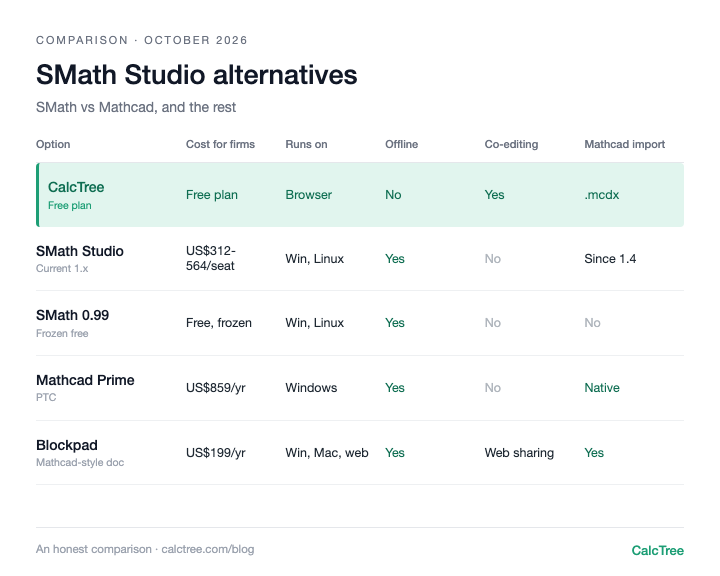
SMath gives you a Mathcad-style worksheet and runs offline on Windows and Linux. But the free Personal plan "cannot be used in organizations", and organisation licences run from US$564 down to US$312 per user per year depending on seat count. Automation through the Calculation Service needs the Enterprise edition. There's more in our SMath Studio alternatives post.
Use it if: you're a solo engineer or already run a licensed SMath installation.
Skip it if: you expected a free option for a firm.
CalcpadCE: free, open and code-first
CalcpadCE is the MIT-licensed community fork of Calcpad, built from the last open release (7.6.2) and maintained by volunteers. You write calcs as plain text and get a clean rendered output, with Word and PDF export, Windows and Linux builds and a web editor. A Python wrapper lets Python drive Calcpad. The cost is that your firm, or a small volunteer community, owns its future.
Use it if: you want free, offline, text-based calcs and are happy to support it yourself.
Skip it if: you need vendor support, a visual editor or collaboration.
Maple Flow: symbolic maths on a single-user desktop
Maple Flow puts Maple's maths engine on a free-form, whiteboard-style canvas with units, runs on Windows and Mac, and has a Mathcad migration assistant. It connects to AI coding assistants, and licences are perpetual or annual.
Use it if: you work alone on a desktop and want Maple's symbolic engine.
Skip it if: you need a shared, governed calc library across a team.
When a desktop calc document stops working
Blockpad, Mathcad, SMath, CalcpadCE and Maple Flow share the same model: a calc is a file. For one engineer that's fine. For a firm, the same problems turn up:
- Verified calcs get copied. One checked calc becomes twenty edited copies, and nobody knows which is current.
- Nothing stops edits to checked logic. We couldn't find calc locking documented for Blockpad, Mathcad or Maple Flow; SMath has password-protected regions.
- Review happens outside the software. Checking is a PDF markup and an email, not part of the calc.
- Python and automation depend on each machine. Local installs drift, and automation means desktop scripting.
- Two people can't work on one calc at once. Designer and checker take turns with a file.
Where CalcTree fits
We make CalcTree, so weigh this accordingly. We built it for teams that have outgrown the calc-as-a-file model:
- AI native. AI is built in for drafting, debugging and reviewing calcs, and an admin can switch it off. Claude and other AI tools can also build and run your calcs through LLM plugins.
- Review and history. Review calcs in the shared workspace, with version history and an audit trail of who checked what.
- Real-time collaboration. Co-editing, comments and mentions on the same page.
- Python, natively. Python cells sit inline with the maths, units carried through, with numpy, scipy and plotting libraries pre-installed. Nothing to install per user.
- Connected to your other software. The Excel add-in and API let anything that can call an API run a calc.
- Governance. Three lock modes and role permissions, and versioned workspace templates that flag pages when the source changes.
- Templates out of the box. 100+ built-in templates across disciplines and jurisdictions, including AS, ACI and Eurocode, to insert or reference, plus your own workspace templates.
- Linked calcs. Pages link to each other, pinned to a revision and flagged when the source changes.
- Reports. Company headers and document elements set once for the whole firm, and a Report Builder that binds multi-page reports with contents and page numbers.
- A generous free plan. Python, the Excel add-in, the API and an AI allowance are all on the free plan. Paid plans are US$14 to US$34 per user per month.
- Your data. You own your IP and can export any time.
Where Blockpad is still ahead: native Word export, and fully offline use (offline is coming soon). Both draw sketches that update with the calc: Blockpad through its own drawing formulas, CalcTree through Python, a widely used language AI tools already write well.
Want to see how it looks and feels with your own work? Request a calc and we'll build it for you, or send us a Mathcad or SMath file and we'll convert it for you.
Try CalcTree free, or if you're running a firm-wide evaluation, book a call and we'll set up a pilot on your own calcs.
Decision tree
- Solo engineer, wants a Mathcad-style desktop document, offline → Blockpad
- Need Word output → Blockpad
- Want parametric sketches that update with the calc → CalcTree with Python
- Clients require .mcdx files, or you need advanced maths → Mathcad Prime or Maple Flow
- Free, text-based, happy to self-support → CalcpadCE
- Team that needs checked calcs locked, reused and run from Python, Excel or an API → CalcTree
- Designers and checkers working on the same calc at the same time → CalcTree
- Need to review and sign off calcs → CalcTree
- Want to build and work on calcs with AI built in → CalcTree
- Want calcs that plug into AI workflows and tools like Claude → CalcTree
Frequently asked questions
Blockpad vs CalcTree: which is better?
It depends on who uses the calc. For a solo engineer who wants an offline desktop document with Word export, Blockpad fits. For a team, CalcTree is the stronger pick: live co-editing and review on the same page, hosted Python, AI built in, 100+ built-in templates, and an API, Excel add-in and LLM plugins so calcs run from other tools. CalcTree has a free plan; Blockpad's commercial licences start at US$199 a year.
What is the best Blockpad alternative?
It depends on why you're leaving. For a Mathcad-style desktop document with heavier maths, Mathcad Prime or Maple Flow. For free and offline, CalcpadCE. For hosted Python, an API, calc locking and real-time collaboration across a team, CalcTree.
Blockpad vs Mathcad: which is better?
Blockpad covers the maths most engineering calcs need, adds spreadsheets, sketches and Word export, and costs US$180-199 per user per year against Mathcad Prime's US$859. Blockpad itself says it doesn't include some higher-level maths such as partial differential equations or Fourier transforms. If you need those, Mathcad.
How much does Blockpad cost?
As of October 2026, Blockpad lists US$199 per user per year for a single user, US$180 per user per year at 5 or more users, US$440 per floating seat, and a US$950 lifetime licence. Check blockpad.net/pricing for current prices.
Blockpad vs SMath: which is better?
Both are Mathcad-style documents that run offline. Blockpad adds a web app, shared online libraries and Word export, and is generally cheaper per seat for organisations. SMath's free plan isn't licensed for organisations, so compare Blockpad against SMath's paid licences, not the free one.
Is BlockCalc the same as Blockpad?
We couldn't find the name BlockCalc anywhere on Blockpad's site. The vendor calls the product Blockpad, and its files use the .bpad extension.
Does CalcTree export to Word?
Not yet. CalcTree exports PDF and Markdown today, with company report styles set at workspace level. If Word output is essential, Blockpad and CalcpadCE both do it.
Prices are list prices from each vendor's website, checked October 2026, and may have changed. Sources: Blockpad pricing; Mathcad Prime (PTC store); SMath Studio price list; SMath Studio plans.