If you are looking for a Tekla Tedds alternative, something has usually tipped you over: a named-user renewal, a new starter on a Mac, or another bespoke check that ended up in a spreadsheet because writing it in Tedds felt like too much work. This guide compares the realistic options as of October 2026.
We make CalcTree, so we are biased. We will also say plainly where Tedds is still the better choice. Its coded library of checks is why most practices bought it, and nothing here fully replaces that on day one. (The product is Tekla Tedds, made by Trimble, so "Trimble Tedds" is the same software.)
The Tekla Tedds alternatives at a glance
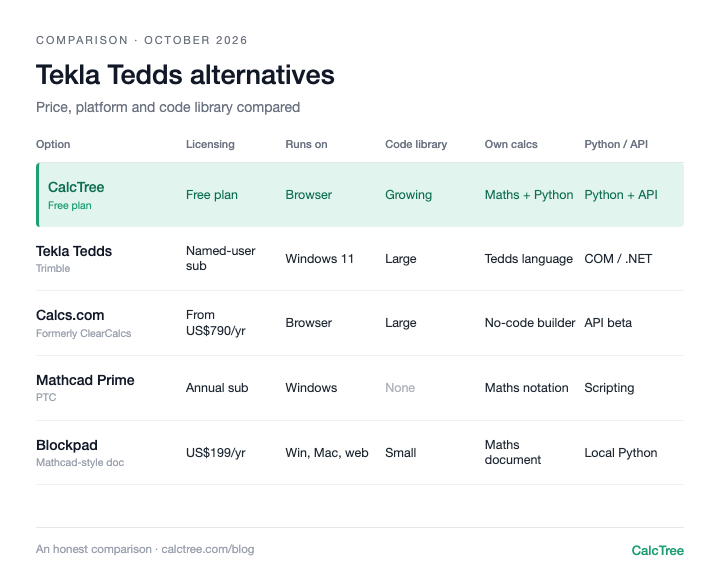
| Option | Licensing (as of Oct 2026) | Runs on | Built-in code library | Build your own calcs | Python / API | Output |
|---|---|---|---|---|---|---|
| Tekla Tedds | Annual named-user subscription; on-premises licences also documented (Trimble store, checked Oct 2026) | Windows 11 desktop | Large: Eurocode, BS, US, Australian, Canadian | Yes, in Tedds for Word with its own calc language | COM and .NET API (Windows) | Word (Tedds for Word) and print |
| CalcTree | Free plan; paid plans US$14-34/user/month (CalcTree pricing) | Desktop browser: Windows, Mac, Linux | Growing: AS 3600, AS 4100, AS 1720.1, ACI 318-19, Eurocode 3 and 5 templates | Yes, maths and Python on the same page | Native Python; GraphQL API (free plan included) | PDF reports, Markdown |
| Calcs.com (formerly ClearCalcs) | From US$790/yr (Basic, annual), concurrent-login plans (Calcs.com pricing, checked Oct 2026) | Browser | Large structural library for AU/NZ, US and Eurocode | Calcs Builder (no-code) | API in beta on Ultimate | PDF reports |
| Mathcad Prime | From about US$859/yr, locked or floating (PTC store, checked Oct 2026) | Windows only | None for codes; general maths | Yes, maths notation | Scripting and API; Python not native in the worksheet | Mathcad worksheet, PDF |
| Blockpad | US$199/yr single; US$180/person at 5+; US$950 lifetime (Blockpad pricing, checked Oct 2026) | Windows, Mac and web | Small paid engineering library | Yes, maths document | Local Python per user; Excel add-in | Word export, PDF |
| Excel / spreadsheets | Usually already licensed | Windows, Mac, web | None | Yes, formulas | VBA, Python in Excel | Spreadsheet printout |
The pattern: Tedds is the only option with a deep, multi-region library of coded Eurocode and British Standard checks, and that is a real moat. Everything else trades some of that library for something Tedds lacks: a browser instead of a Windows install, Mac support, Python in the calc, or easier sharing. Pick based on whether most of your work is standard checks or bespoke ones.
Tekla Tedds: still the benchmark for coded checks
Credit first. The Tedds library covers hundreds of structural calcs (loading, beams, columns, connections, foundations, retaining walls) across Eurocodes with UK, Irish and Nordic annexes, British Standards, US, Australian and Canadian codes. The 2026 release added an AISC 360 torsion check and a Eurocode wind assessment, so it is actively maintained. Tedds for Word output is familiar to checkers, and there is a real API: library calcs can be driven from COM and .NET code.
The friction is around the library. Tedds is a desktop install for Windows 11, and Tedds for Word needs current Microsoft Office. Trimble's online store sells an annual named-user subscription in the US, UK and Ireland only; elsewhere you go through sales. Writing your own calc means learning the Tedds calculation language and Interface Designer. The new Trimble Assistant answers support questions in the app, but does not draft or review calcs.
Use it if: most of your work is standard checks to Eurocode or BS, your team is on Windows, and Word output is your house format.
Skip it if: you are on Macs, your bespoke calcs keep escaping to Excel, or you want Python in the calc itself.
CalcTree: the open, AI-native platform for calcs you build, review and reuse
CalcTree runs in any desktop browser, with nothing to install. Maths notation and native Python sit on the same page, units carried through. AI is built in for drafting, debugging and reviewing, and Claude and other AI tools can run your calcs through LLM plugins. A checked calc becomes a workspace template, and one page can call another as a subroutine pinned to a revision, so a verified beam calc is reused rather than rebuilt (see linked engineering calculations). Any page runs with new inputs through the GraphQL API or the Excel add-in, and calcs are reviewed in the shared workspace with a history of who checked what.
The honest gap: Tedds' coded library is deeper for British Standards and Eurocode. CalcTree has 100+ built-in templates across disciplines and jurisdictions, including AS, ACI and Eurocode, and anything missing you build yourself with Python and AI. There's no native Word export today (PDF and Markdown instead).
Use it if: your calcs get checked, reused or shared, you build your own checks, or you want AI, Python and your other software working on the same calc.
Skip it if: you need native Word export, or fully offline work today (offline use is coming soon).
Calcs.com (formerly ClearCalcs): the cloud library
ClearCalcs rebranded to Calcs.com in 2025. It is the closest thing to a cloud Tedds: ready structural calculators for AU/NZ, US and Eurocode, loads that propagate between linked calcs, and clean PDF reports. Plans limit concurrent logins rather than named users, and the no-code Calcs Builder handles custom calculators. By its own admission, Tedds has the broader library for UK and European codes.
Use it if: you want ready calculators in a browser and your codes are AU/NZ or US.
Skip it if: you need Python in your calcs, or your custom logic goes beyond form-style inputs.
Mathcad Prime: the general maths worksheet
Tedds vs Mathcad comes up a lot, but they solve different problems. Mathcad Prime is a general maths worksheet with excellent units and readable notation, and no coded structural library: you write every check yourself. It is Windows only, on an annual term licence. Our free Mathcad alternatives review covers that side.
Use it if: your work is mostly bespoke maths and you are already licensed.
Skip it if: you need ready code checks, or anyone on the team uses a Mac.
Blockpad: a lighter desktop alternative that runs on Mac
Blockpad is a Mathcad-style maths document with spreadsheets and sketches, from a small independent team. Every paid licence includes Windows, Mac and web apps, and it has Word export and a lifetime option. Its engineering library is small, and Python runs from each user's local install.
Use it if: you want an affordable desktop calc document with Word output, including on Mac.
Skip it if: you need a large code library or team-wide governance.
Excel and spreadsheets: what everyone falls back to
Every engineer knows them, which is why bespoke checks end up there. The cost shows up at review: logic hidden in cells, no units, copies drifting across projects.
Use it if: the calc is simple and short-lived.
Skip it if: it will be reused, checked by someone else, or signed off.
When desktop, per-seat calc software stops working
What pushes teams off Tedds is rarely the library. It is how the work moves:
- Seats follow people, not work. Occasional users and checkers each need a named seat or go without.
- Files on shared drives. Reuse means copying, and copies drift.
- One operating system. Mac users need a virtual machine.
- Bespoke work leaks out. If a new calc is harder than opening Excel, Excel wins.
- Automation needs Windows developers. A COM or .NET API is powerful, but most structural teams script in Python.
Where CalcTree fits
We built CalcTree for teams who want calcs on an open platform rather than in desktop files. Bias acknowledged:
- AI native. AI is built in for drafting, debugging and reviewing calcs, and an admin can switch it off. Claude and other AI tools can also build and run your calcs through LLM plugins.
- Review and history. Review calcs in the shared workspace, with version history and an audit trail of who checked what.
- Real-time collaboration. Co-editing, comments and mentions on the same page, in any desktop browser on any OS.
- Python, natively. Python cells sit inline with the maths, units carried through, with numpy, scipy and plotting libraries pre-installed.
- Connected to your other software. The Excel add-in and API let anything that can call an API run a calc. No COM or .NET needed.
- Governance. Three lock modes and role permissions, and versioned workspace templates that flag pages when the source changes.
- Templates out of the box. 100+ built-in templates across disciplines and jurisdictions, including AS, ACI and Eurocode, to insert or reference, plus your own workspace templates.
- Linked calcs. Pages link to each other as subroutines, pinned to a revision and flagged when the source changes.
- Reports. Company headers and document elements set once for the whole firm, and a Report Builder that binds multi-page reports with contents and page numbers.
- A generous free plan. Python, the Excel add-in, the API and an AI allowance are all on the free plan. Paid plans are US$14 to US$34 per user per month, with no named-user Windows seats.
Where others are still ahead: native Word export, and fully offline use (offline is coming soon).
Want to see how it looks and feels with your own work? Request a calc and we'll build it for you, or send us a Mathcad or SMath file and we'll convert it for you.
Try CalcTree free → or, for a firm-wide move, book a call.
Decision tree
- Only standard Eurocode or BS checks, Windows team, Word output as your house format → stay on Tekla Tedds
- Ready structural calculators in a browser, AU/NZ or US codes → Calcs.com
- Already own Mathcad and mostly do bespoke maths alone → Mathcad Prime
- Need Word export from a desktop document on Mac → Blockpad
- Quick one-off numbers nobody else will check → Excel
- Lots of bespoke calcs, Python, API, reuse across projects → CalcTree
- Need to review and sign off calcs, with a history of who checked what → CalcTree
- Want to build and work on calcs with AI built in → CalcTree
- Want calcs that plug into Excel, other software and AI tools like Claude → CalcTree
Frequently asked questions
Tekla Tedds vs CalcTree: which is better?
If your work is almost all standard BS and Eurocode checks on Windows, with Word as your house format, Tedds. If you build your own checks, review calcs as a team, or want Python, AI and an API on the same calc, CalcTree: 100+ built-in templates, any desktop OS, and a free plan instead of named-user seats.
Is Tekla Tedds the same as Trimble Tedds?
Yes. The product is officially called Tekla Tedds and is made by Trimble, which owns the Tekla brand. "Trimble Tedds" searches lead to the same software.
How much does a Tedds licence cost?
Trimble sells Tekla Tedds online as an annual named-user subscription in the US, UK and Ireland, bundled with Tedds for Word, a Tekla Structural Designer LT licence and Trimble Connect Pro. Orders of 11 or more, and other regions, go through sales, so check Trimble's store for your current price.
Does Tekla Tedds run on Mac?
Not natively. Trimble lists Tedds as a Windows 11 64-bit desktop install. Some users run it in Parallels, but we couldn't find that documented as supported. CalcTree and Calcs.com run in a browser, and Blockpad has a Mac app.
Tedds vs Mathcad: which should I use?
Tedds gives you ready code checks; Mathcad gives you a blank maths worksheet. Tedds for standard member and connection design, Mathcad for bespoke derivations. Many firms own both, which is why a platform combining templates with your own maths and Python is worth a look.
Is there a free Tekla Tedds alternative?
Nothing free matches the Tedds library. CalcTree has a free plan for building and sharing your own calcs, and Calcs.com has a 14-day trial.
Can I automate Tedds calcs with Python?
Tedds' API is documented for COM and .NET languages such as C# and VBA; we couldn't find Python documented. CalcTree has native Python inside the calc and a GraphQL API you can call from Python.
Prices are list prices from each vendor's website, checked October 2026, and may have changed. Sources: Calcs.com pricing; Mathcad Prime (PTC store); Blockpad pricing.


.jpg)