
Cold-formed RHS section properties to EN 10219-2: area, second moments, moduli and radii of gyration. Pick a section and read the values.

This template is not available yet. You can sign up and create it yourself!
Or let us know if you'd like to be notified when it’s ready:
No items found.
No items found.
About this Cold-Formed RHS Section Properties Calculator
This calculator returns the section properties of any cold-formed rectangular hollow section in the standard range, computed from the published depth, width, wall thickness and corner radii. Cold-formed sections have larger corner radii than hot-finished sections of the same size, so their properties are not interchangeable.
- Structural engineer: take the properties of a candidate cold-formed RHS into a member check with the correct corner geometry already applied.
- Design engineer: size a section from the cold-formed range during concept design, and see how it compares with the hot-finished equivalent.
- Checker: confirm that a calculation has used cold-formed properties where a cold-formed section has been specified.
Every property is computed on the page in visible MathJS rather than read from a stored table, and each one is checked against an independent geometric integration of the same section before it ships. It is an engineering-grade calculator you can audit, duplicate and adapt in CalcTree.
More info on Cold-Formed RHS Section Properties
What defines a cold-formed RHS
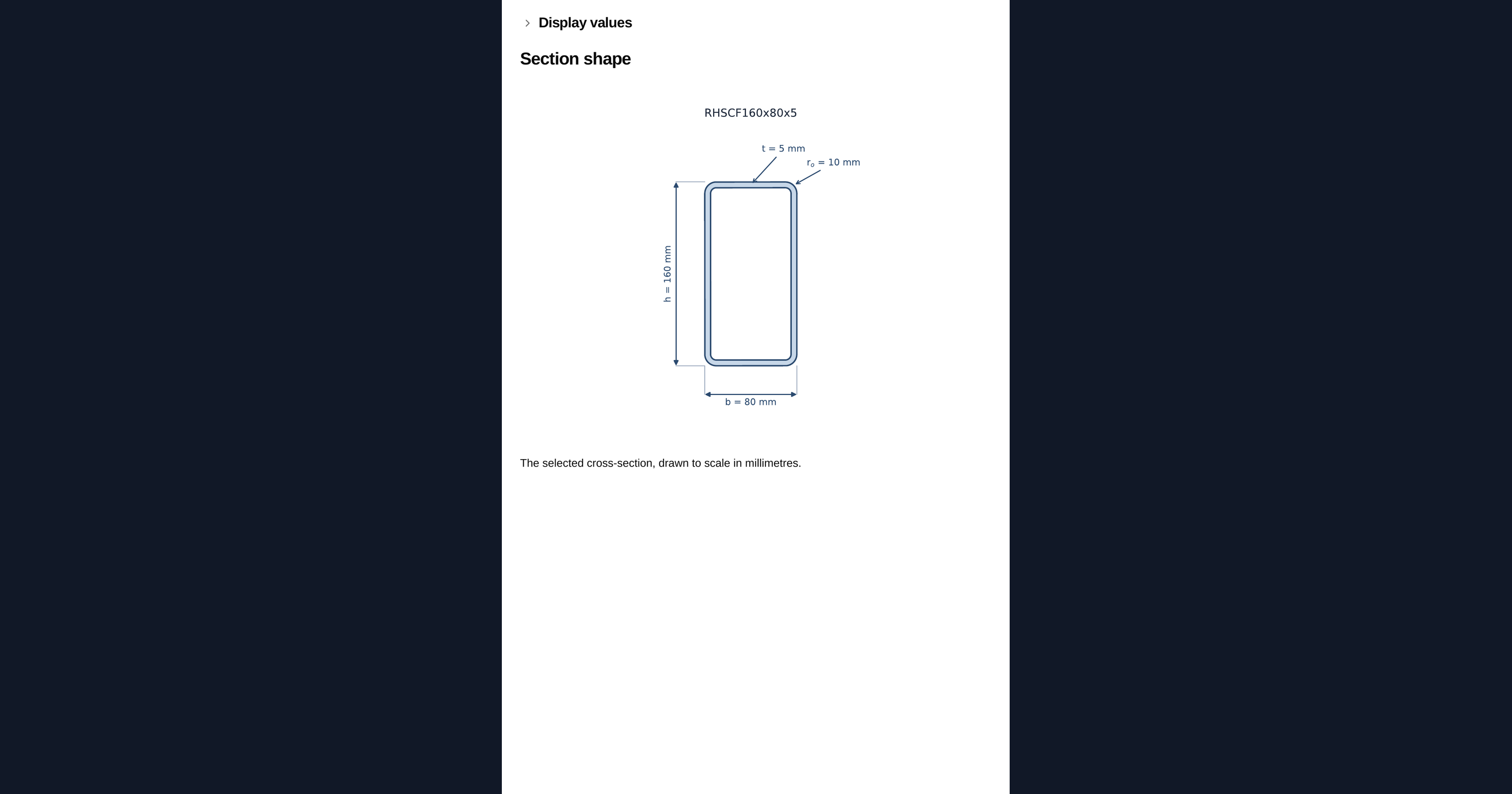
Five published dimensions define the section: the overall depth, the overall width, the wall thickness, and the outer and inner corner radii. The corner radii are the difference between this range and the hot-finished one, and they are what makes the properties differ for the same nominal size.
How the properties are derived
The section is the outer rounded rectangle less the inner one. Each rounded corner removes a corner piece, the square of side r minus the quarter disc inside it, so the properties are the plain rectangle plus four corner corrections. Because the section is doubly symmetric, the plastic neutral axis coincides with the centroidal axis.
Using the library in your own calculation
The section range is attached to the page as a dataset rather than pasted in as a table, so the same file can be inserted into any other calculation in your workspace. Duplicate the page and the data comes with it, which means a member check you build on top of it stays tied to one copy of the section range rather than a retyped subset of it.
Where the numbers are checked
Each section is verified against an independent numerical integration of the same geometry, carried out by a different method to the closed-form expressions used on the page. Both have to agree to four significant figures for every section in the range.
Common Calculation Errors to Avoid
- Mixing hot-finished and cold-formed sections: A cold-formed section and a hot-finished section of the same nominal size are not interchangeable. The cold-formed corner radii are larger, which removes more material and lowers the area and the second moment of area. Use the library that matches the standard you are specifying to.
- Ignoring the corner radii: Treating a hollow section as a sharp-cornered tube overstates both the area and the second moment of area, and the error grows as the wall gets thicker relative to the size. The radii are part of the section definition, not a detailing nicety.
- Using plastic properties without classifying the section: The plastic modulus only applies if the cross-section can reach and sustain its plastic moment. Classify the section for the relevant load case first; a Class 3 section is limited to its elastic modulus and a Class 4 section needs effective properties, not the gross ones given here.
- Confusing nominal and design thickness: The thickness in the product standard is the nominal wall thickness. Some cold-formed design rules work from a design thickness that deducts the zinc coating or a rolling tolerance, so check which one the clause you are applying expects.
- Treating gross properties as net properties: These are gross section properties. Bolt holes, cope cuts and corrosion allowances all reduce the section, and none of them are accounted for here.
Engineering templates
Common calculators
Design guides




FAQs
Can I substitute a cold-formed section for a hot-finished one of the same size?
Not on properties alone. The larger cold-formed corner radii remove more material, so the area and the stiffness are lower for the same nominal size. Check against the library that matches what you are specifying.
Why are the corner radii larger?
It follows from the manufacturing route. EN 10219 sections are rolled and welded from strip and the corners are formed cold, which needs a larger radius than the hot-finishing route of EN 10210.
Does the corner region behave differently?
Cold working raises the yield strength in the corners and reduces ductility there. That does not change the geometric properties given here, but it is relevant to connection detailing and to any clause that depends on corner material.
Can I use this inside my own calculation?
Yes. The section range is a dataset attached to the page, so duplicating the page brings the data with it and you can look up any section from your own maths.
Does it account for cross-section classification?
No. The properties given are the gross section. Classification, and any reduction to effective properties for a slender section, belong in the member check.
Learn about the benefits of using CalcTree on engineering projects!