
We're introducing two things that work together.
The first is the CalcTree desktop app, a native client that runs alongside the engineering software your team already uses, with the performance and local-integration benefits of a real desktop application instead of a browser tab.
The second is Connection Nodes, a unified, live integration layer between CalcTree and the rest of your engineering stack. Two tools to begin with, ETABS and Excel. Bidirectional. Type-aware. Unit-safe. Live. More tools rolling out over time.
These belong together because they're two halves of the same idea: CalcTree as a first-class citizen in your engineering tool stack, not a webapp you have to tab over to.
This is an enterprise capability, and we're deploying it with teams now rather than shipping it self-serve. The reason is simple: connecting live to a firm's analysis models and spreadsheets is something we'd rather set up properly with you than hand over cold. More on how to start that below.
What changes about your day
If you've used CalcTree before, the workflow is the same, just connected.
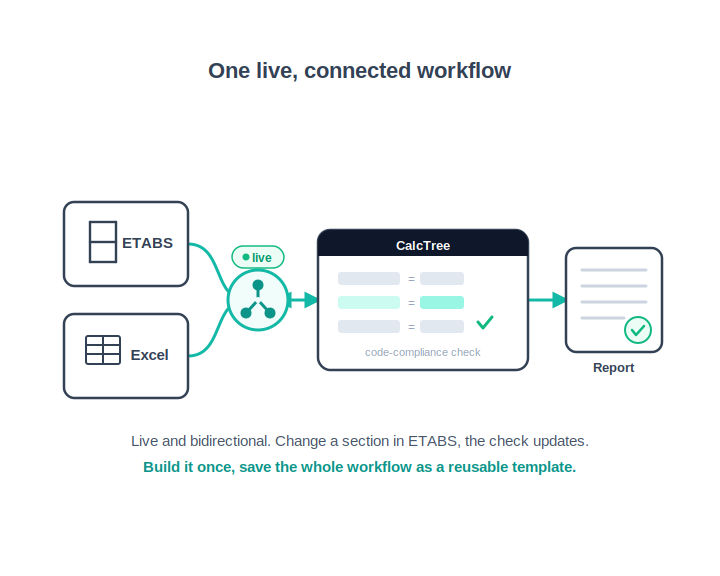
Structural analysis workflow. Your ETABS model produces results. Connection Nodes wires those results live into a CalcTree calc page: moments, shears, deflections, whatever you've selected. Your CalcTree calculation runs the code-compliance checks. The downstream report block reflects the result. Change a section in ETABS, and your CalcTree check updates. No CSV exports, no copy-paste, no version drift between the analysis and the calc.
Spreadsheet-driven workflow. Excel stays Excel. The cells your team has spent years tuning don't move. Connection Nodes wires those cells into CalcTree pages bidirectionally, so the Excel sheet stays canonical for the parts your team trusts it for, and CalcTree handles the structured layer that Excel was never quite right for. Change a value on either side, the other reflects it.
Cross-tool flow. ETABS provides the model output. Excel provides the firm-specific calc inputs. CalcTree holds the structured calculation, the documentation, and the report. Each step is a connection node. Each connection is live. The workflow is the artefact, not a folder full of stale CSVs.
And the workflow becomes reusable
The third part of this: workflows built with Connection Nodes save as templates.
Build the ETABS-to-CalcTree code-check loop once. Save it. Share it. The next project that needs the same check starts with the workflow already wired up. The new project lead provides the inputs, and the template runs. The new hire on the team learns the firm's approach by running it, not by being walked through it.
This is the bit that turns Connection Nodes from a productivity feature into a knowledge-capture feature. Your firm's best workflows stop living in one senior engineer's head, or one Python script that breaks the day they leave. They become documented, versioned, shareable IP. The workflow itself is the deliverable. The firm owns it. The team can run it. The new hire learns from it.
It's the answer to a problem most engineering teams have lived with for so long they've stopped noticing: the difference between a firm that knows things and a firm where individual people know things.
How Connection Nodes work
The short version: a connection node is a typed, bidirectional bridge between a CalcTree calculation and an external tool. You define what data flows in and what data flows out, and CalcTree handles the rest: type translation, unit conversion, change propagation, dependency tracking.
The desktop app is what makes this work for desktop-resident tools. Most engineering software runs locally, and the desktop app runs locally too, alongside it. Connection nodes can talk directly to local processes without round-tripping through a server. That's the part that wasn't possible from the web app.
We'll go into the architecture in more depth in a follow-up post.
What we don't do
Worth being explicit about a few things, because partner-platform pitches sometimes elide them.
- We don't compete with the tools we connect to. CalcTree is a calculation platform. We're not building a parametric modeller, an analysis engine, or a CAD tool. The tools you currently use stay best-in-class at what they do. Connection Nodes just lets data move between them and CalcTree cleanly.
- No training on your data. Data passing through Connection Nodes is workspace-scoped and not used to train any model. Same policy as Knowledge Base.
- No lock-in. Connection Nodes use open, documented schemas. Migrating off is a documented process, not a commercial chokepoint.
Getting it deployed in your organisation
Connection Nodes and the desktop app are available as an enterprise deployment. We set them up with your team: the tools you want connected first, the workflows worth templating, and the people who'll own them.
If you'd like to see Connection Nodes running against your own ETABS models and Excel calcs, book a call with our team and we'll walk through what deployment looks like for your stack.
.webp)




