
Timber Shear Check to EC5 - Cl 5.2.1.2 with notch factors, k_mod & k_v auto-calculated. Verify beams faster. Try the free template on CalcTree.

Tell us what you need, or sign up and build it yourself in minutes.
Leave your email and we'll tell you when a template for it is ready:




No items found.
No items found.
About this EC5 Timber Shear Check Calculator
This calculator checks timber beam shear capacity at the support, including the reduction in shear capacity due to a notch. It pulls characteristic material strengths, applies EC5 modification factors, and compares the design shear stress to the design shear strength to give a simple utilisation and pass/fail.
- Structural engineer — verify a support shear check quickly for a sawn or glulam member, including notches, without rebuilding EC5 factors by hand.
- Timber detailer — sanity-check notch geometry effects (effective depth, notch slope) and confirm whether the notch is governing the connection region.
- Design reviewer — audit what factors were applied (kmod, ksys, kcr, kv, γM) and confirm the utilisation matches EC5 clause intent.
It’s built as an engineering-grade CalcTree calculator: inputs are explicit, intermediate factors are exposed, and the final utilisation is traceable back to the governing expressions so you can review and reuse it confidently.
More info on EC5 Timber Shear Check
Inputs and section geometry
The calculator defines member geometry (breadth, depth, span) and support/spacing metadata used to convert actions “per metre” into actions “per member” via a member-per-metre factor. If a notch is present, it defines notch depth and notch slope length, then derives an effective depth for the shear stress calculation.
The section properties (area, section modulus, second moment) are also calculated for reporting and cross-checking, even though the shear check itself relies primarily on breadth and effective depth.
Material properties and partial factors
A strength class selector drives characteristic material properties, including characteristic shear strength and other grade properties. A separate material type selector drives the partial factor for material properties and assigns groups used to determine serviceability deformation and crack/notch related factors.
This separation matters because it allows the calculator to apply one set of grade-based strengths (e.g., fv,k) while independently applying material-type-based factors (e.g., γM, kcr, kn) that vary across timber and panel products.
Modification factors and notch factor
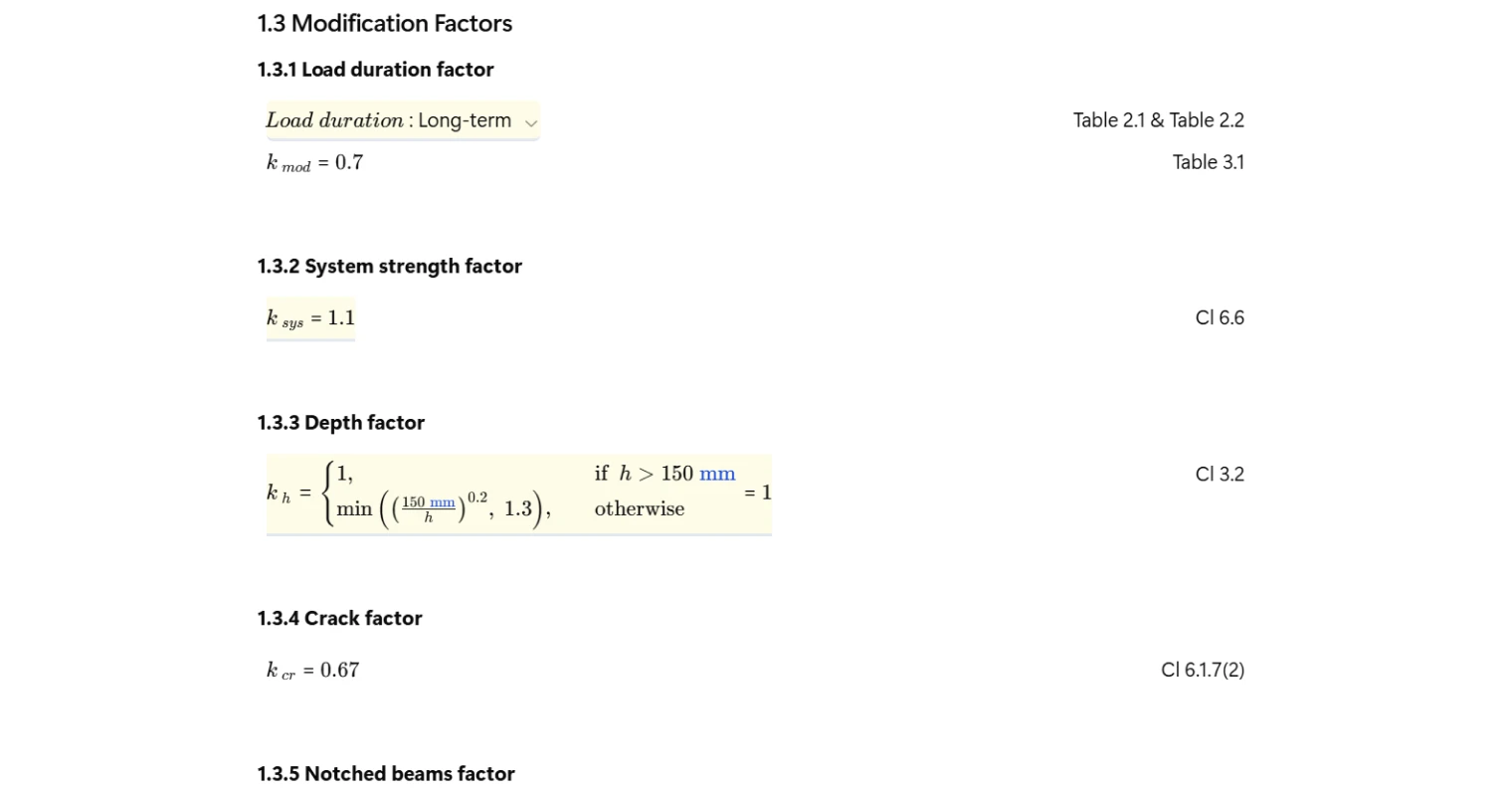
The design shear strength is built up from EC5-style multipliers, including load-duration and service-class effects, system effects, cracking effects, and (when notched) a notch/shear reduction factor derived from notch geometry. The notch geometry is converted into the intermediate ratios used by the notch factor expression, including the effective depth ratio and notch slope ratio.
Key implementation point: the notch factor should evaluate to unity when there is no notch, and only apply the reduction when notch depth is non-zero.
Shear stress, design strength, and utilisation
The check compares:
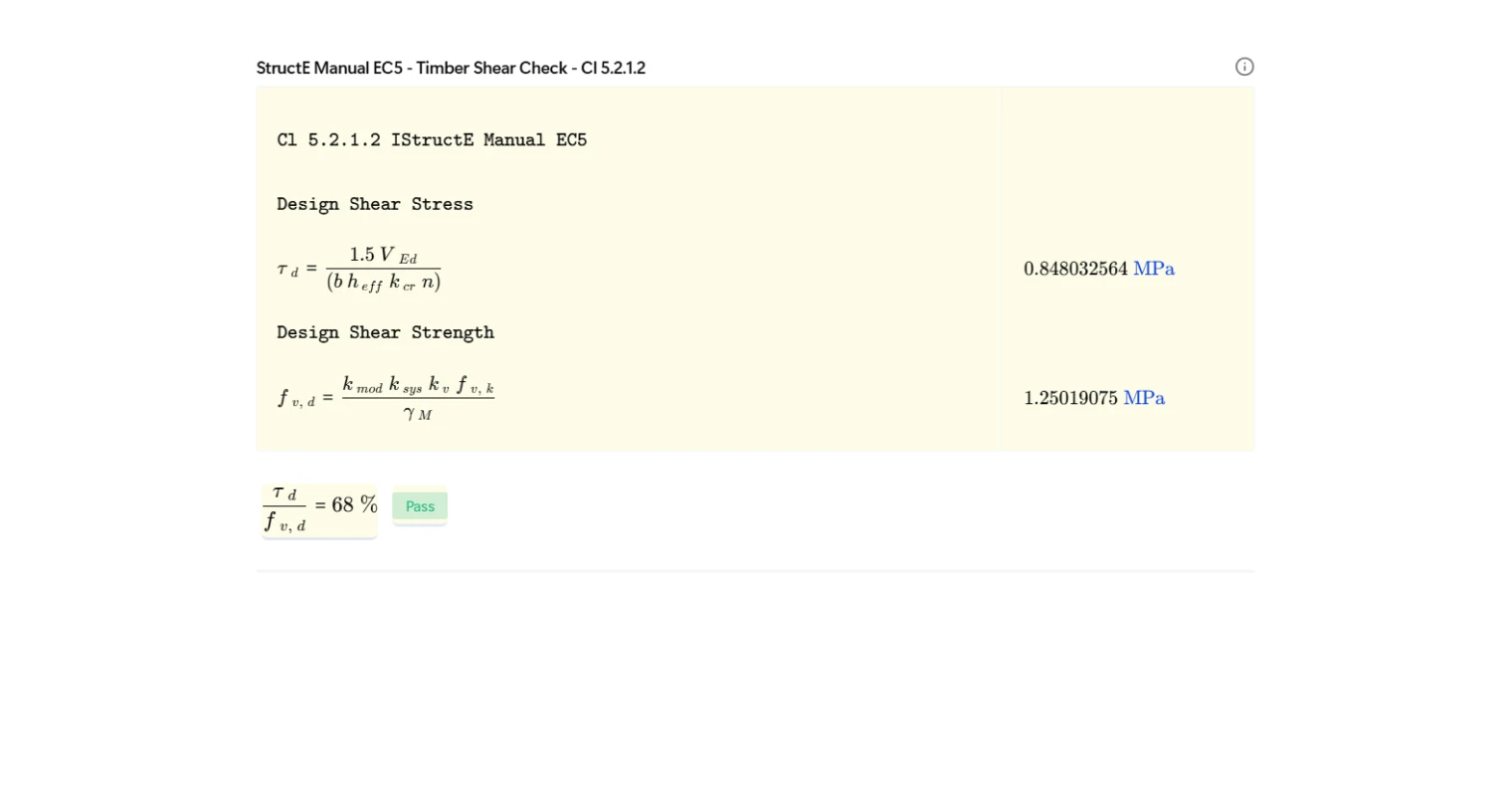
- design shear stress τd computed from the design shear force and the resisting breadth × effective depth, with the appropriate spacing and cracking factors included; and
- design shear strength fv,d computed from characteristic shear strength multiplied by the applicable modification factors and divided by the material partial factor.
Utilisation is then τd / fv,d and a traffic-light style pass/fail is returned based on whether utilisation is less than unity.
Common Calculation Errors to Avoid
- Forgetting to normalise units before using sqrt or exponents — if you use
sqrt(h_)whereh_carries units, many engines will throw or silently produce inconsistent results; convert to a dimensionlessh_mm = h_/(1 mm)beforesqrt, powers, or comparisons that expect scalars. - Using the wrong “material” variable for kmod — kmod must be keyed off the same material taxonomy used by the kmod table; mixing “Strength Class” (C24 etc.) with “Material Type” (solid timber, glulam, LVL, panels) will return no match or a wrong match.
- Case-sensitive text comparisons in selectors — if you compare strings using
equalText(or equivalent) with inconsistent casing, the condition may never trigger and you’ll default to an unintended value. - Notch factor applying when notch depth is zero — ensure the notch reduction returns
1when notch depth is zero; otherwise you can incorrectly reduce capacity for an un-notched member. - Service class treated as text instead of number — if service class is stored as
"1"vs1, table lookups keyed by integer can fail and return fallback values. - Member spacing factor applied in the wrong direction — confirm whether the “number per metre” factor should multiply or divide the action and stress terms; getting this backwards can shift utilisation dramatically.
- Python variable names not matching CalcTree nodes — if Python defines
k_deeeeeeeeeeebut the page expectsk_def, the downstream check will read an uninitialised/incorrect value and your utilisation becomes meaningless.
Engineering templates
Common calculators
Design guides




FAQs
What does this calculation check according to EC5?
This template checks shear capacity of a timber beam at the support in accordance with EC5 clause 5.2.1.2, as implemented via the IStructE Manual to EC5. It computes the design shear stress tau_d from the factored shear force and compares it against the design shear strength f_v_d, accounting for notch geometry where applicable. The utilisation ratio must be less than 1.0 to pass.
How does a notch at the support affect the shear check?
A notch reduces the effective depth of the beam at the support, which both increases the design shear stress and introduces a stress concentration captured by the factor k_v from EC5 clause 6.5.2. The template calculates k_v from the notch depth, notch slope length, effective depth ratio alpha, and the distance x from the support to the point of load application. If no notch is present, set notch depth to zero and k_v defaults to 1.0.
What is the crack factor k_cr and why does it matter?
k_cr reduces the effective shear area to account for cracking along the grain in timber. For solid timber it is 0.67, and for most panel products it is 1.0. It is drawn automatically from the material type selection per EC5 clause 6.1.7(2). It directly reduces the denominator of the shear stress calculation, so using the wrong material type will produce an unconservative result.
How do I enter the design shear force for a joist system?
V_Ed should be entered as the factored shear force per meter of floor or roof width, in kN. The template then uses the joist spacing s and number of joists per meter n_ to convert this into the force carried by a single member when computing shear stress. Make sure V_Ed is consistent with the tributary width assumed in your structural analysis.
Which timber strength classes are supported?
The dropdown covers softwood classes C14 to C30, hardwood classes D24 to D70, tropical hardwood TR26, and machine-graded classes T11 to T22 per EN 338. Characteristic strengths f_v,k, f_m,k, and stiffness E_0,mean are pulled automatically from the built-in table once you select the class.
How do service class and load duration affect the result?
Both influence k_mod, the modification factor that scales characteristic strength to design conditions. A higher service class (wetter environment) and longer load duration both reduce k_mod, directly reducing f_v_d. The template selects k_mod automatically from EC5 Table 3.1 based on your chosen material type, service class (1, 2, or 3), and load duration category (permanent through instantaneous).
Learn about the benefits of using CalcTree on engineering projects!