
Rectangular Section - Geometric Properties Calculation: instantly compute area, second moments, centroid & radii of gyration. Try the free template now!

Tell us what you need, or sign up and build it yourself in minutes.
Leave your email and we'll tell you when a template for it is ready:

No items found.
No items found.
About this Rectangular Section - Geometric Properties Calculator
This calculator determines the key geometric properties of a solid rectangular cross-section. Given the section width and depth, it computes gross area, second moments of area, perimeter, centroid location, and radii of gyration about both axes — all in one place, with full equation traceability.
- Structural engineer — pull cross-section properties for beam or column design checks without manually deriving each quantity from first principles.
- Civil designer — run rapid section comparisons during concept phases to assess stiffness and efficiency across different rectangular proportions.
- Mechanical engineer — extract moment of inertia and radius of gyration values for deflection, buckling, or dynamic analysis of rectangular members.
This is an engineering-grade calculator built on CalcTree, where every formula is visible, auditable, and linked directly to its output — ready to save, share, or embed in a project calculation set.
More info on Rectangular Section - Geometric Properties
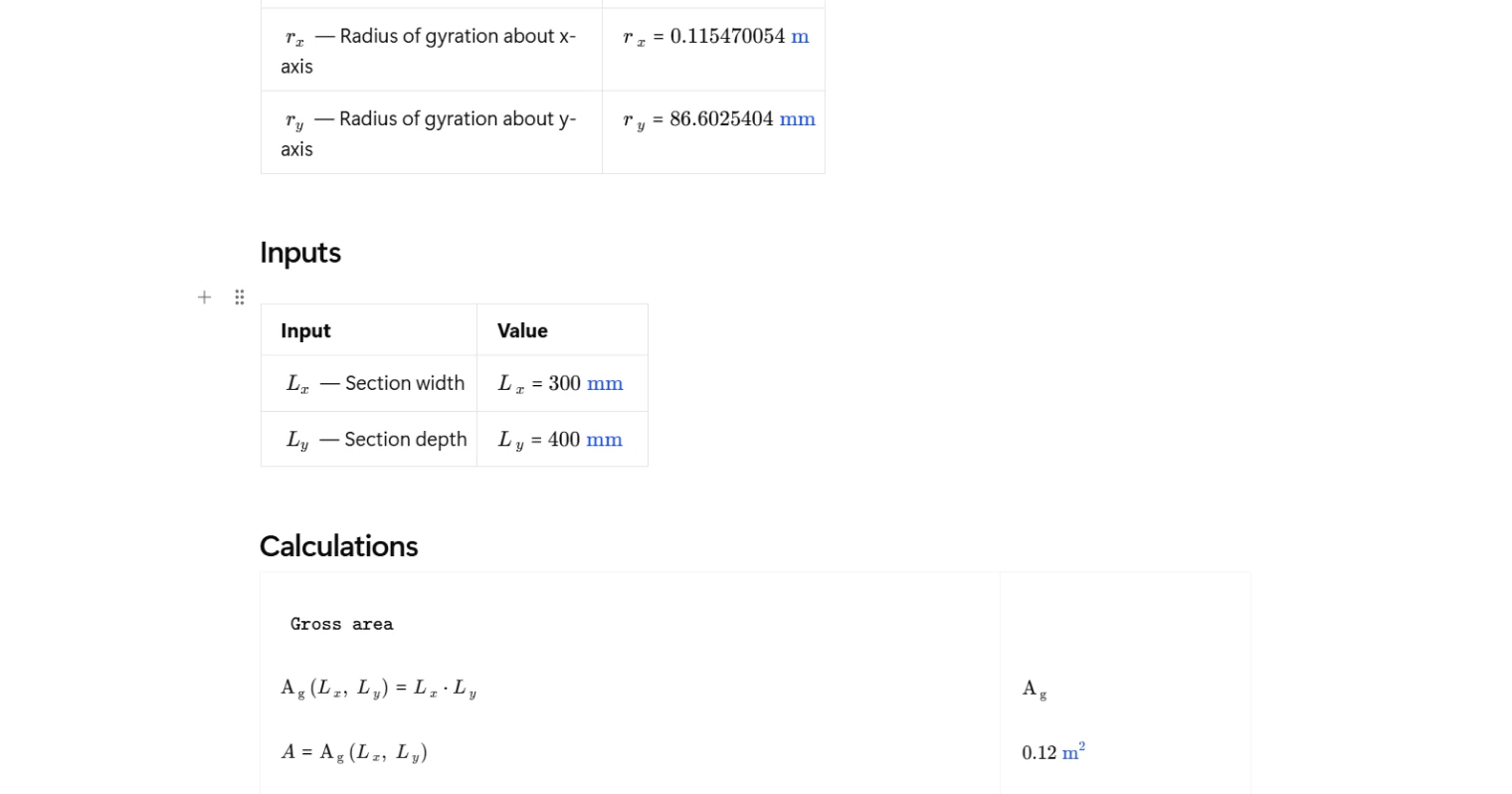
Inputs
The calculator takes two inputs: the section width $L_x$ and the section depth $L_y$. Both dimensions are defined relative to their respective axes, so it's important to be consistent with orientation before entering values. Width refers to the horizontal extent of the section and depth refers to the vertical extent. All downstream properties are derived directly from these two dimensions, so getting the inputs right is the only thing needed to generate a complete set of section properties.
Geometric Properties Calculated
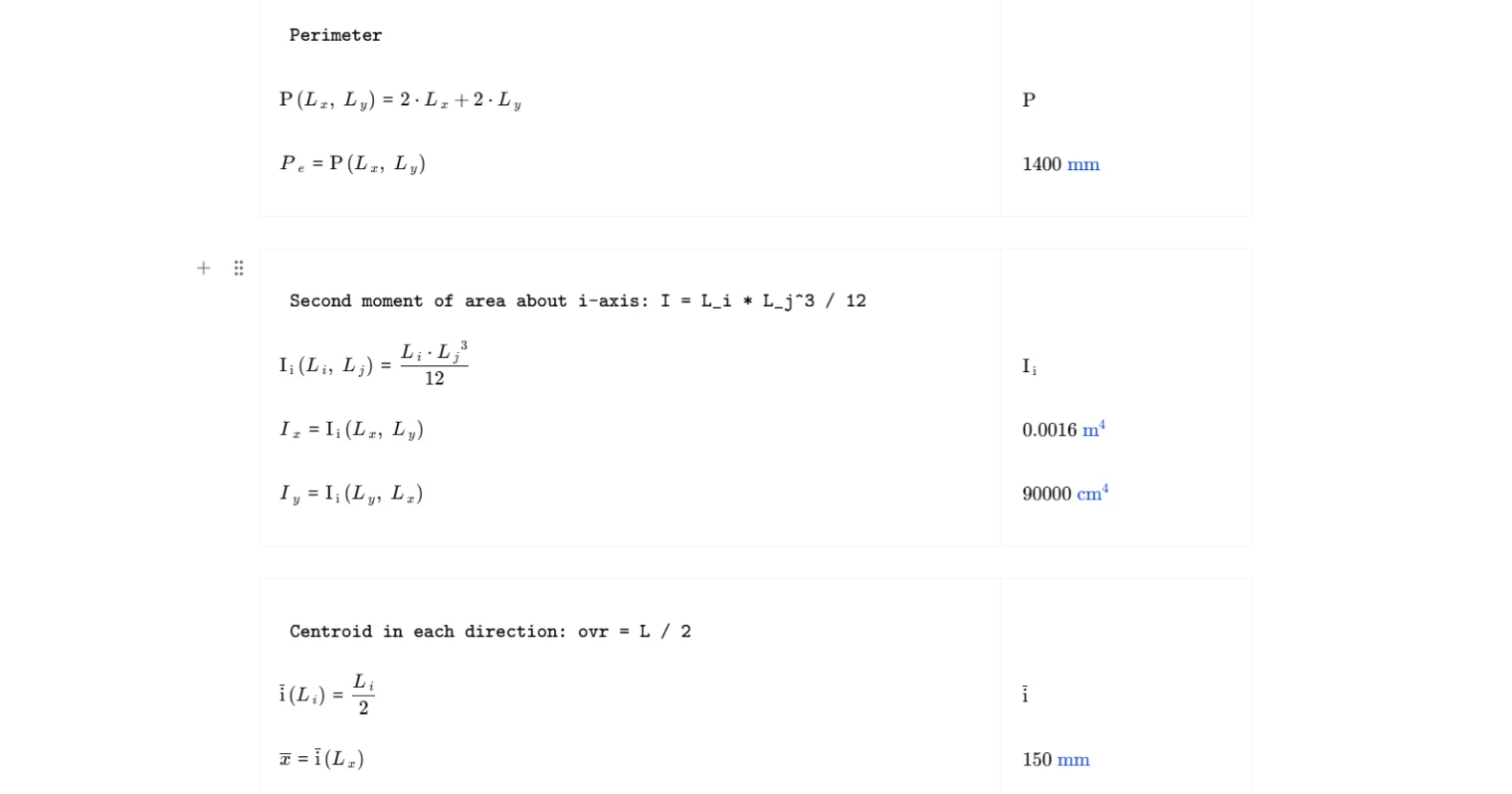
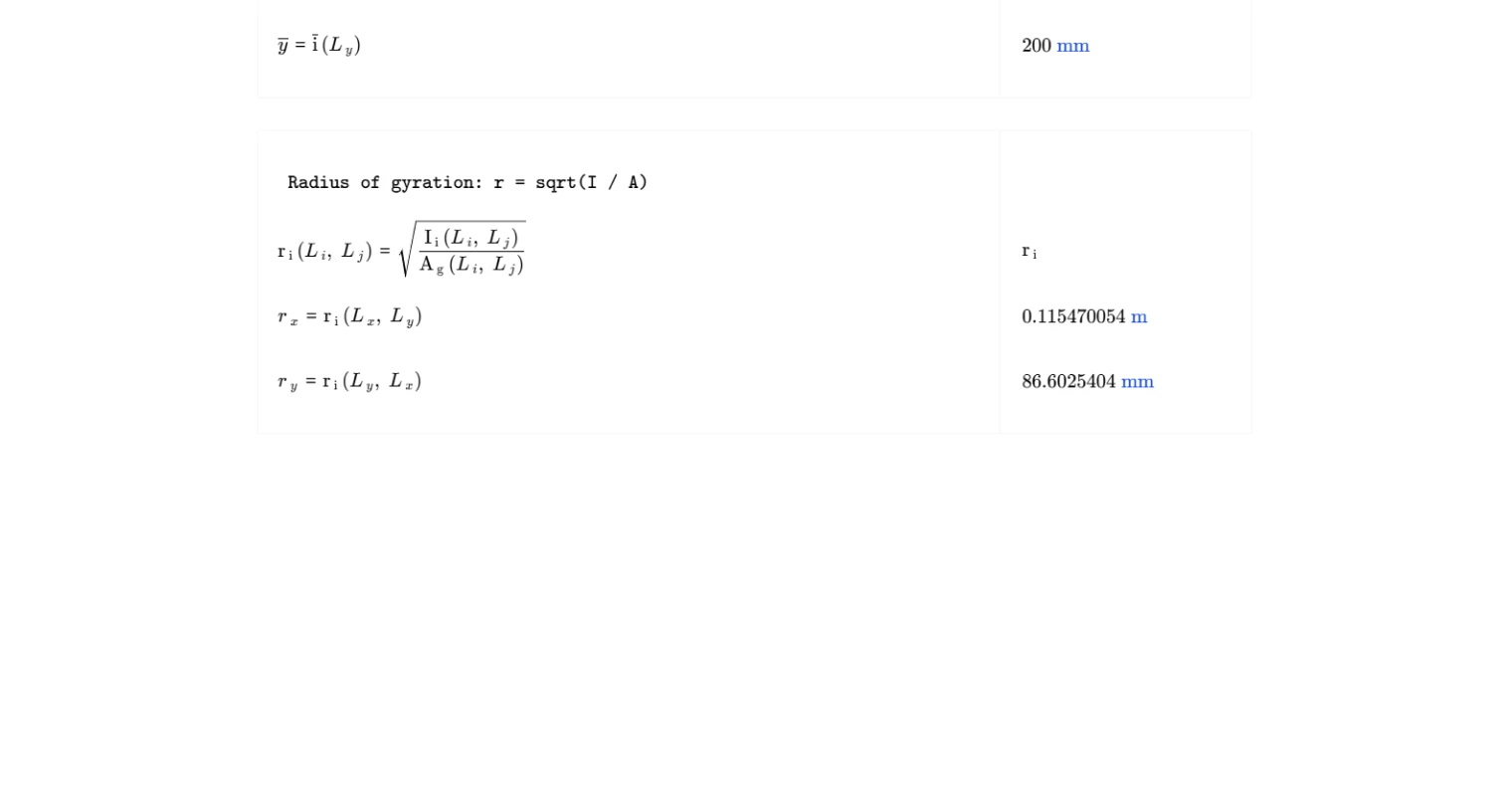
The calculator outputs eight section properties. Gross area is computed as the product of width and depth. Perimeter is the sum of all four side lengths. The second moment of area about the x-axis uses the depth as the dominant dimension, and about the y-axis it uses the width — each following the standard $bh^3/12$ form with the appropriate dimensions assigned. Centroid locations in both the x and y directions are each taken as half the respective section dimension, reflecting the symmetry of a rectangular section about both axes. Radii of gyration about each axis are derived from the ratio of the relevant second moment of area to the gross area, then square-rooted — giving a single length that characterises the distribution of area relative to each axis.
Method and Formulation
All properties are calculated using standard closed-form expressions for a solid rectangular section with uniform geometry. The section is assumed to be homogeneous, prismatic, and symmetric about both centroidal axes. No composite action, voids, or built-up configurations are accounted for. The second moments of area are taken about the centroidal axes, which is the standard reference for most structural design calculations. Radii of gyration are derived directly from those centroidal values. These are the same expressions found in structural steel, concrete, and timber design references, making the outputs directly usable in code-based design checks.
Outputs and How to Use Them
The summary table presents all computed properties with consistent units. Second moments of area are output in cm⁴, which aligns with common practice in structural design. These outputs feed directly into bending stiffness calculations ($EI$), section modulus derivations ($I/y$), slenderness checks using radius of gyration, and deflection estimates. If you're sizing a beam, checking a column for buckling, or verifying a section against a code limit, these properties are the starting point. The calculator can be updated instantly by changing the width or depth inputs, making it straightforward to iterate across multiple section sizes within a single CalcTree project page.
Common Calculation Errors to Avoid
- Swapping width and depth — assigning $L_x$ and $L_y$ to the wrong axes produces correct-looking numbers that are wrong for the actual orientation, leading to unconservative bending or buckling checks.
- Confusing centroidal and non-centroidal second moments of area — this calculator outputs $I_x$ and $I_y$ about the centroidal axes; applying the parallel axis theorem on top of these values without shifting the reference point first will double-count the offset.
- Using depth as both dimensions — when checking a square section it doesn't matter, but for non-square sections, using the same dimension for both axes masks any directional difference in stiffness.
- Ignoring unit consistency — mixing millimetres and centimetres across inputs and downstream calculations causes large errors in $I$ values, which scale with the cube of the dimension.
- Applying gross area properties to net sections — this calculator computes gross section properties; if holes, notches, or cutouts are present, net section properties must be calculated separately for strength checks.
- Treating radius of gyration as a strength measure — $r_x$ and $r_y$ describe the distribution of area relative to an axis and are used for slenderness, not for direct load capacity; confusing the two leads to misapplied checks.
Engineering templates
Common calculators
Design guides




FAQs
What geometric properties does this rectangular section calculator output?
The calculator returns eight properties for a solid rectangular cross-section: gross area, second moments of area about both the x and y axes, perimeter, centroid location in both directions, and radii of gyration about both axes. All outputs are derived from just two inputs — section width Lx and section depth Ly.
What are the second moment of area formulas used for a rectangle?
For a solid rectangle, the second moment of area about the x-axis is Ix = Lx · Ly³ / 12, and about the y-axis it is Iy = Ly · Lx³ / 12. These are calculated about the centroidal axes, which for a symmetric rectangle coincide with the geometric centre of the section.
Where is the centroid of a solid rectangular section?
Because a solid rectangle is doubly symmetric, the centroid sits at the geometric centre. This means x̄ = Lx / 2 and ȳ = Ly / 2. No offset adjustments are needed, and both centroidal axes are principal axes.
What is the radius of gyration and why does it matter?
The radius of gyration r is defined as r = √(I / A). It represents the distance from the axis at which the entire cross-sectional area could be concentrated and still produce the same second moment of area. It is commonly used in column buckling checks — a larger radius of gyration about the critical axis means a higher slenderness resistance.
How do I enter inputs and what units are supported?
Enter section width Lx and depth Ly directly into the input fields. The calculator is unit-aware, so you can enter values in millimetres or other consistent SI length units. Second moments of area are output in cm⁴ by default. Keep both inputs in the same unit to avoid conversion issues.
Can this be used for checking both strong and weak axis behaviour?
Yes. The calculator outputs Ix and Iy independently, along with radii of gyration about both axes. This makes it straightforward to identify the strong axis (larger I) and weak axis (smaller I), which is relevant for beam bending checks and column buckling assessments in both directions.
Learn about the benefits of using CalcTree on engineering projects!