
Check ACI 318-19 max spacing of shear reinforcement legs in beams per Table 9.7.6.2.2. Get instant Pass/Fail results. Try it free on CalcTree.

Tell us what you need, or sign up and build it yourself in minutes.
Leave your email and we'll tell you when a template for it is ready:




No items found.
No items found.
About this ACI 318-19: Maximum Spacing of Shear Reinforcement Legs - Beams (Table 9.7.6.2.2) Calculator
This calculator checks the maximum allowable spacing of shear reinforcement legs in beams per ACI 318-19 Table 9.7.6.2.2. It covers both spacing along the member length and spacing across the beam width, applying the correct limits based on whether the beam is nonprestressed or prestressed and whether the required shear force resisted by shear reinforcement exceeds the code threshold.
- Structural engineer — verify stirrup spacing at critical sections quickly, with the table threshold and governing limits calculated automatically for both directions.
- Reinforced concrete designer — check longitudinal and transverse leg spacing in a single pass for both standard and prestressed beam configurations without manually parsing the code table.
- Plan checker or reviewer — confirm that provided stirrup layouts satisfy ACI 318-19 maximum spacing requirements for beams before approving construction documents.
This is an engineering-grade calculator built on CalcTree, where you can audit every intermediate result, adapt inputs to your project, and save the page directly to a project workspace.
More info on ACI 318-19: Maximum Spacing of Shear Reinforcement Legs - Beams (Table 9.7.6.2.2)
Inputs
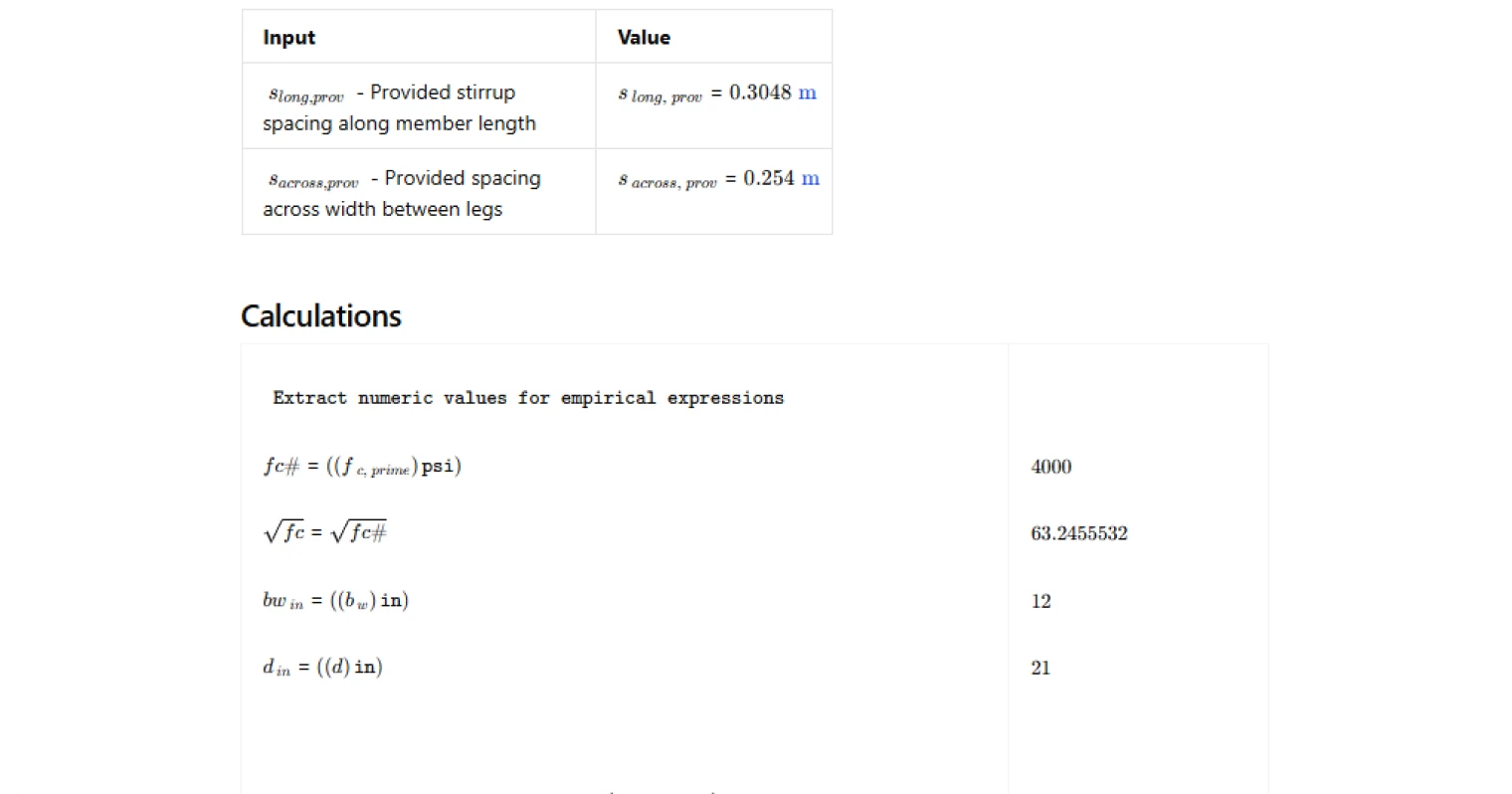
The calculator requires three categories of input. Beam type and geometry covers whether the beam is nonprestressed or prestressed, the web width, the effective depth, and the overall section depth. The material input is the specified compressive strength of concrete, which feeds into the table threshold expression. The actions input is the required shear force resisted by the shear reinforcement at the section being checked. Finally, the provided stirrup spacings — one along the member length and one across the beam width between legs — are entered so the calculator can run the compliance checks directly.
Table Threshold and Maximum Spacing Limits
The core of the calculation is the evaluation of the ACI 318-19 Table 9.7.6.2.2 threshold, which is a function of the concrete compressive strength, web width, and effective depth. This threshold determines which column of the table governs. When the required shear reinforcement force is at or below the threshold, more relaxed spacing limits apply. When it exceeds the threshold, the limits are halved, reflecting the higher demand on the reinforcement. For nonprestressed beams, the longitudinal spacing limits are expressed in terms of the effective depth, while the transverse spacing limits across the width are based on the effective depth at a less restrictive ratio. For prestressed beams, the limits are expressed in terms of the overall section depth. In all cases, an absolute upper cap on spacing applies regardless of section dimensions, and the governing limit is the lesser of the depth-based expression and that cap.
Outputs and Design Checks
The calculator outputs the computed table threshold, the maximum permissible spacing along the member length, and the maximum permissible spacing across the beam width. These are compared directly against the provided spacings in two separate checks — one for the longitudinal direction and one for the transverse direction. Each check returns a clear pass or fail result, making it straightforward to confirm compliance or identify which direction requires adjustment.
Common Calculation Errors to Avoid
- Using the wrong depth parameter for beam type — nonprestressed limits reference the effective depth, while prestressed limits reference the overall section depth; substituting one for the other produces incorrect maximum spacings in both directions.
- Applying a single spacing limit to both directions — the longitudinal and transverse limits are distinct and must be checked independently; the across-width limit is generally less restrictive than the along-length limit but still governs stirrup leg placement.
- Forgetting the absolute cap — the depth-based expressions can exceed the absolute maximum spacing permitted by the code for sections with large depths; always take the lesser of the two values.
- Comparing the wrong Vs value to the threshold — the threshold check uses the required shear force resisted by shear reinforcement, not the total factored shear demand; using the total shear can incorrectly trigger the tighter spacing limits.
- Neglecting to recheck after section changes — adjusting the web width, effective depth, or overall depth changes both the threshold and the depth-based spacing limits, so any geometry revision requires a full recalculation.
- Treating the table as applying to all reinforcement types equally — Table 9.7.6.2.2 applies specifically to legs of shear reinforcement in beams; different provisions apply to other member types or other forms of transverse reinforcement.
Engineering templates
Common calculators
Design guides




FAQs
What does ACI 318-19 Table 9.7.6.2.2 actually control?
Table 9.7.6.2.2 sets upper limits on how far apart shear reinforcement legs can be spaced, both along the beam length and across the beam width. The purpose is to ensure stirrups intercept potential diagonal cracks before they can propagate unchecked. Without these limits, widely spaced stirrups could miss a crack entirely, leaving a section with no effective shear resistance even if the total stirrup area is adequate.
Why do the spacing limits tighten when Vs exceeds 4√f'c · bw · d?
At higher shear demand, diagonal cracks form at steeper angles and can develop more rapidly. The code responds by halving the allowable spacing in both directions once Vs crosses this threshold. For nonprestressed beams, the longitudinal limit drops from d/2 to d/4 (max 12 in instead of 24 in), and the transverse limit drops from d to d/2. This keeps stirrups close enough together that no crack can fully form between two consecutive legs.
What is Vs,req and how do I calculate it before using this template?
Vs,req is the portion of shear that your shear reinforcement must carry after subtracting the concrete contribution. It comes from the strength equation: Vs,req = (Vu/φ) − Vc, where Vu is the factored shear demand, φ is the shear strength reduction factor (0.75), and Vc is the concrete shear contribution per ACI 318-19 Section 22.5. Calculate Vs,req first from your load combinations, then enter it here to determine which spacing regime applies.
What is the difference between spacing along length and spacing across width?
Spacing along length is the center-to-center distance between consecutive stirrups measured parallel to the beam's longitudinal axis. Spacing across width is the center-to-center distance between stirrup legs measured perpendicular to the beam axis within a single cross-section. Wide beams often require multiple stirrup legs at a single spacing station, and the transverse limit ensures those legs are close enough to engage the full width of the web.
How do I use this calculation for a prestressed beam?
Select "Prestressed beam" from the beam type dropdown. The limits then reference overall depth h rather than effective depth d. For low shear demand, the longitudinal limit is the lesser of 3h/4 and 24 in; for high shear demand it drops to the lesser of 3h/8 and 12 in. Enter h in the geometry inputs. The effective depth d is still required to compute the Vs threshold but does not control the spacing limits for prestressed members.
My longitudinal check passes but the width check fails — what should I do?
Add an intermediate stirrup leg across the width to reduce s_across,prov. For example, if you have a single U-stirrup in a wide beam, adding a middle leg converts it to a three-leg arrangement and cuts the transverse spacing roughly in half. You do not necessarily need to change the stirrup spacing along the length. Recalculate s_across,prov as the clear distance between legs divided by the number of spaces, then re-enter it to confirm the check passes.
Learn about the benefits of using CalcTree on engineering projects!