
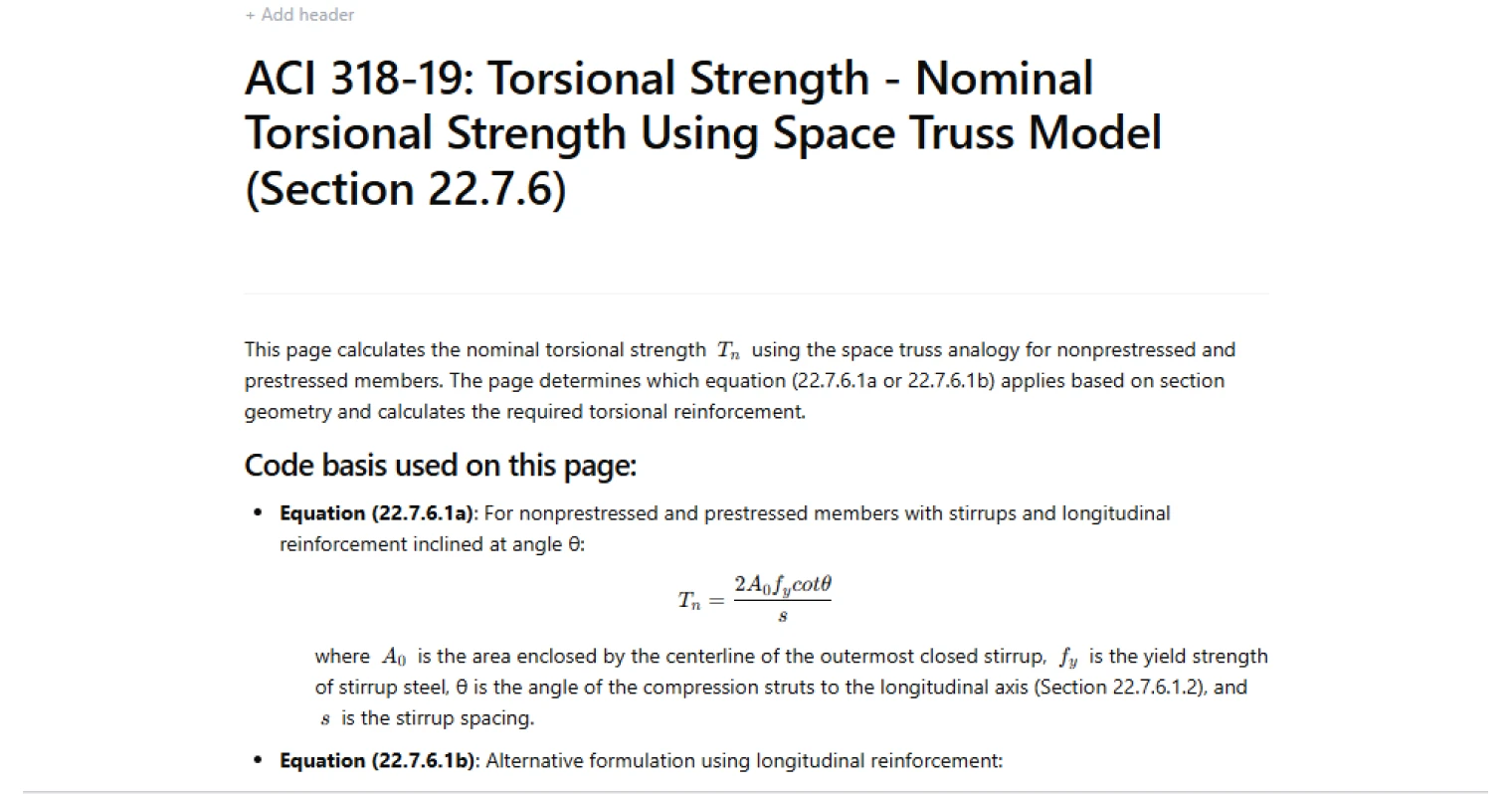
Calculate ACI 318-19 nominal torsional strength Tn using the space truss model (Sec. 22.7.6). Covers Eq. 22.7.6.1a/b. Try it free on CalcTree.

Tell us what you need, or sign up and build it yourself in minutes.
Leave your email and we'll tell you when a template for it is ready:
No items found.
No items found.
About this ACI 318-19 Nominal Torsional Strength Calculator
This calculator computes the nominal torsional strength, (T_n), for reinforced concrete members using the ACI 318-19 space truss analogy. It supports both nonprestressed and prestressed members and lets you evaluate (T_n) using either the stirrup spacing form or the perimeter form, consistent with Eq. (22.7.6.1a) and Eq. (22.7.6.1b).
- Structural engineer — estimate torsional capacity from the closed-stirrup geometry and reinforcement properties, and confirm the governing (T_n) formulation used for design checks.
- Bridge engineer — iterate torsion detailing assumptions (stirrup spacing vs. closed-stirrup perimeter approach) while keeping the compression strut angle selection transparent.
- Detailer / checker — validate that the adopted (\cot\theta) falls within the permitted range and that the selected inputs are consistent with the equation being used.
This is an engineering-grade calculator on CalcTree: inputs, intermediate parameters (including (\theta) and (\cot\theta)), equation selection, and checks are exposed so results are auditable and easy to QA in a project workflow.
More info on ACI 318-19 Nominal Torsional Strength
Inputs
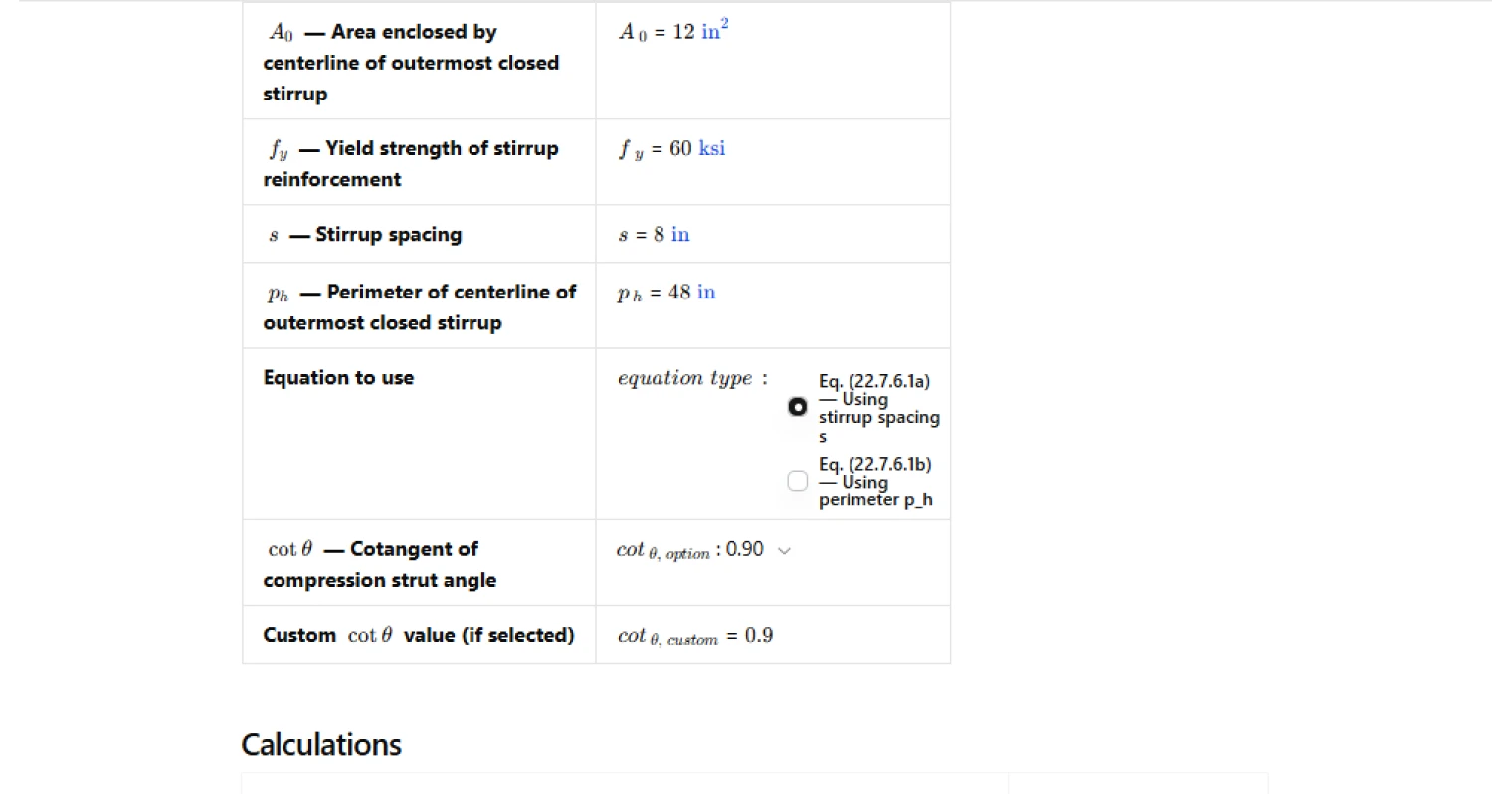
The calculator is driven by the closed-stirrup “tube” definition used in the space truss analogy:
- (A_0): area enclosed by the centerline of the outermost closed stirrup.
- (f_y): yield strength of stirrup reinforcement (used as the transverse torsion reinforcement strength term in the space truss relationship).
- (s): closed stirrup spacing along the member.
- (p_h): perimeter of the centerline of the outermost closed stirrup.
- Equation selector: choose between the spacing-based form (Eq. 22.7.6.1a) and the perimeter-based form (Eq. 22.7.6.1b).
- (\cot\theta): selected from permitted values or entered as a custom value; (\theta) is derived from (\cot\theta).
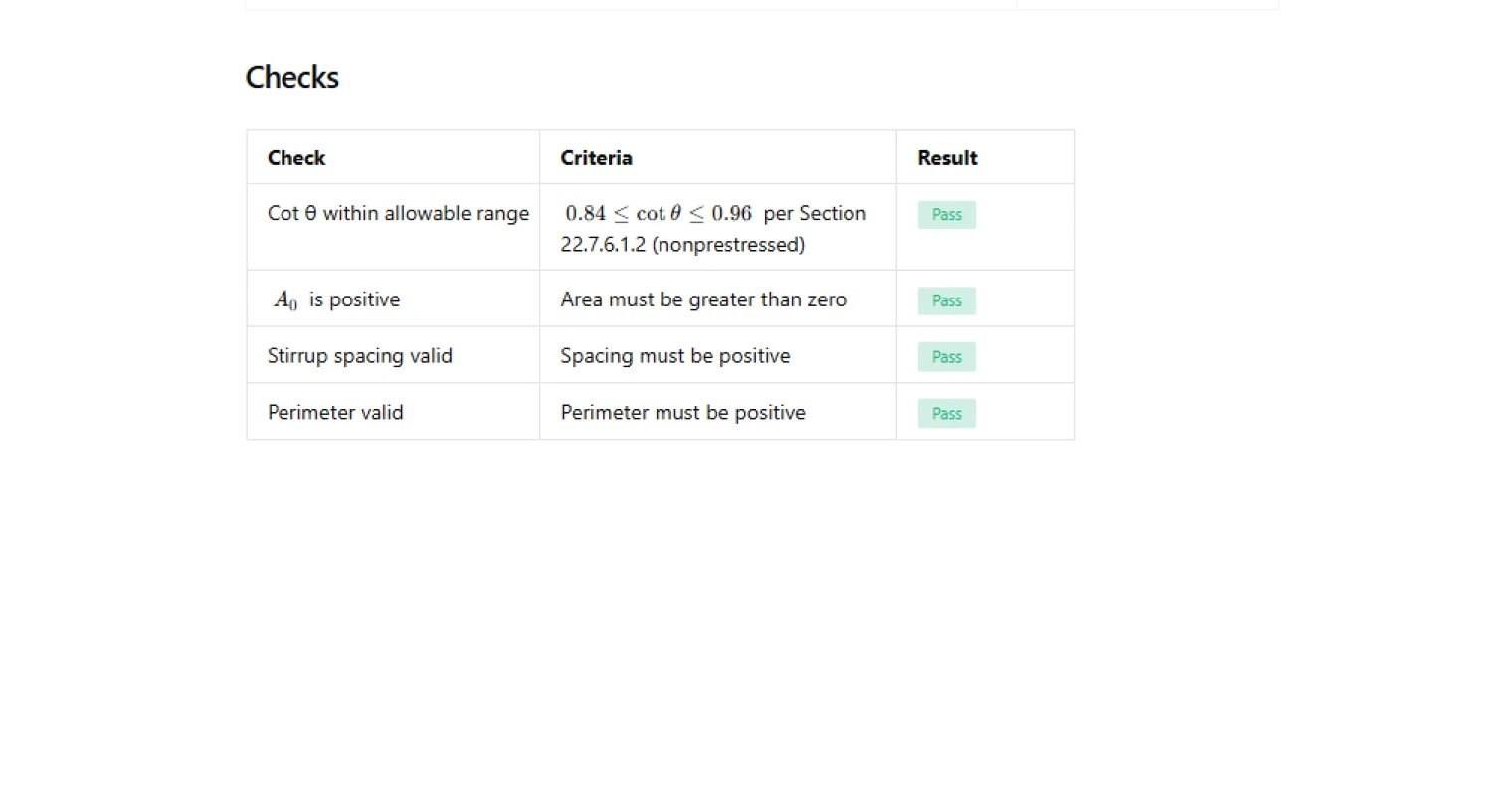
The page includes basic validity checks on the geometric and spacing/perimeter inputs to prevent non-physical torsional strength outputs.
Compression strut angle selection
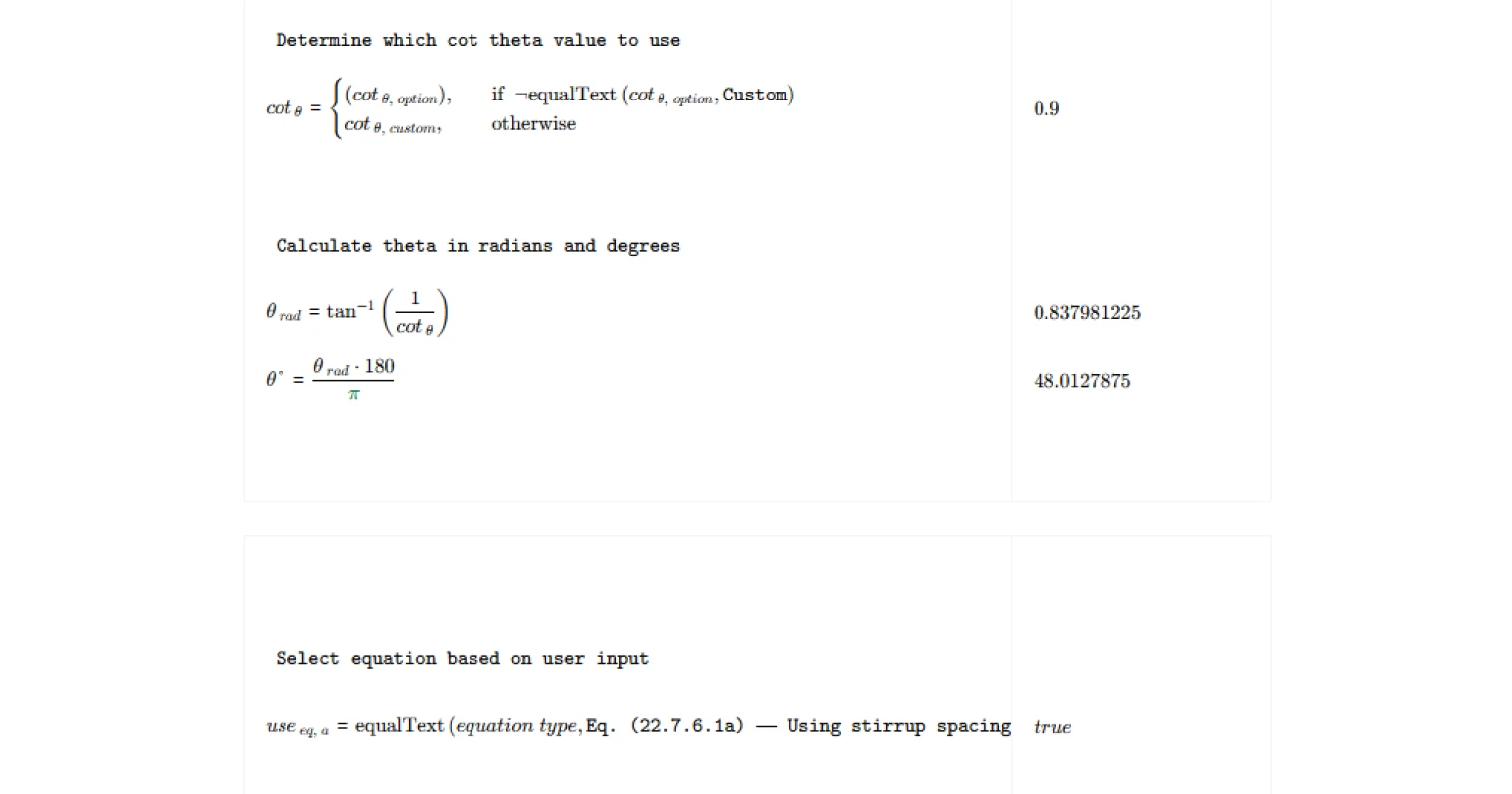
The compression strut angle (\theta) is represented via (\cot\theta). The calculator:
- Selects (\cot\theta) from a dropdown (or uses a custom value when specified).
- Computes (\theta) from (\theta = \arctan(1/\cot\theta)), and reports (\theta) in degrees for interpretation.
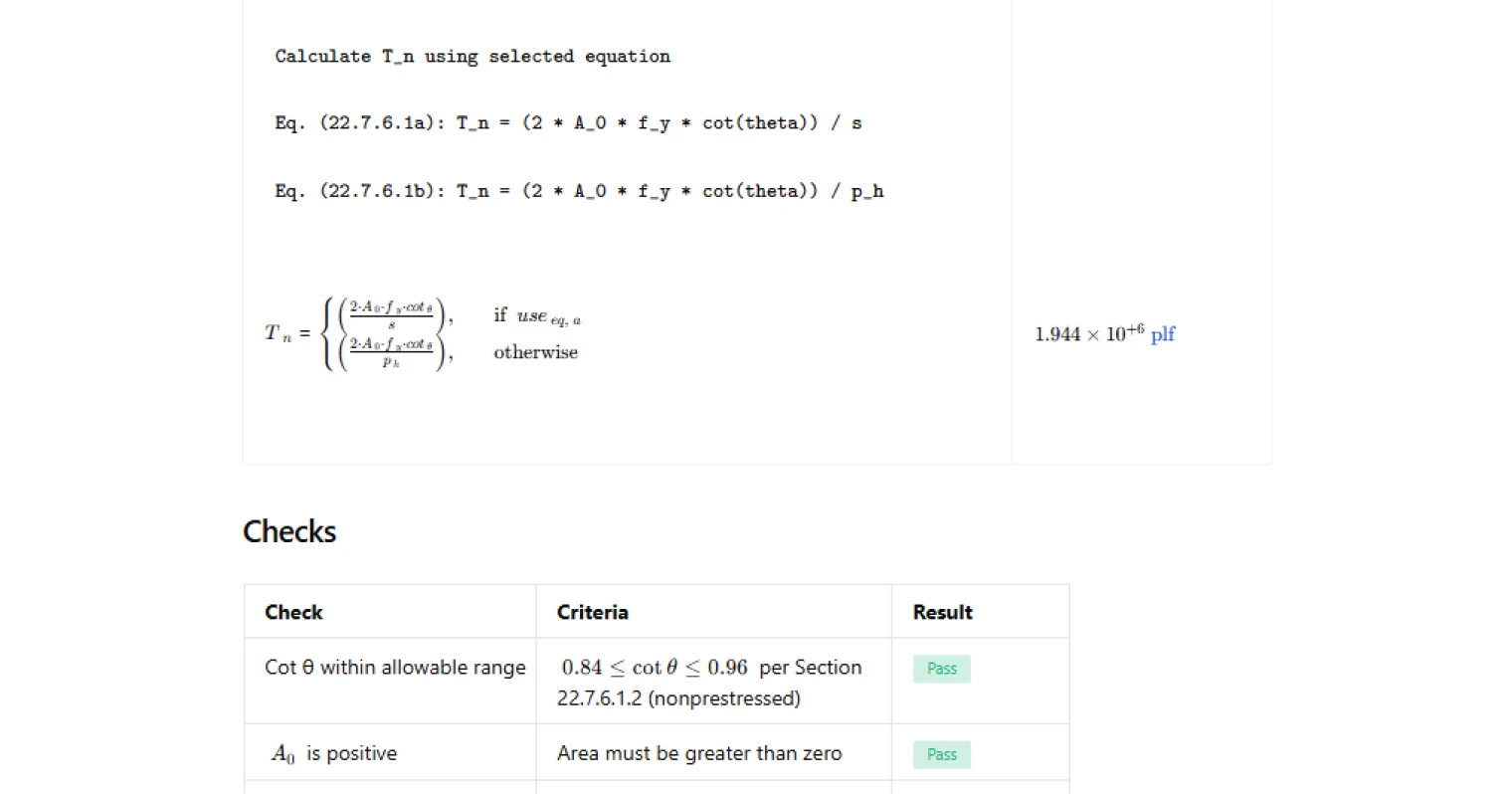
A range check is included to flag when (\cot\theta) is outside the permitted bounds referenced on the page for nonprestressed members. This helps prevent unconservative capacity from an overly favorable strut angle assumption.
Nominal torsional strength calculation
The page computes (T_n) using one of two ACI expressions, selected explicitly by the user:
- Eq. (22.7.6.1a) uses stirrup spacing (s): capacity scales with the closed-stirrup area (A_0), transverse steel strength (f_y), and (\cot\theta), and is inversely proportional to (s).
- Eq. (22.7.6.1b) uses the closed-stirrup perimeter (p_h): capacity uses the same numerator terms but replaces the spacing denominator with (p_h).
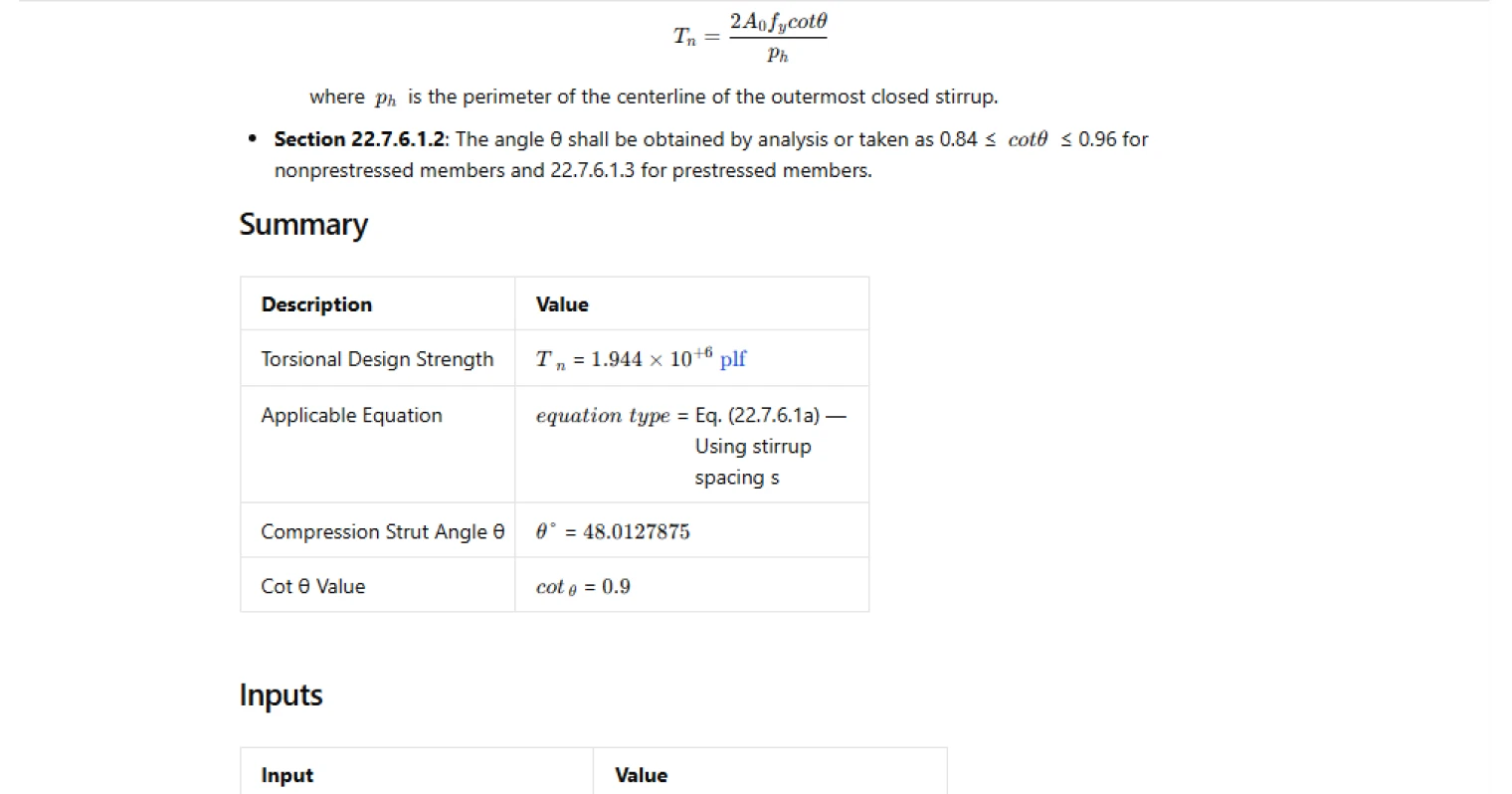
The chosen equation is displayed in the summary so downstream design checks and report reviewers can confirm which form governed the reported (T_n).
Outputs and reporting
The calculator reports:
- (T_n) as the nominal torsional strength.
- The selected “Applicable Equation” label (Eq. 22.7.6.1a or Eq. 22.7.6.1b).
- (\theta) and (\cot\theta) used in the computation.
These outputs are structured so you can drop them directly into a torsion design workflow (capacity checks, reinforcement iteration, and design documentation) while keeping the underlying assumptions visible.
Common Calculation Errors to Avoid
- Using the wrong (A_0) definition — (A_0) must be based on the centerline of the outermost closed stirrup; using gross section area or an outside-to-outside dimension will misstate torsional capacity.
- Mixing up (s) and (p_h) in the denominator — ensure the equation selection matches the denominator variable you intend to use; swapping them changes the scaling and can produce inconsistent results.
- Unconservative (\cot\theta) selection — selecting a (\cot\theta) outside the permitted range (or using a custom value without justification) can inflate (T_n); treat the range check as a hard gate unless you have a defensible basis.
- Inconsistent reinforcement strength parameter — use the correct steel strength term for the reinforcement represented in the equation; do not substitute unrelated material strengths.
- Non-physical geometry inputs — zero or negative (A_0), (s), or (p_h) indicate a definition or units issue; fix geometry and units before relying on the output.
- Unit handling mistakes — (A_0), (s), and (p_h) must be in compatible length units with (f_y) to return a torsion unit; inconsistent unit systems can silently skew the result.
Engineering templates
Common calculators
Design guides




FAQs
What is the space truss analogy used in ACI 318-19 Section 22.7.6?
The space truss model idealizes a torsionally loaded concrete member as a hollow tube with diagonal concrete compression struts, transverse stirrups acting as tension ties, and longitudinal reinforcement resisting the net axial force. Once torsional cracking occurs, the concrete core contributes little, so resistance comes entirely from this truss action. The model underpins both equations in Section 22.7.6.1 and governs how stirrup area, spacing, and strut angle combine to set nominal torsional strength Tn.
What is the difference between Equation 22.7.6.1a and 22.7.6.1b, and which should I use?
Both equations calculate the same nominal torsional strength Tn but are expressed in terms of different reinforcement parameters. Eq. (22.7.6.1a) uses the stirrup area At and spacing s, making it the natural choice when you are designing or checking transverse reinforcement. Eq. (22.7.6.1b) uses the longitudinal reinforcement area Al and perimeter ph, and is used when checking the longitudinal steel demand. In this template, select the equation that matches the reinforcement parameter you are solving for or verifying.
What value of cot θ should I use for a nonprestressed member?
ACI 318-19 Section 22.7.6.1.2 permits cot θ to be determined by analysis or taken directly within the range 0.84 ≤ cot θ ≤ 0.96 for nonprestressed members. A value of 0.90, corresponding to θ ≈ 48°, is the common default and is pre-selected in this template. Using a higher cot θ increases Tn but also increases the longitudinal steel demand, so check both effects. For prestressed members, refer to Section 22.7.6.1.3 for the adjusted expression.
How do I determine A₀ and pₕ from my section geometry?
A₀ is the area enclosed by the centreline of the outermost closed stirrup, not the gross section area. For a rectangular section with stirrups of leg dimensions x₀ and y₀ measured to the stirrup centreline, A₀ = x₀ × y₀ and pₕ = 2(x₀ + y₀). ACI 318-19 Section 22.7.6.1.1 also permits A₀ to be taken as 0.85·Aoh, where Aoh is the area enclosed by the centreline of the outermost stirrup. Enter the final computed value directly into this template.
Does this template check whether torsion can be neglected or whether threshold and maximum limits are satisfied?
No. This template calculates nominal torsional strength Tn from the space truss model only. Before using it, you should have already confirmed that torsion exceeds the threshold in Section 22.7.4 and therefore must be designed for, and separately verified that the section size is adequate against the combined shear-torsion limit in Section 22.7.7. Apply the strength reduction factor φ = 0.75 outside this template to obtain the design torsional strength φTn for comparison against factored demand Tu.
The cot θ range check is failing for my custom value — what should I do?
The check flags any cot θ outside 0.84 to 0.96 because that is the code-permitted range for nonprestressed members per Section 22.7.6.1.2. If you are designing a prestressed member, the applicable cot θ expression differs and may fall outside this range legitimately — note that the check is written for nonprestressed members only. If you are working with a nonprestressed member and have entered a custom value outside the range, revise it to stay within 0.84 to 0.96 to remain code-compliant.
Learn about the benefits of using CalcTree on engineering projects!