
Calculate ACI 318-19 threshold torsion Tth (22.7.4.1) for solid & hollow sections—all 3 member cases covered. Try the free template now.

Tell us what you need, or sign up and build it yourself in minutes.
Leave your email and we'll tell you when a template for it is ready:
No items found.
No items found.
About this ACI 318 Threshold Torsion Calculator
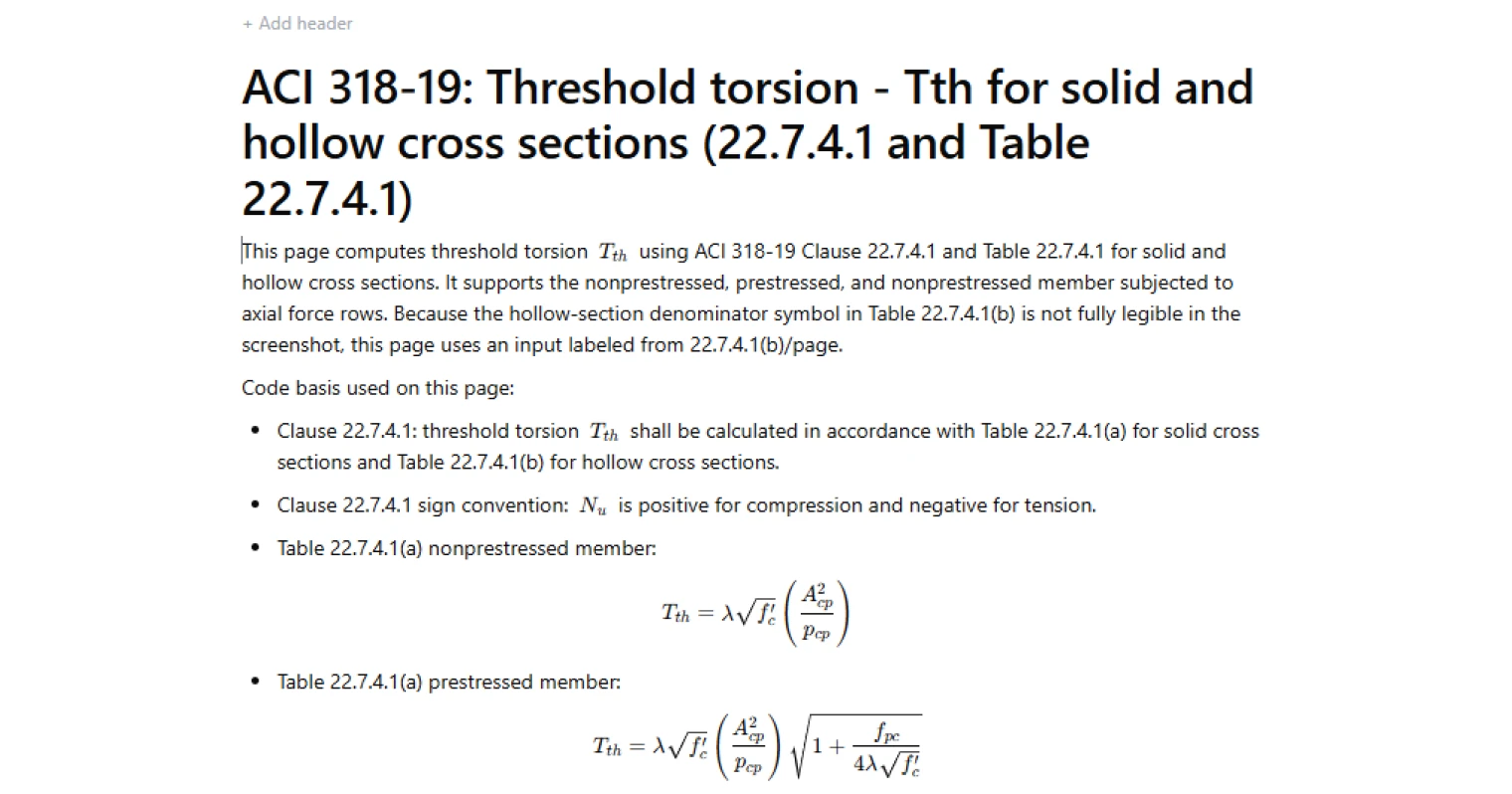
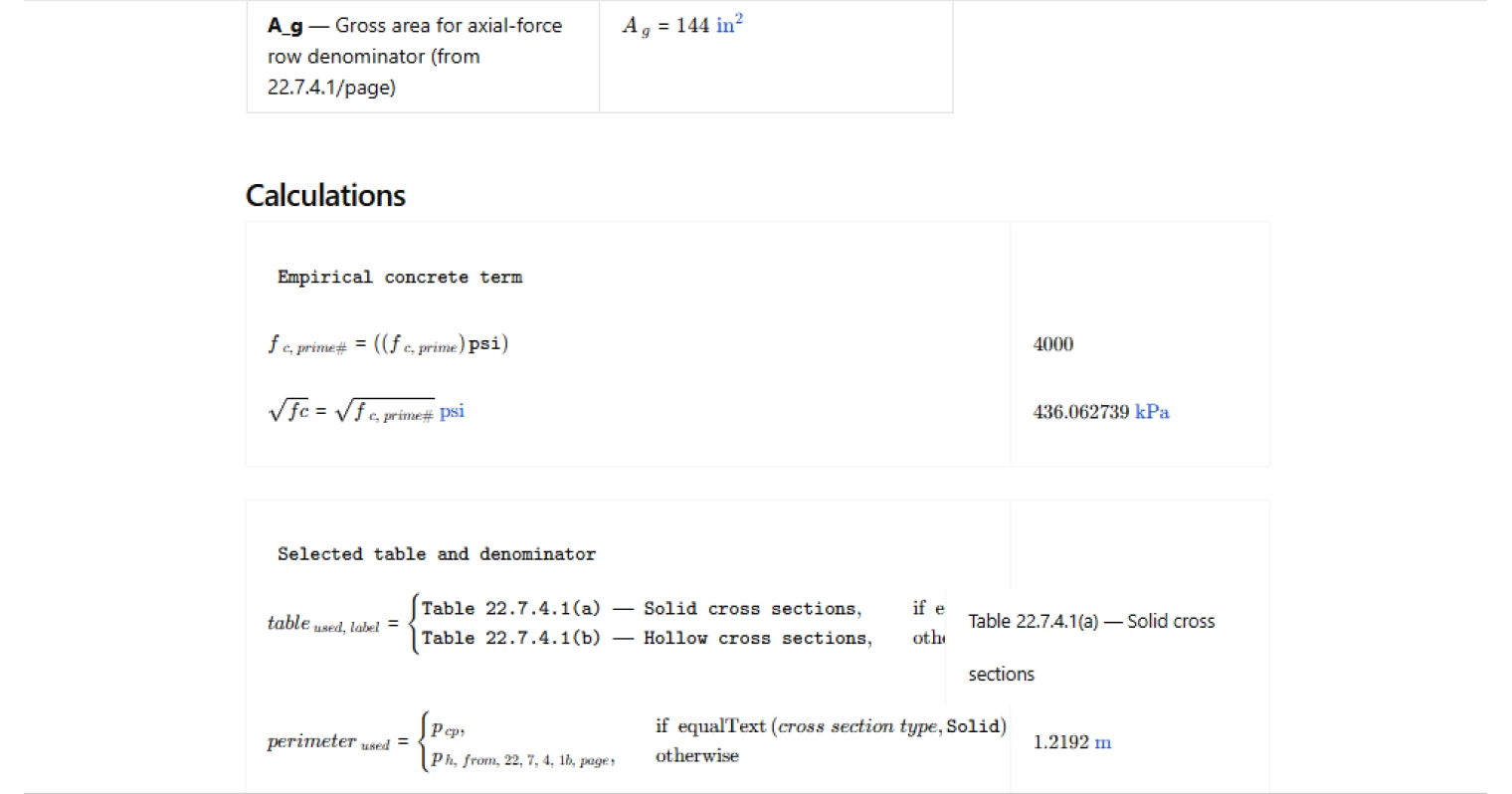
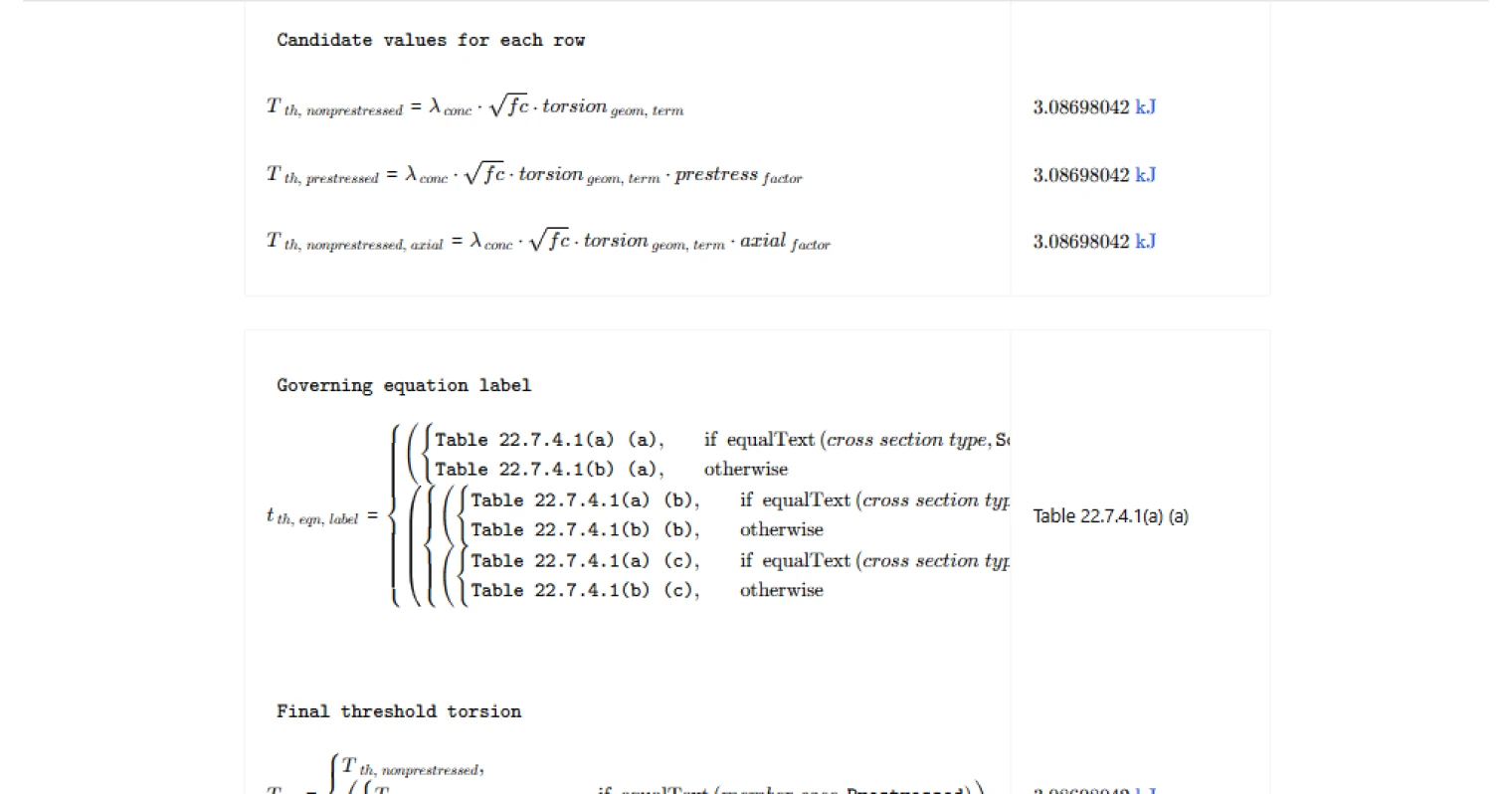
This calculator computes the ACI 318-19 threshold torsion, (T_{th}), per Clause 22.7.4.1 using Table 22.7.4.1 for either solid or hollow cross sections. It supports the three table rows (nonprestressed, prestressed, and nonprestressed with axial force) and reports the governing equation label, intermediate factors, and an overall domain/applicability check.
- Structural engineer — decide whether torsional design and detailing is triggered by comparing demand (T_u) to (T_{th}), while keeping section geometry terms explicit for audit.
- Concrete detailer — understand which member-case row is being used and what inputs control the threshold before detailing closed ties and longitudinal torsion steel.
- Design checker — verify that the correct table (solid vs hollow) and the correct modifier (prestress or axial force) were applied, with guard checks on square-root domains.
This is an engineering-grade calculator on CalcTree: it preserves traceability by exposing the selected table, governing row label, intermediate terms (including (\sqrt{f'_c}) and the geometric term), and pass/fail checks that flag invalid domains.
More info on ACI 318 Threshold Torsion
Scope and method
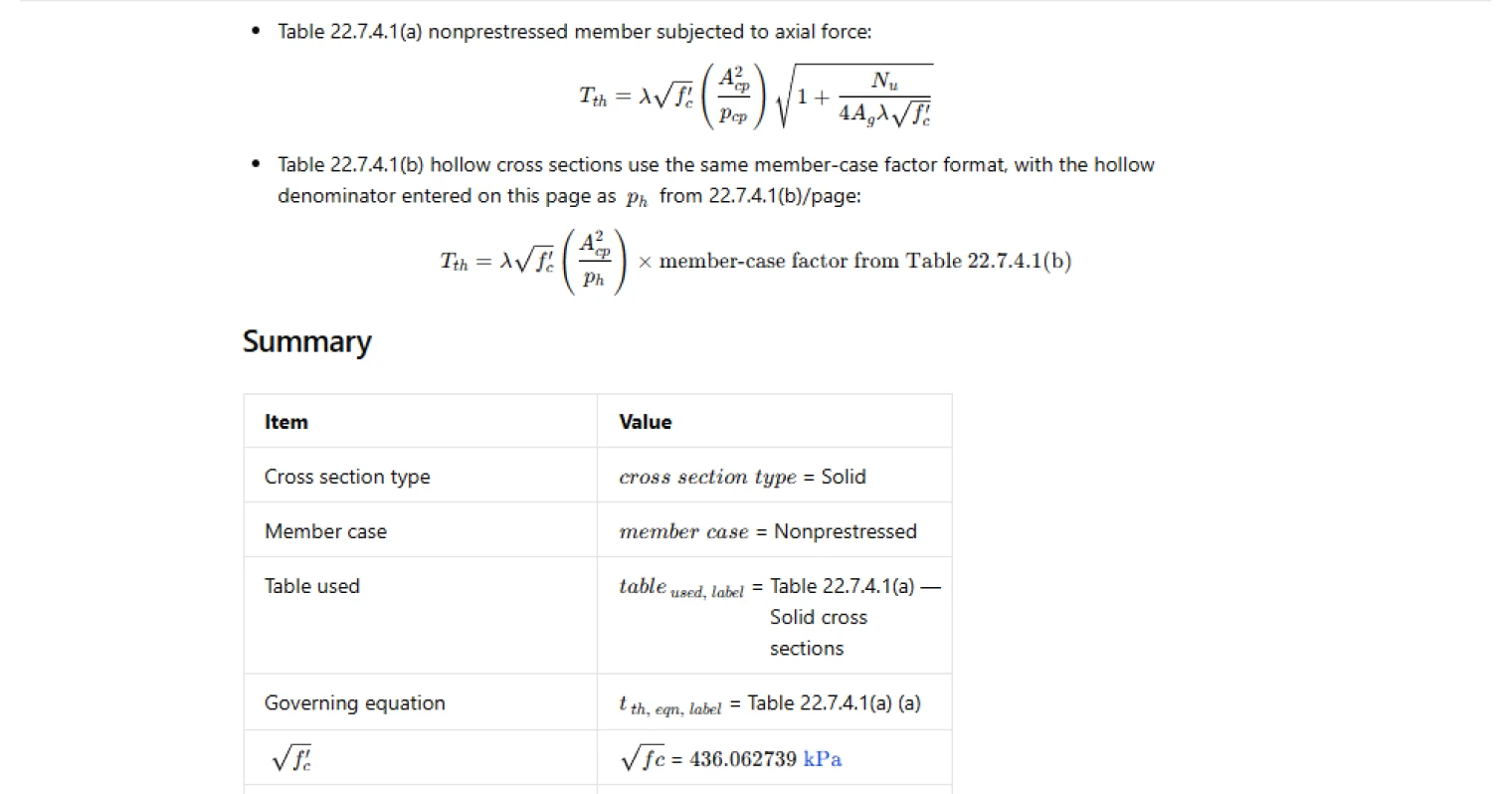
The page follows ACI 318-19 Clause 22.7.4.1, which requires (T_{th}) to be calculated from Table 22.7.4.1(a) for solid cross sections and Table 22.7.4.1(b) for hollow cross sections. The axial-force sign convention is implemented as stated: (N_u) is positive in compression and negative in tension, and it only affects the axial-force row via the table’s square-root modifier.
Inputs and section geometry
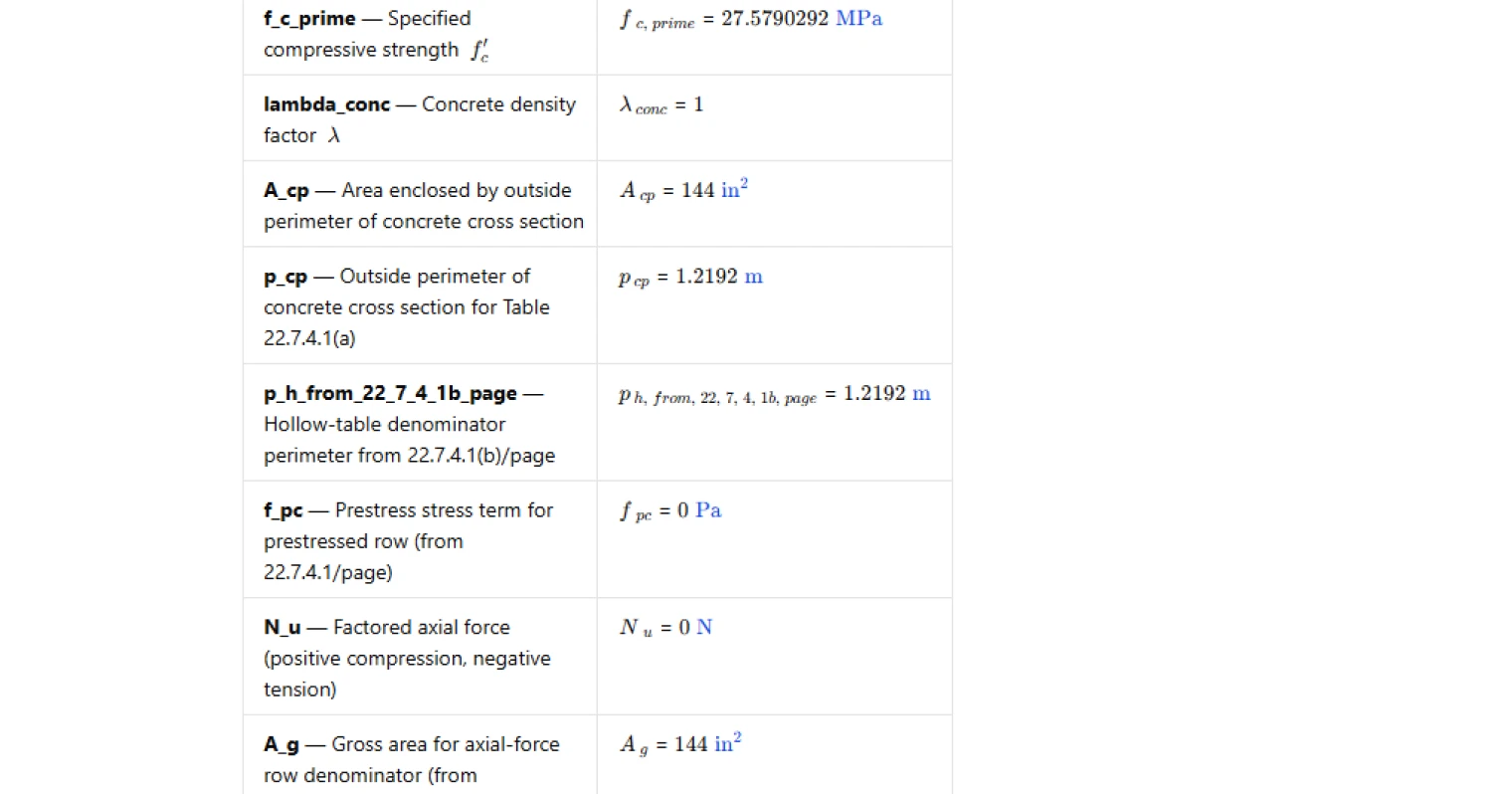
Inputs cover concrete strength and density factor, plus the section geometry used by the table:
- Concrete terms: specified compressive strength (f'_c) and density factor (\lambda).
- Section geometry: (A_{cp}) (area enclosed by the outside perimeter) and a perimeter denominator. For solid sections the perimeter is taken as (p_{cp}).
- Additional row-only terms: (f_{pc}) for the prestressed row, and (N_u) with (A_g) for the axial-force row.
For hollow sections, the table’s denominator symbol in the screenshot is treated as an explicit input (p_h) (entered as <code>p_h_from_22_7_4_1b_page</code>) so the geometric term can still be formed consistently as (\left(A_{cp}^2 / p\right)) using the selected perimeter.
Member-case modifiers
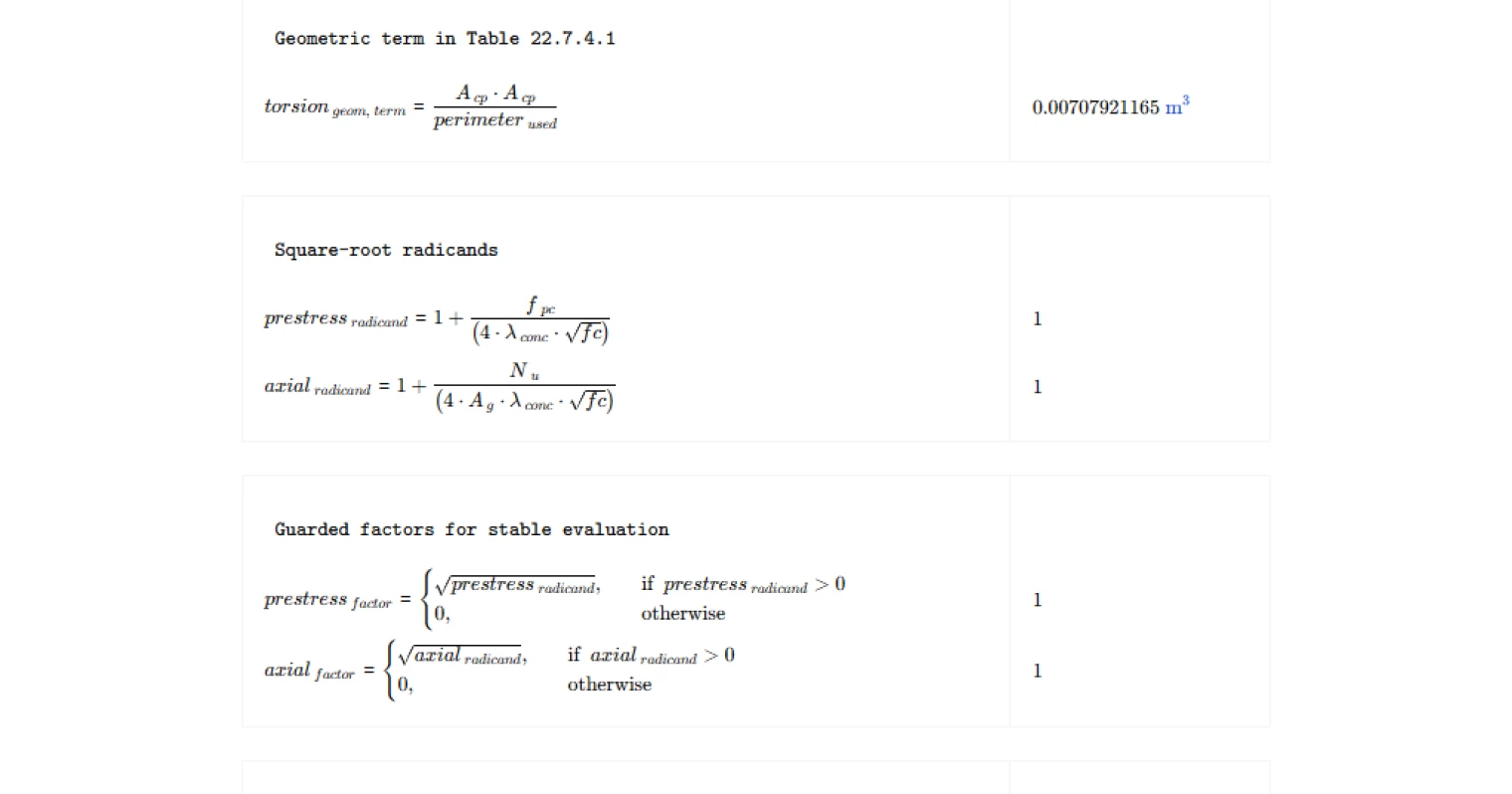
The calculator constructs the base term (\lambda\sqrt{f'<em>c}\left(A</em>{cp}^2/p\right)), then applies a row-specific square-root modifier:
- Prestressed row: a square-root factor based on (f_{pc}) and (\lambda\sqrt{f'_c}).
- Axial-force row: a square-root factor based on (N_u), (A_g), and (\lambda\sqrt{f'_c}).
To keep evaluation stable and to prevent invalid results, the page explicitly checks that each radicand is positive when its corresponding row is selected.
Outputs and checks
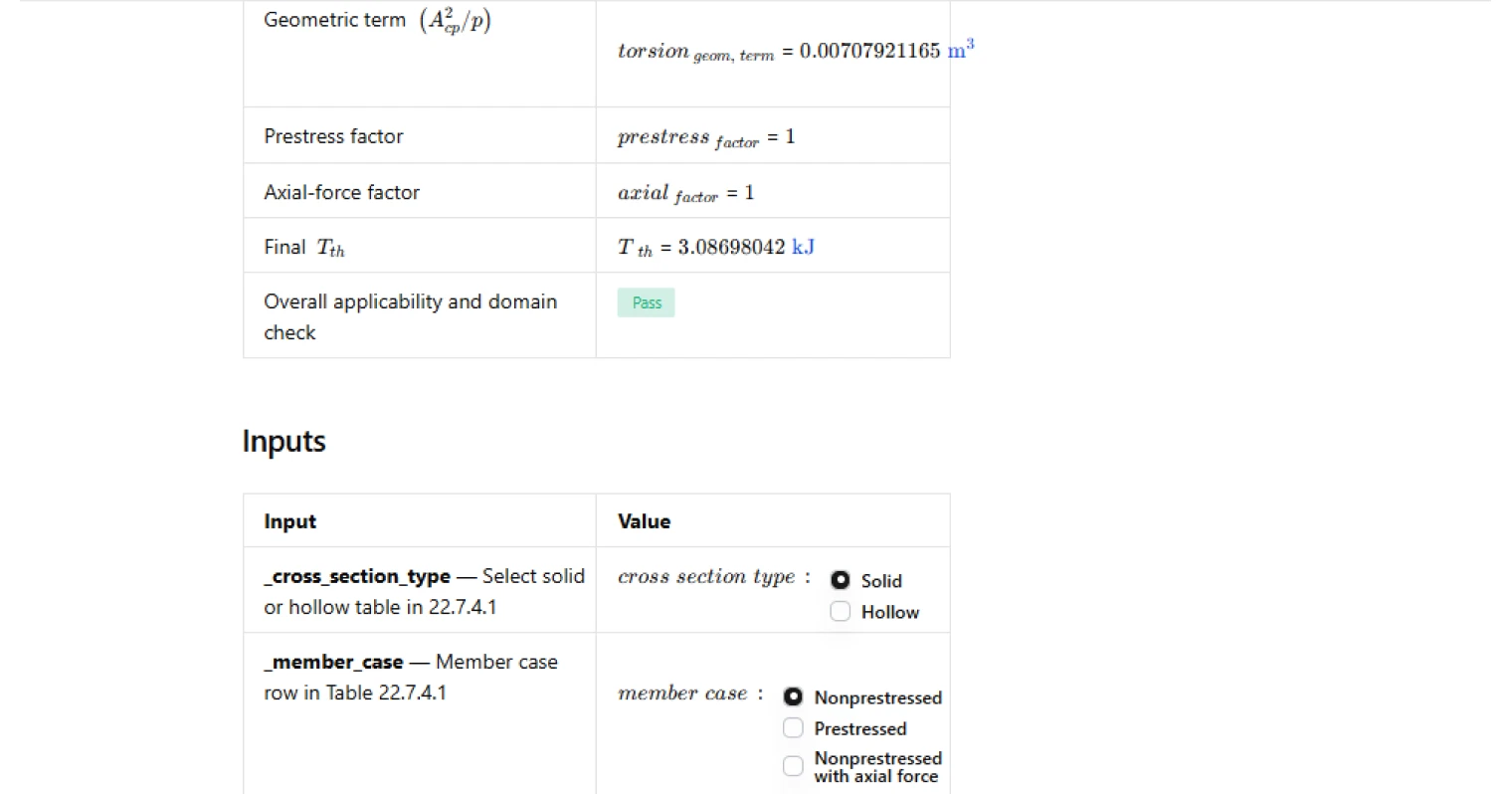
Reported outputs include:
- The selected table label (solid vs hollow) and governing equation label (table and row).
- (\sqrt{f'<em>c}), the geometric term (\left(A</em>{cp}^2/p\right)), and the prestress/axial factors (as applicable).
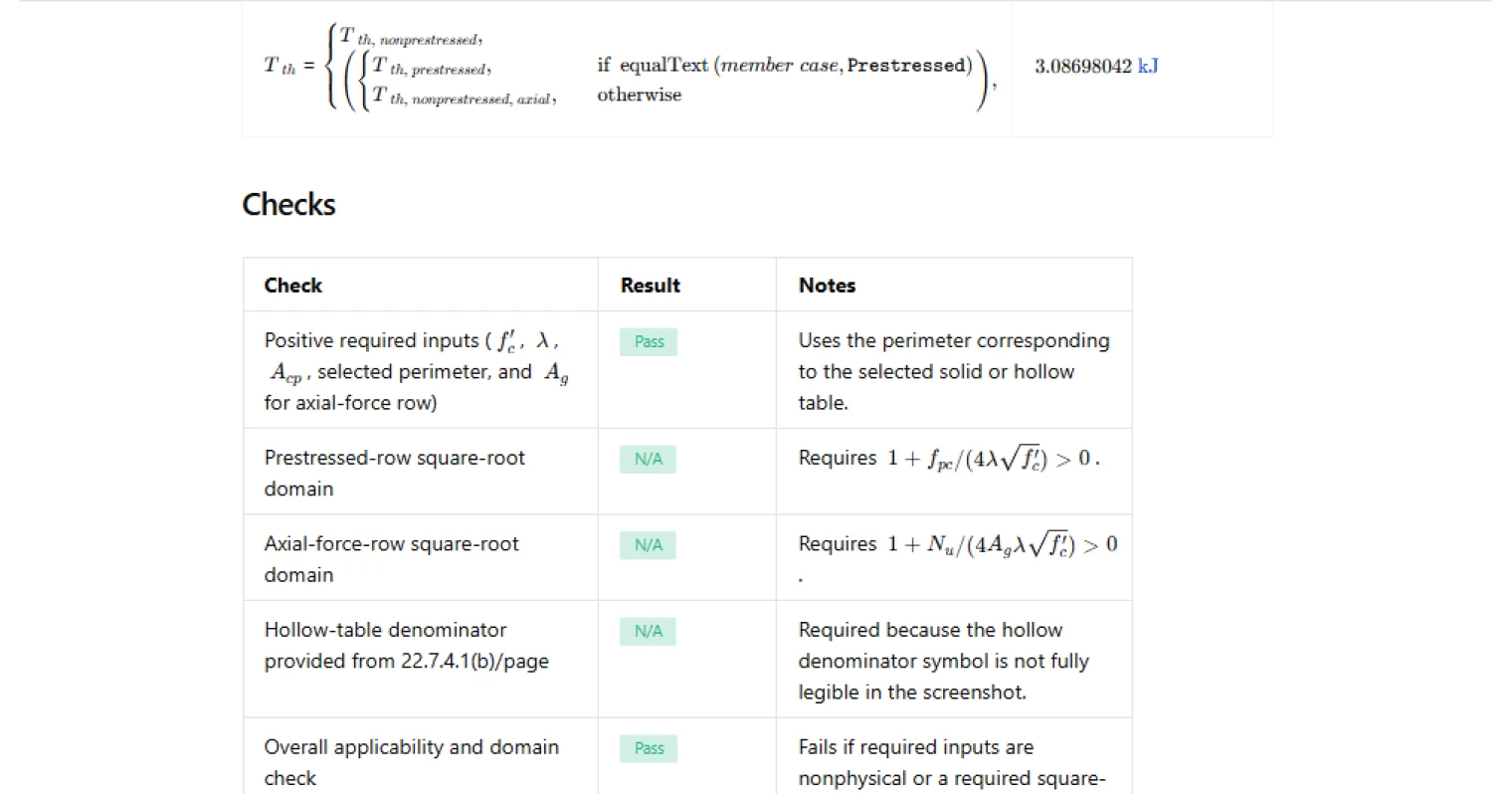
- Final (T_{th}).
Checks include:
- Required input positivity (including the selected perimeter and (A_g) when the axial-force row is selected).
- Square-root domain checks for the prestress and axial-force radicands when those rows are active.
- A dedicated hollow-denominator check when the hollow table is selected.
- An overall pass/fail that aggregates the required input and domain conditions.
Common Calculation Errors to Avoid
- Using the wrong perimeter denominator — for solid sections the denominator is the outside perimeter used for Table 22.7.4.1(a), while hollow sections use the Table 22.7.4.1(b) denominator; mixing these changes the geometric term directly.
- Confusing (A_{cp}) with other torsion areas — (A_{cp}) is the area enclosed by the outside perimeter of the concrete cross section, not an effective core area or a thin-walled area substitute.
- Ignoring the axial-force sign convention — (N_u) is positive in compression and negative in tension; using the wrong sign can push the axial radicand toward an invalid domain or inflate the modifier incorrectly.
- Applying prestress or axial modifiers to the wrong member case — the square-root factors only apply to their respective table rows; ensure the selected member case matches the design scenario.
- Not checking square-root domains — if the prestress or axial radicand is not positive, the table expression is outside the calculator’s valid domain and should be corrected at the input/model level.
- Inconsistent units across inputs — (f'_c), perimeters, and areas must be consistent so the geometric term and (\lambda\sqrt{f'_c}) combine into torsion units without hidden scaling errors.
Engineering templates
Common calculators
Design guides




FAQs
What is threshold torsion and why does it matter in ACI 318-19?
Threshold torsion Tth is the factored torsional moment below which torsion effects can be neglected in design per ACI 318-19 Clause 22.7.4.1. If the applied factored torsion Tu is less than or equal to φTth, torsional reinforcement is not required. It sets a practical lower bound so that minor incidental torsion does not drive reinforcement design. For solid sections the formula uses Acp and pcp; for hollow sections a separate denominator perimeter applies per Table 22.7.4.1(b).
What is the difference between solid and hollow cross section inputs in this calculation?
For solid sections the geometric term Acp²/pcp uses the outside perimeter pcp directly from Clause 22.7.4.1 and Table 22.7.4.1(a). For hollow sections the denominator perimeter comes from Table 22.7.4.1(b), which has a different symbol that is not fully legible in the code screenshot. This calculator therefore uses a separate input labeled p_h_from_22_7_4_1b_page so you can enter the correct hollow-section denominator explicitly. Select hollow in the cross section type toggle and enter that perimeter to get the Table 22.7.4.1(b) result.
How do I handle a nonprestressed member under net axial tension?
Select the "Nonprestressed with axial force" member case and enter Nu as a negative value, since ACI 318-19 treats compression as positive and tension as negative. The calculator then evaluates the radicand 1 + Nu/(4Ag·λ·√f'c). If net tension is large enough to make this radicand zero or negative, the axial-force-row domain check will flag a Fail, indicating Tth cannot be computed with valid inputs under those conditions and the section warrants further review.
What does the lambda (λ) input represent and what value should I use?
Lambda is the concrete density modification factor from ACI 318-19. Use λ = 1.0 for normalweight concrete, λ = 0.85 for sand-lightweight concrete, and λ = 0.75 for all-lightweight concrete unless a more precise value is determined by test per ACI 318-19 Section 19.2.4. It scales the √f'c term in all three member-case equations.
Why does the calculation show separate prestress and axial-force factors in the summary?
The summary table breaks out the prestress factor (√(1 + fpc/(4λ√f'c))) and the axial-force factor (√(1 + Nu/(4Ag·λ√f'c))) as intermediate outputs so you can quickly verify each square-root term before it multiplies into Tth. Only the factor corresponding to your selected member case affects the final result; the other factor is computed but not applied. This layout also makes it straightforward to spot domain issues before they propagate to the final answer.
What triggers a Fail on the overall applicability check?
The overall check fails if any of the following conditions occur: f'c, λ, Acp, or the active perimeter input is zero or negative; Ag is zero or negative when the axial-force row is selected; the prestress radicand is not positive when the prestressed row is selected; or the axial-force radicand is not positive when the axial-force row is selected. Individual sub-checks identify which condition caused the failure so you can correct the specific input without hunting through the full set.
Learn about the benefits of using CalcTree on engineering projects!