
Calculate ACI 318-19 beam-column joint shear strength: get Vn, Aj, and Vu≤φVn checks instantly. Try this free CalcTree template now.

Tell us what you need, or sign up and build it yourself in minutes.
Leave your email and we'll tell you when a template for it is ready:
No items found.
No items found.
About this ACI 318 Beam-Column Joint Shear Strength Calculator
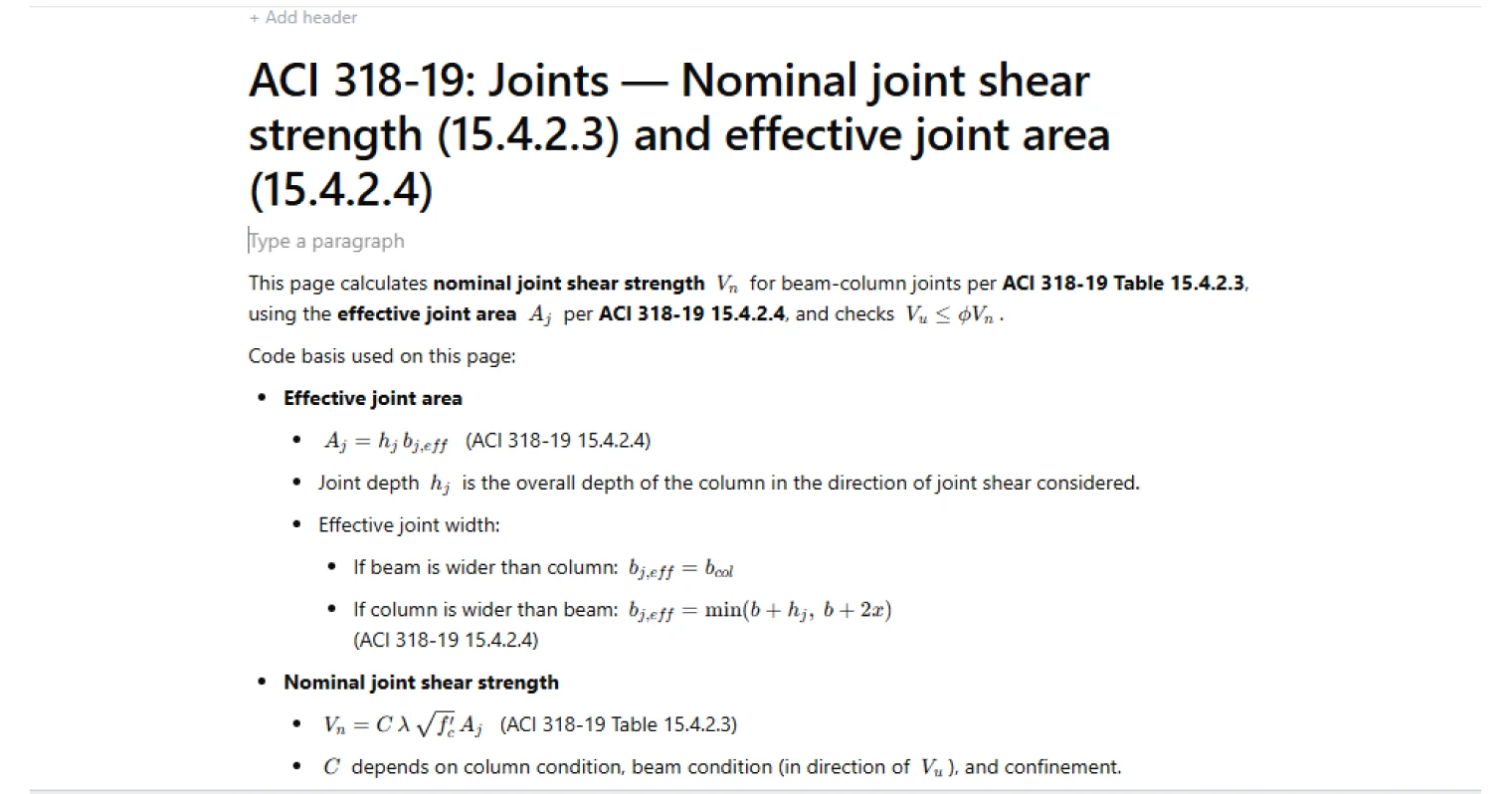
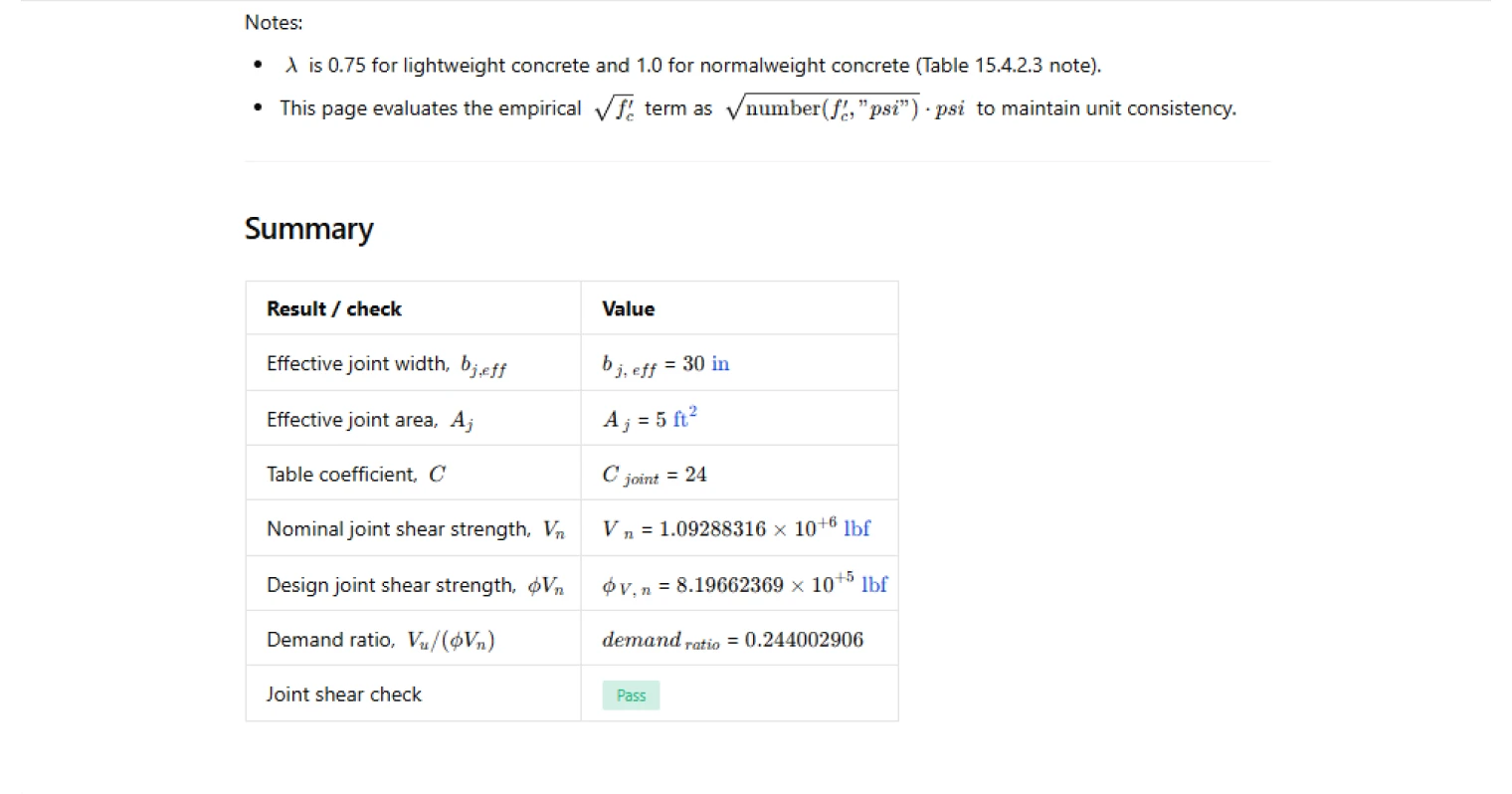
This calculator checks beam-column joint shear capacity using ACI 318-19 Table 15.4.2.3. It computes the effective joint area (A_j) per ACI 318-19 15.4.2.4, calculates the nominal joint shear strength (V_n), and verifies the design inequality (V_u \le \phi V_n).
- Structural engineer — verify joint shear adequacy for a frame joint by selecting the applicable continuity/confinement conditions and confirming the resulting (V_u/(\phi V_n)) demand ratio.
- Detailer / reinforcement designer — sanity-check whether the selected confinement condition and joint geometry are consistent with the assumed joint shear coefficient (C) used in the capacity.
- Peer reviewer — audit the joint-width and table-lookup logic (effective width limits, continuity flags, confinement flags) and confirm the code path matches the intended joint classification.
This is an engineering-grade calculator on CalcTree: inputs, intermediate terms ((b_{j,eff}), (A_j), (C), (\sqrt{f'_c})) and the final pass/fail check are all exposed for traceability and review.
More info on ACI 318 Beam-Column Joint Shear Strength
Effective joint area and geometry assumptions
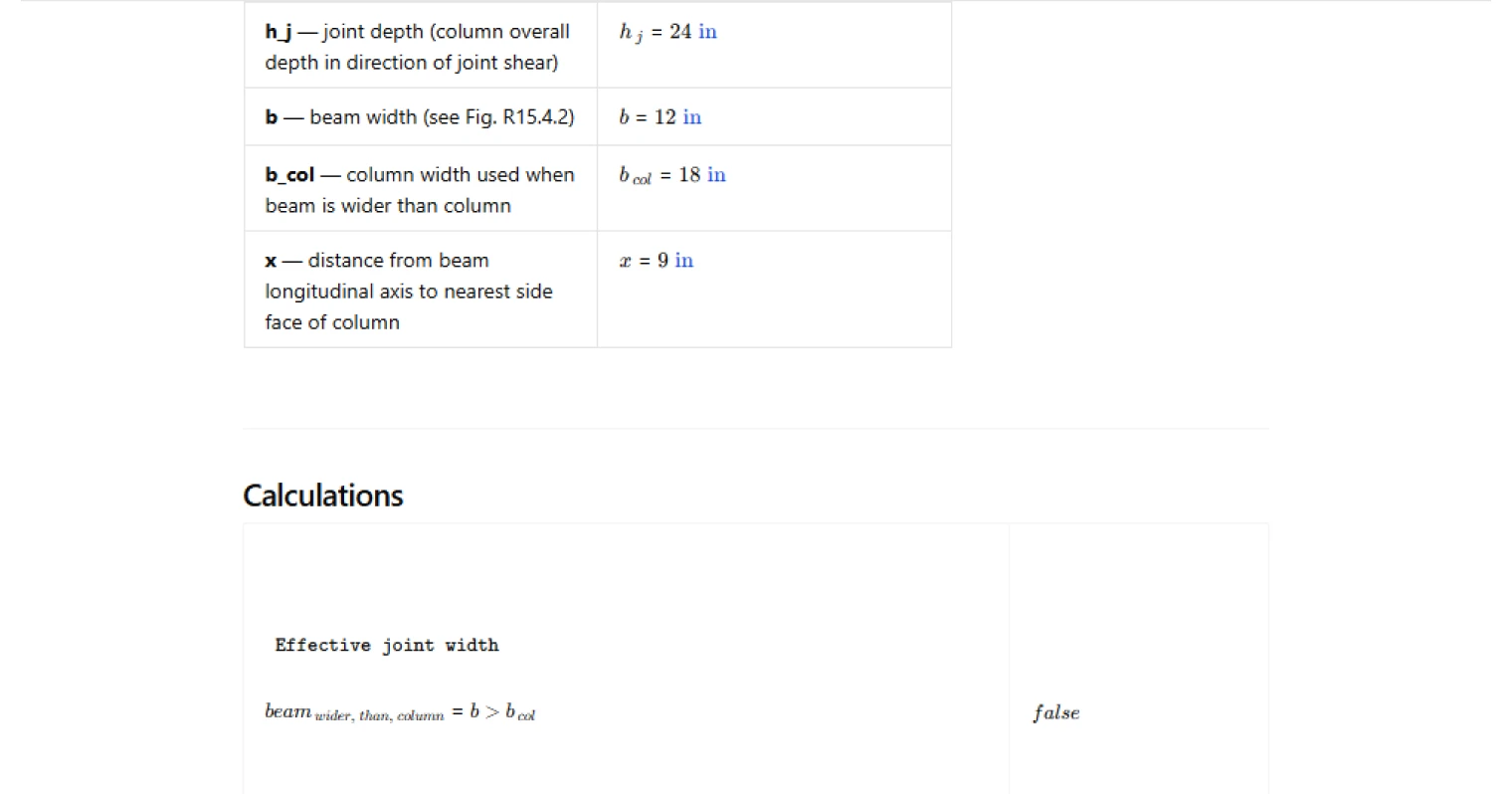
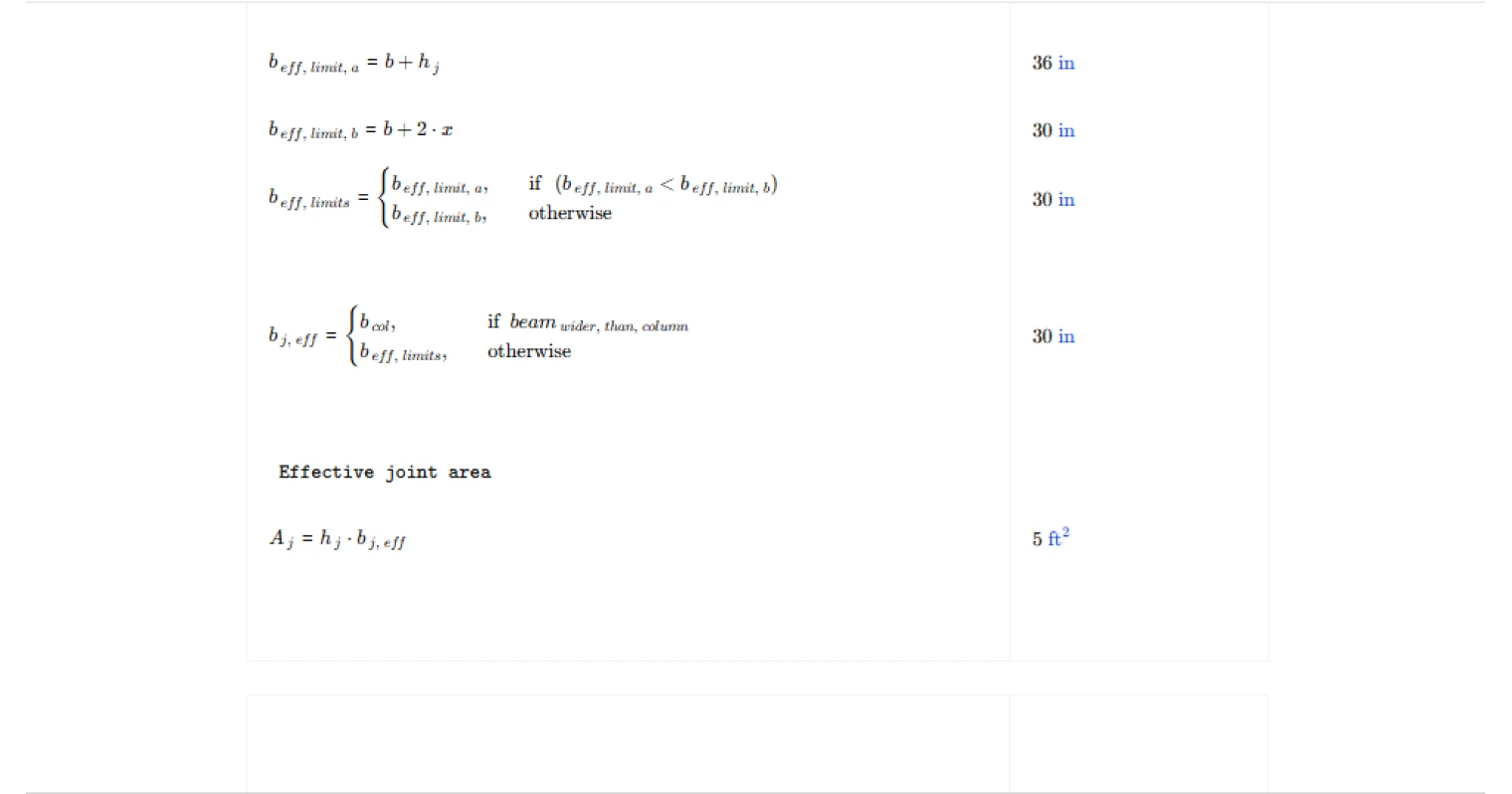
The effective joint area is taken as (A_j = h_j,b_{j,eff}) per ACI 318-19 15.4.2.4, where (h_j) is the overall column depth in the direction of the joint shear being checked. The effective joint width (b_{j,eff}) is determined from relative beam/column widths: if the beam is wider than the column, (b_{j,eff}) is limited to the column width; otherwise the width is bounded by a minimum of the two geometric limits (b + h_j) and (b + 2x). This captures the intent that the effective joint width cannot exceed what can be mobilized through the joint region geometry.
Table coefficient selection
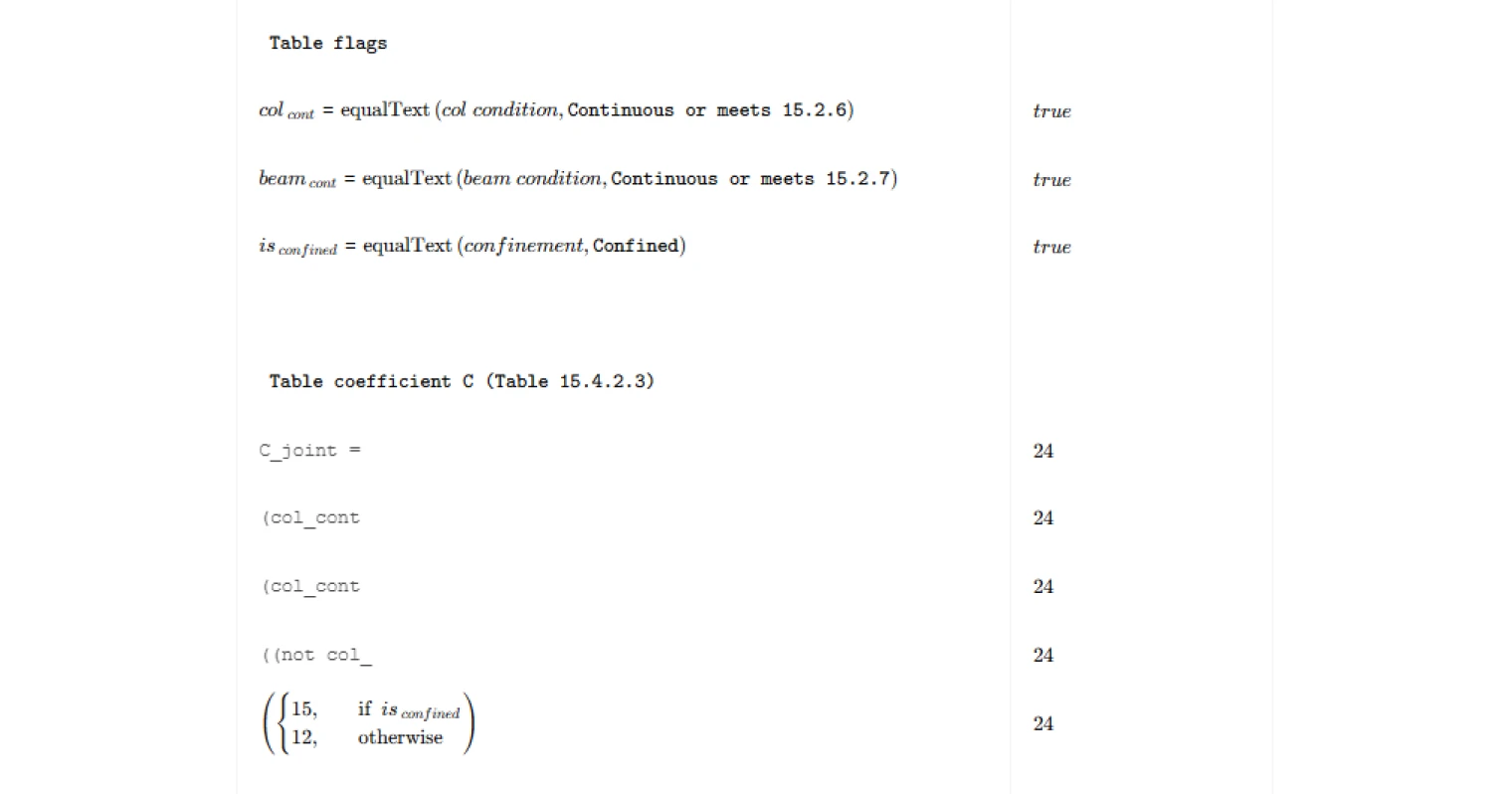
The nominal strength uses a tabulated coefficient (C) that depends on:
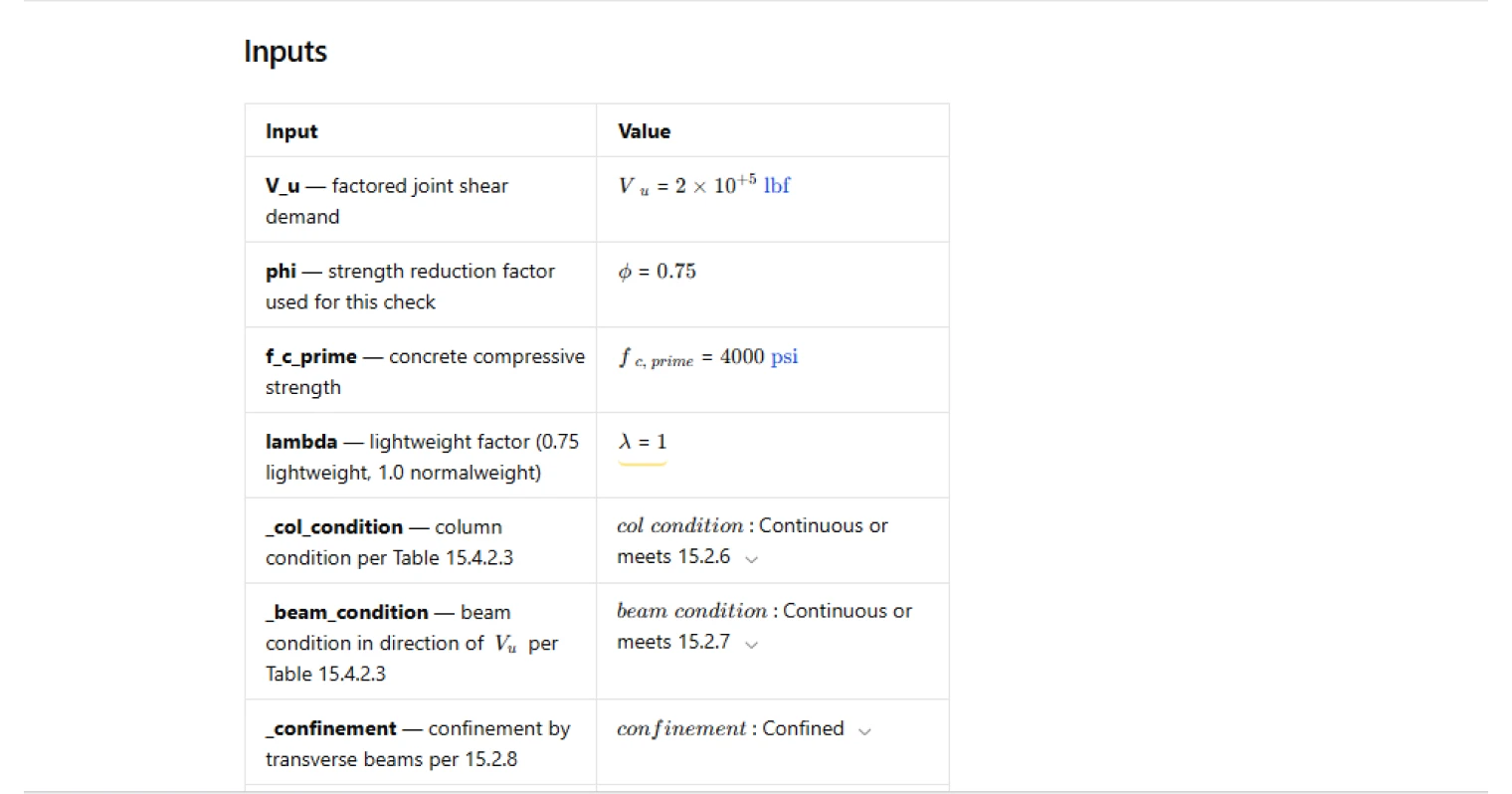
- column condition (continuous or meeting the referenced clause vs other),
- beam condition in the direction of (V_u) (continuous or meeting the referenced clause vs other),
- confinement condition (confined vs not confined).
The calculator implements this as a deterministic mapping from the three flags to a single (C) value, then uses that value directly in the strength equation. This makes it straightforward to review whether the selected joint classification matches detailing intent.
Strength equation, units handling, and design check
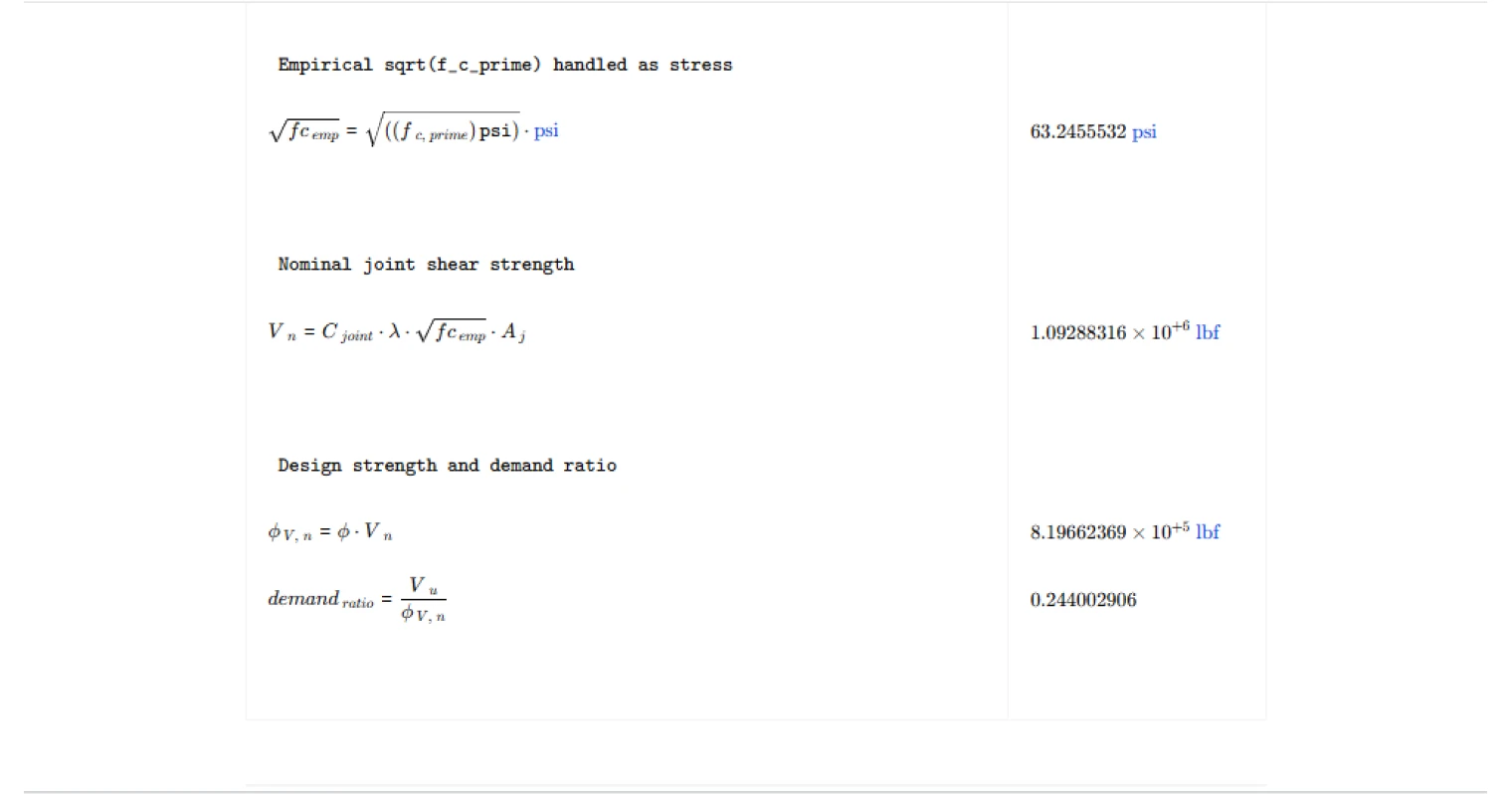
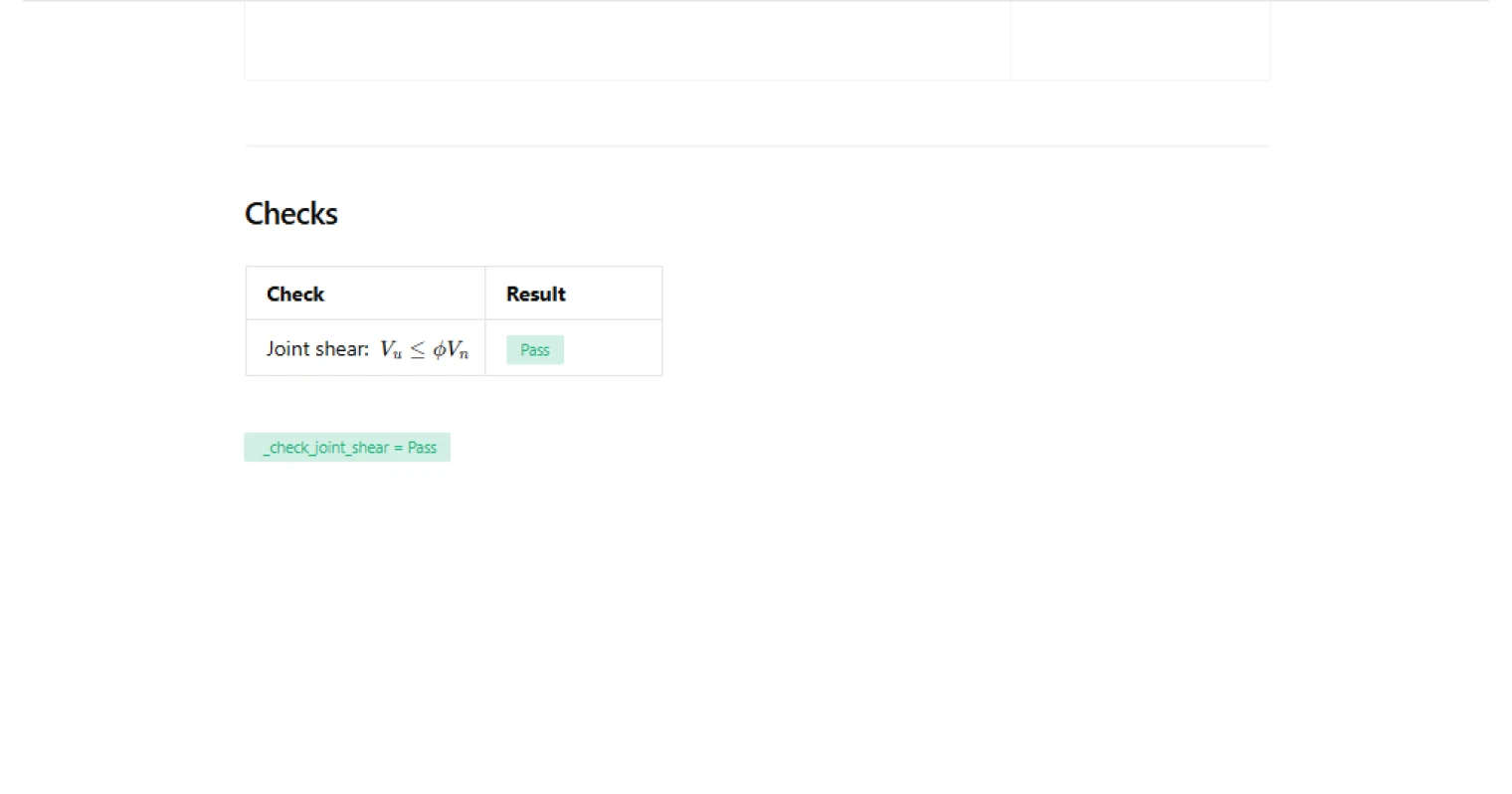
Nominal joint shear strength is computed as:[V_n = C,\lambda,\sqrt{f'_c},A_j]with (\lambda) taken as the lightweight modification factor per the note to Table 15.4.2.3. To maintain unit consistency for the empirical (\sqrt{f'_c}) term, the calculator evaluates (\sqrt{f'_c}) by extracting the numeric value in psi, taking the square root, and reapplying stress units before multiplying by area. The design check is then:[\phi V_n = \phi,V_n,\qquad \text{Demand ratio} = \frac{V_u}{\phi V_n},\qquad V_u \le \phi V_n]and a traffic-light output reports pass/fail based on whether the demand ratio exceeds unity.
Common Calculation Errors to Avoid
- Using the wrong joint classification — (C) is highly sensitive to continuity and confinement; confirm the selected column/beam condition and confinement actually match the detailing and the direction of the joint shear being checked.
- Checking the wrong direction of joint shear — (h_j) is the column depth in the direction of the joint shear considered; swapping axes can change (A_j) and capacity.
- Misapplying effective joint width limits — ensure the beam-vs-column width branch is correct, and that the limiting width uses (\min(b+h_j,\ b+2x)) only when the column is wider than the beam.
- Inconsistent units in the (\sqrt{f'_c}) term — the empirical square-root term must remain consistent with the stress unit system used for (f'_c) and the area used in (A_j).
- Incorrect (\phi) for the intended design context — the check is linear in (\phi); make sure the strength reduction factor matches the design provisions you are applying for this joint check.
- Mixing up demand definition for (V_u) — verify that the provided factored joint shear demand corresponds to the joint action intended by the code check and matches the direction used for the geometry inputs.
Engineering templates
Common calculators
Design guides




FAQs
What is nominal joint shear strength and why does ACI 318-19 check it?
Nominal joint shear strength Vn is the maximum horizontal shear force a beam-column joint can resist based on concrete alone, without relying on joint reinforcement for shear. ACI 318-19 Table 15.4.2.3 limits this to protect the joint core from diagonal tension failure, which can be brittle and difficult to inspect. The check ensures Vu ≤ φVn before the joint is considered adequate.
What controls the table coefficient C in Table 15.4.2.3?
C depends on three conditions: whether the column is continuous or meets ACI 15.2.6, whether beams frame through the joint continuously or meet 15.2.7 in the direction of shear, and whether the joint is confined by transverse beams per 15.2.8. Higher continuity and confinement give higher C values, ranging from 12 (no continuity, unconfined) up to 24 (full continuity, confined). Select each condition carefully from the dropdowns — misclassifying confinement is the most common input error.
How is effective joint area Aj calculated, and why does beam vs. column width matter?
Aj = hj × bj,eff per ACI 318-19 15.4.2.4. The joint depth hj is the overall column depth in the direction of shear. The effective width bj,eff depends on which member is wider. If the beam is wider than the column, bj,eff defaults to the column width b_col. If the column is wider, bj,eff is the minimum of (b + hj) and (b + 2x), where x is the distance from the beam longitudinal axis to the nearest column face. This prevents crediting concrete outside the column that is not reliably engaged.
What is the factored joint shear demand Vu and how do I determine it?
Vu is the net horizontal shear force acting on the joint at the factored load level. It is not simply the column shear — it is typically calculated from equilibrium of the joint, accounting for beam flexural forces transferred at the joint face. This calculation must be done separately from this template before entering Vu as an input. A common approach is to sum the horizontal beam bar forces entering the joint and subtract the column shear above the joint.
How does the lightweight concrete modifier λ affect the result?
λ scales the sqrt(f'c) term directly. Use λ = 1.0 for normalweight concrete and λ = 0.75 for lightweight concrete per the Table 15.4.2.3 footnote. This reduction accounts for the lower tensile capacity of lightweight aggregate concrete. If you have a mix with a documented splitting tensile strength, ACI 318-19 Section 19.2.4 allows an alternate λ calculation, but you would need to apply that manually before entering it here.
What strength reduction factor φ should I use for joint shear?
ACI 318-19 uses φ = 0.75 for joint shear in special moment frames. This is the default in the template. If your project falls outside special moment frame provisions or a different classification applies under your governing code or project specifications, confirm the appropriate φ value before running the check — the template allows you to override it directly.
Learn about the benefits of using CalcTree on engineering projects!