
Check ACI 318-19 Cl. 10.6 longitudinal reinforcement limits and minimum shear reinforcement for nonprestressed columns. Try the free CalcTree template.

Tell us what you need, or sign up and build it yourself in minutes.
Leave your email and we'll tell you when a template for it is ready:
No items found.
No items found.
About this ACI 318-19: Longitudinal Reinforcement Limits and Minimum Shear Reinforcement - Nonprestressed Columns (Cl. 10.6) Calculator
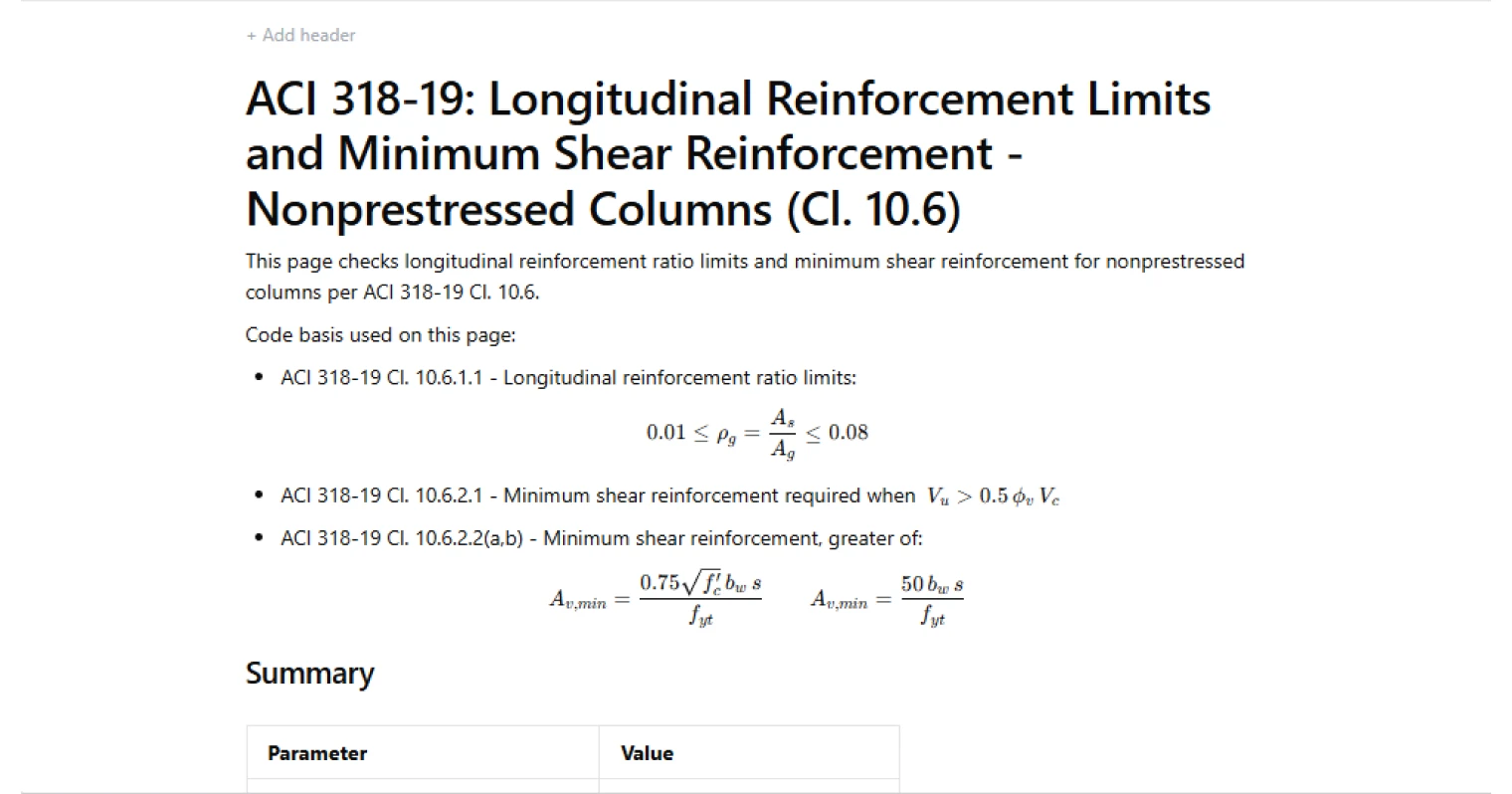
This calculator checks longitudinal reinforcement ratio limits and minimum shear reinforcement requirements for nonprestressed concrete columns per ACI 318-19 Clause 10.6. It evaluates whether the provided longitudinal steel falls within the code-prescribed bounds and determines whether minimum shear reinforcement is required based on the factored shear demand relative to concrete shear capacity.
- Structural engineer — verify column reinforcement detailing against ACI 318-19 limits during design or review, with both longitudinal and shear checks resolved in a single calculation.
- RC detailer — confirm bar counts, sizes, and tie configurations satisfy minimum and maximum steel requirements before finalizing drawings.
- Project checker — audit a column design against code-mandated thresholds with full traceability from inputs through to pass/fail results.
This is an engineering-grade calculator built on CalcTree, where calculations can be saved to a project, shared with a team, and updated as design progresses.
More info on ACI 318-19: Longitudinal Reinforcement Limits and Minimum Shear Reinforcement - Nonprestressed Columns (Cl. 10.6)
Inputs
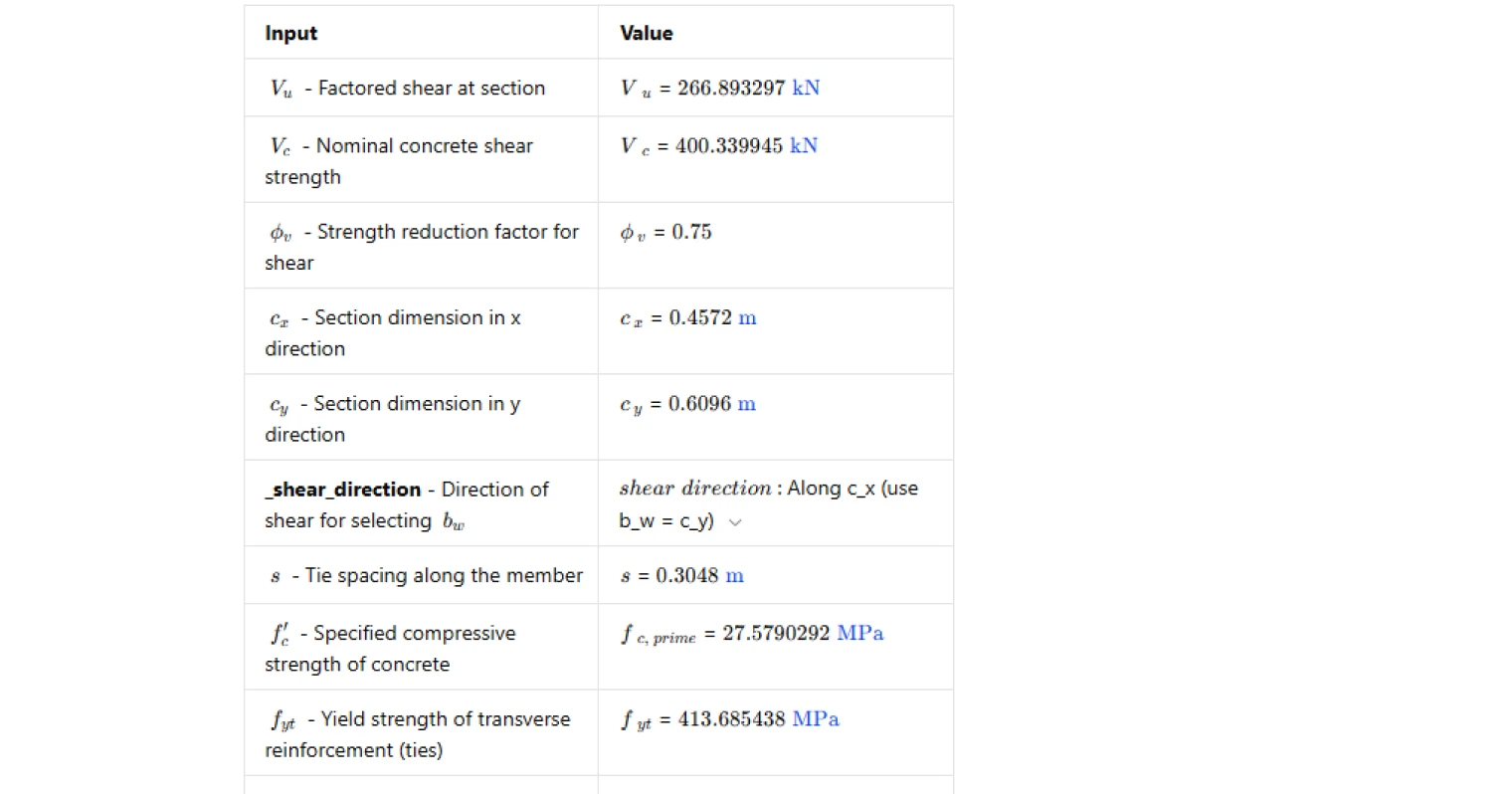
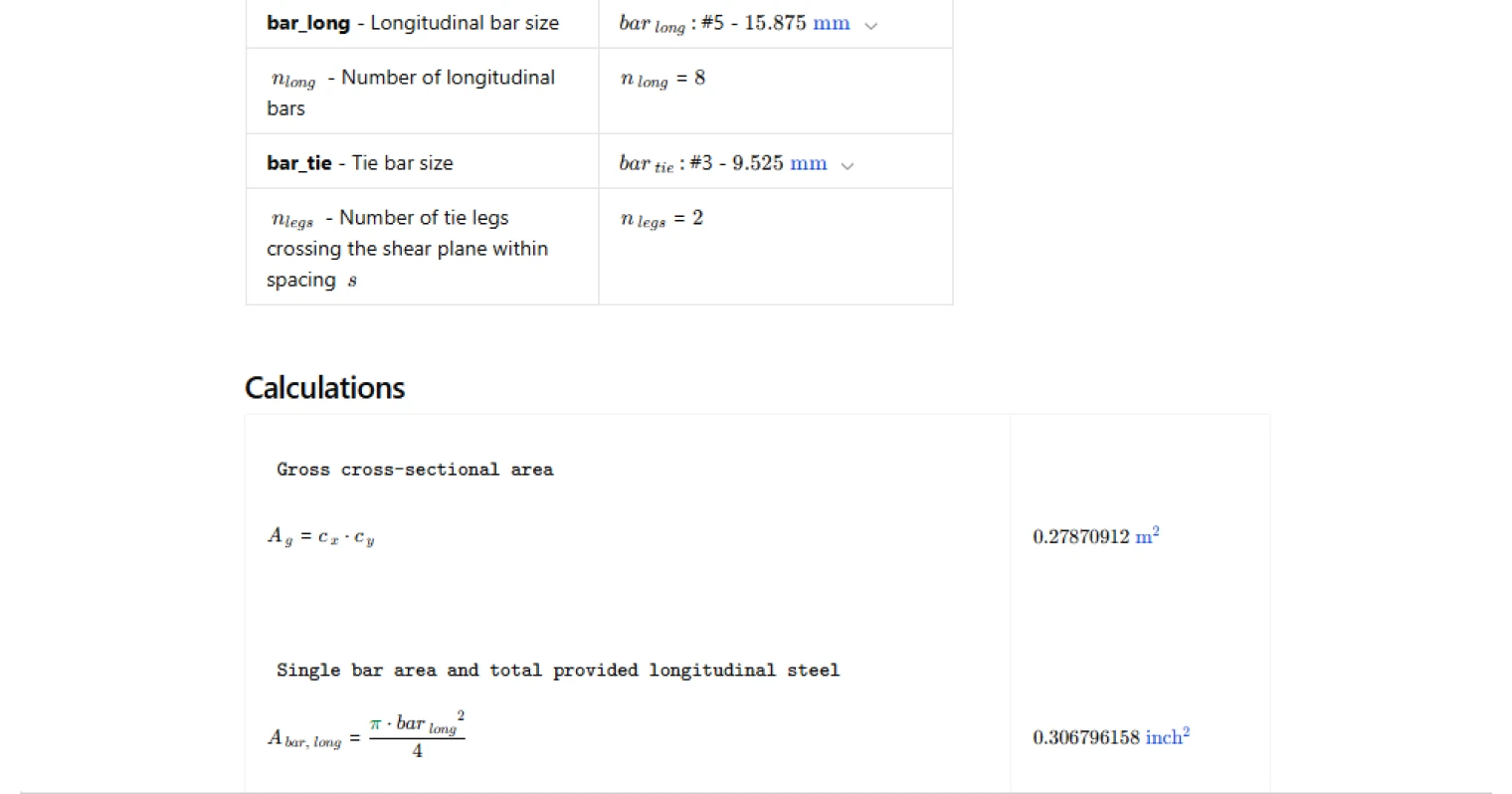
The calculator takes column section dimensions in both plan directions, material properties for concrete and transverse reinforcement, and the factored shear force and nominal concrete shear strength at the section being checked. Longitudinal reinforcement is defined by bar size and count. Transverse reinforcement is defined by tie bar size and the number of legs crossing the shear plane within a given tie spacing. A shear direction selector determines which section dimension acts as the web width for the shear reinforcement calculations. The shear strength reduction factor is also entered directly, giving the user control over the applicable load combination and design context.
Longitudinal Reinforcement Ratio Limits — Cl. 10.6.1.1
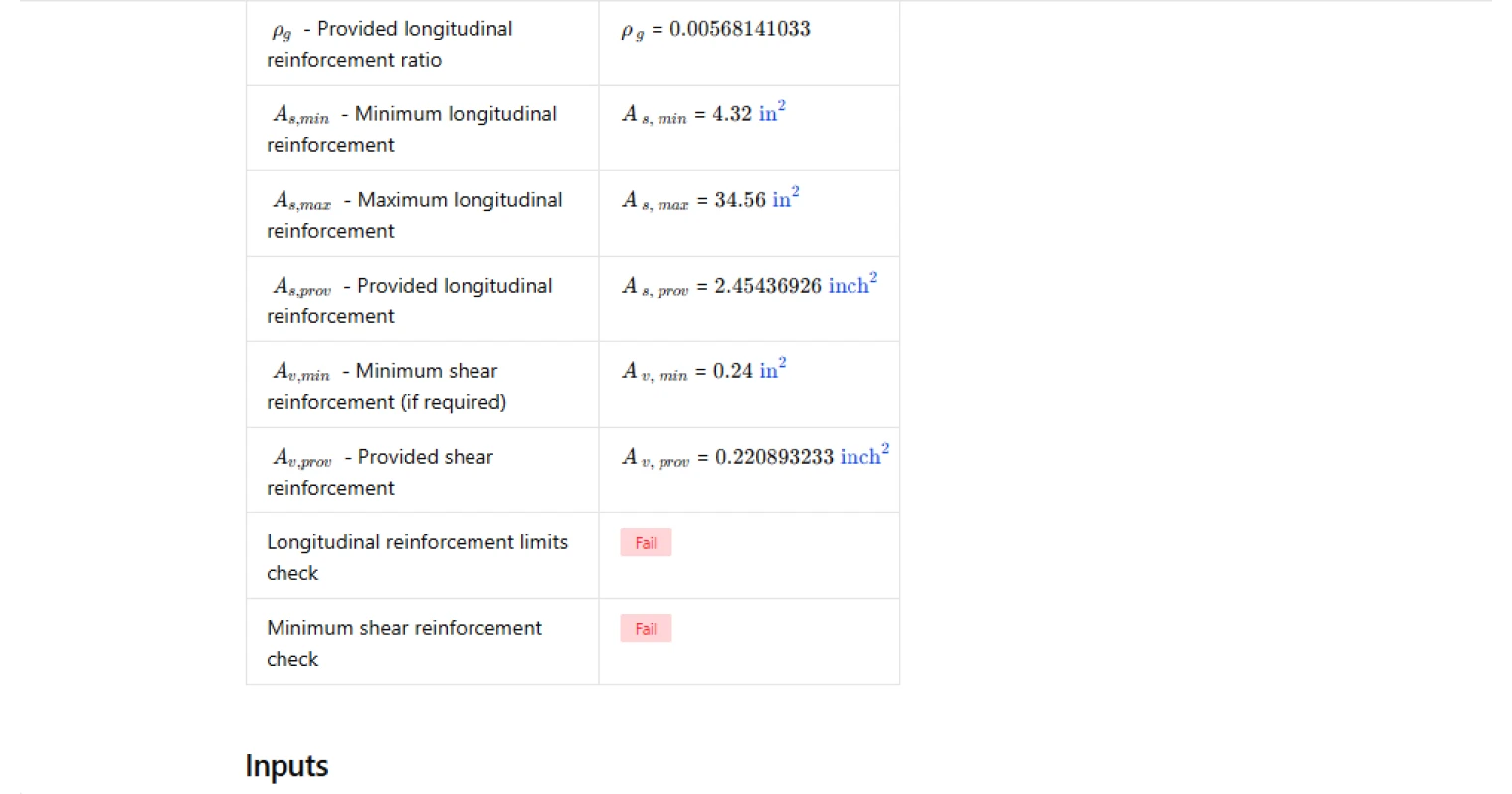
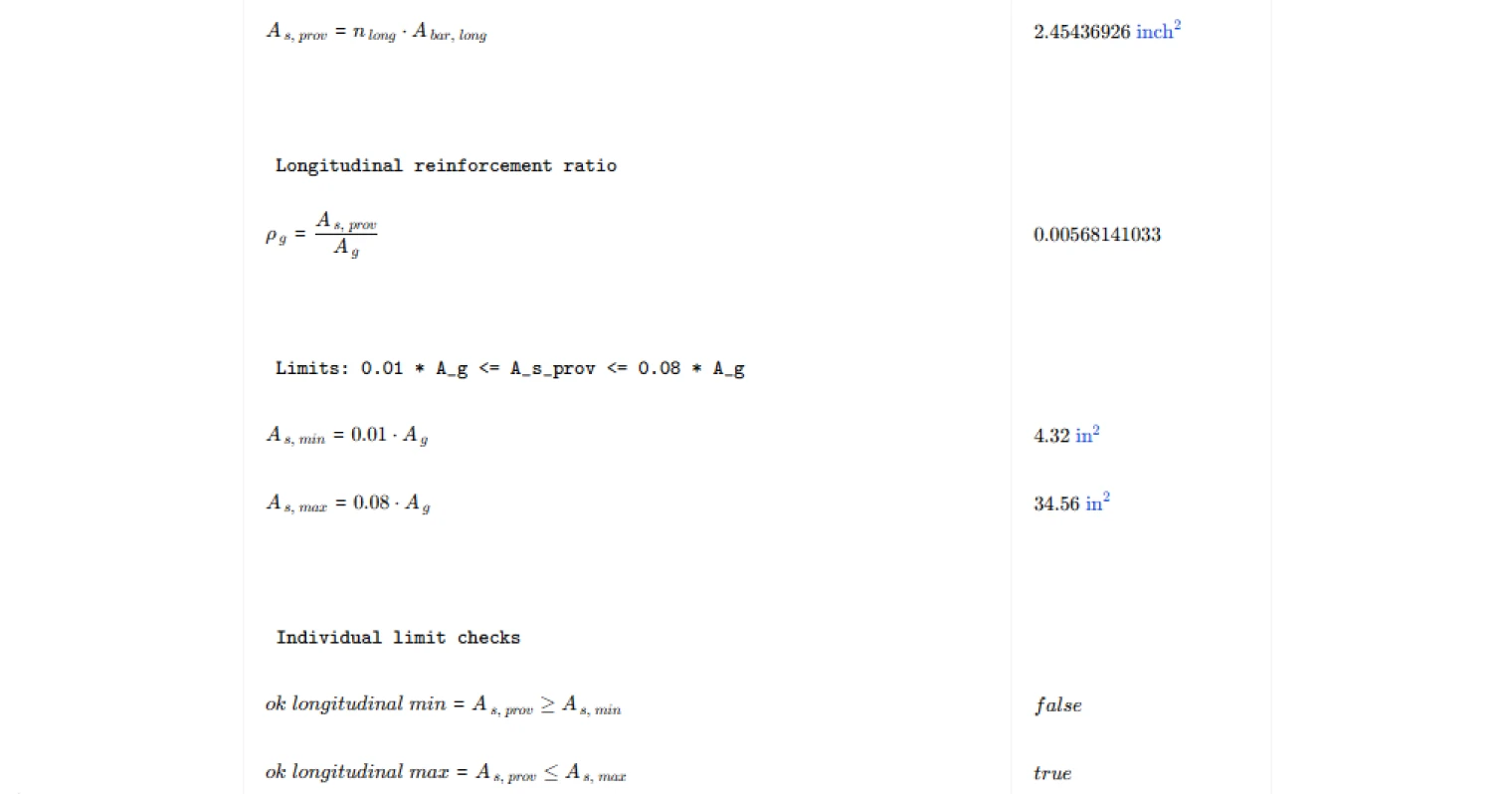
ACI 318-19 Clause 10.6.1.1 requires the gross longitudinal reinforcement ratio to fall between 0.01 and 0.08. The calculator computes the gross cross-sectional area from the entered section dimensions, determines the total provided longitudinal steel area from the selected bar size and count, and evaluates the ratio against both limits. Minimum and maximum permissible steel areas are reported alongside the provided area, giving a clear picture of how much margin exists against each bound. The upper limit exists to prevent congestion and ensure concrete can be properly placed and consolidated; the lower limit guards against brittle failure at cracking.
Minimum Shear Reinforcement — Cl. 10.6.2
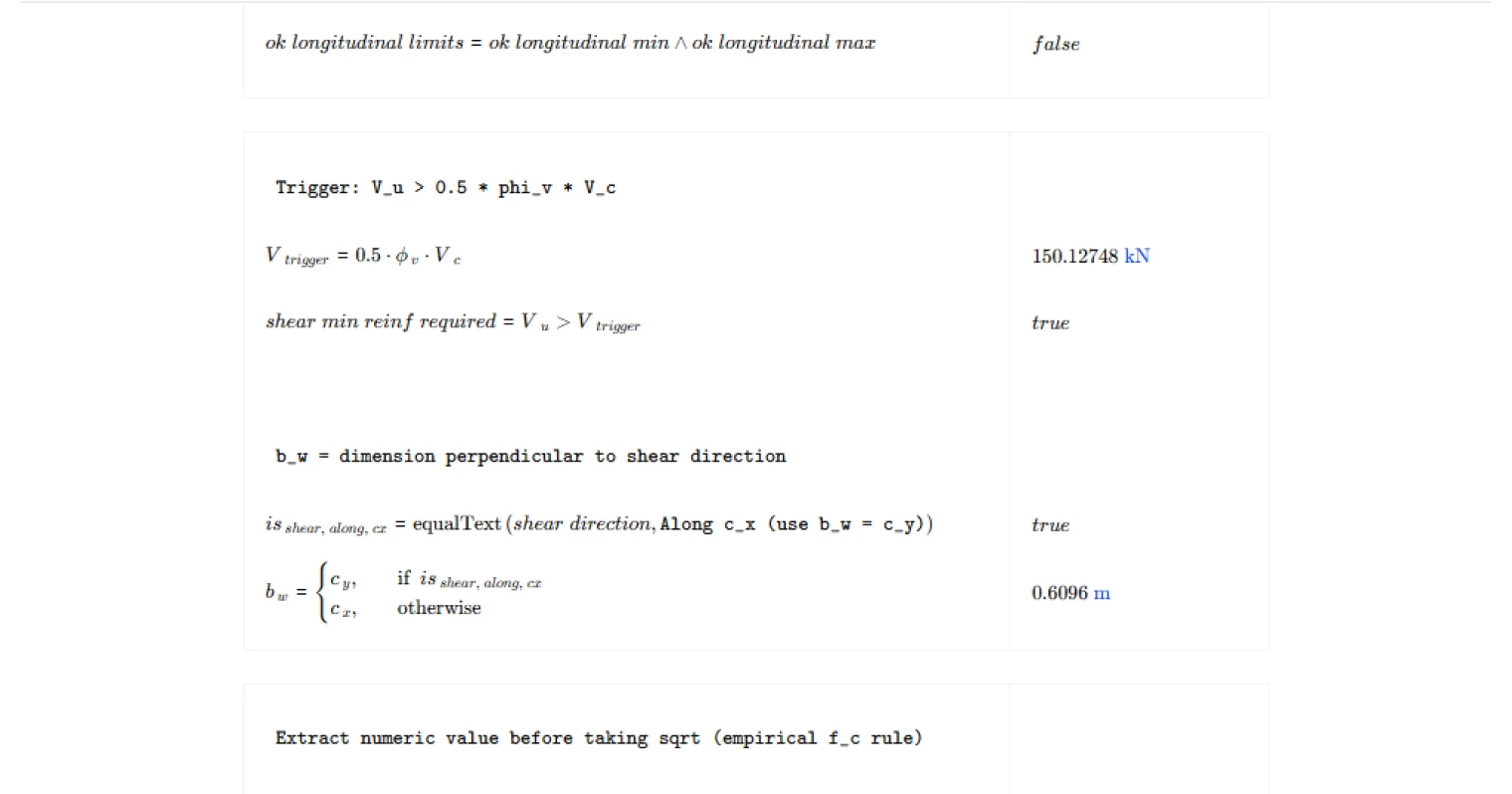
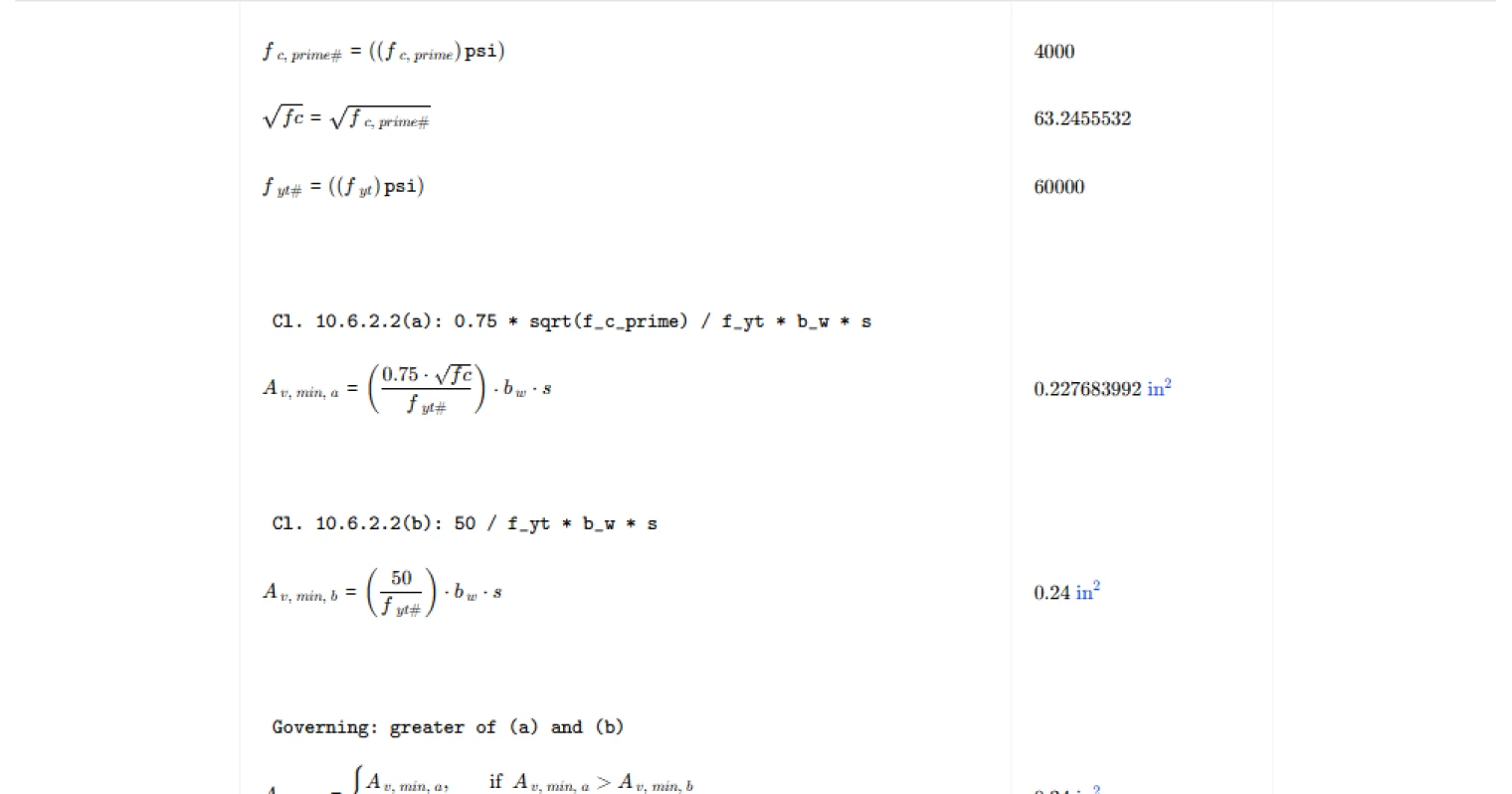
Minimum shear reinforcement is only required when the factored shear demand exceeds half the factored concrete shear strength. The calculator evaluates this trigger condition first and flags the shear check as not applicable when the threshold is not exceeded. When minimum reinforcement is required, the governing area is taken as the greater of the two expressions in Clause 10.6.2.2: one tied to the square root of the specified concrete compressive strength and one based on a fixed empirical constant. Both are scaled by the web width and tie spacing. The web width is automatically selected based on the chosen shear direction, using the perpendicular section dimension.
Design Checks and Outputs
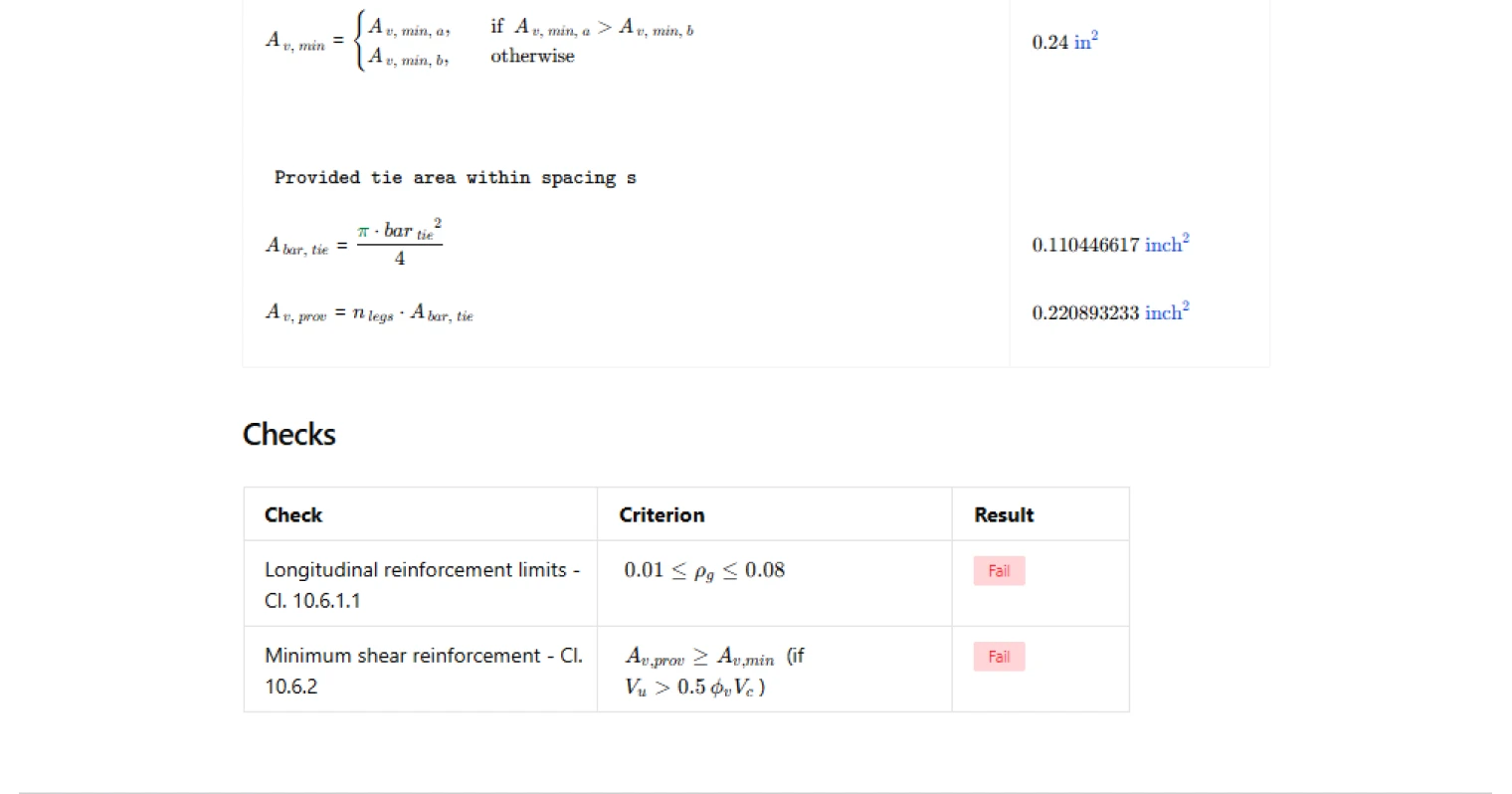
The summary table reports the longitudinal reinforcement ratio, minimum and maximum permissible longitudinal steel areas, the provided longitudinal steel area, the minimum and provided shear reinforcement areas, and pass/fail results for both checks. The longitudinal check passes when the provided steel area falls within the calculated bounds. The shear check either confirms adequacy of the provided tie area against the governing minimum or returns a not-applicable result when the shear demand is below the trigger threshold. All intermediate values are visible, making the calculation straightforward to review and audit.
Common Calculation Errors to Avoid
- Using net area instead of gross area for the reinforcement ratio — ACI 318-19 Cl. 10.6.1.1 bases the ratio on the gross cross-sectional area of the column section, not the net concrete area after deducting bar area. Using the net area will overstate the ratio slightly, which can cause unnecessary failures near the upper limit.
- Misidentifying the web width for shear reinforcement — the web width used in the minimum shear reinforcement equations is the section dimension perpendicular to the direction of shear, not parallel to it. Mixing these up will produce an incorrect minimum area.
- Skipping the shear trigger check — applying minimum shear reinforcement requirements regardless of the factored shear demand is conservative but incorrect practice. The code only mandates minimum transverse steel when the factored shear exceeds the threshold in Cl. 10.6.2.1.
- Counting tie legs incorrectly — only the legs that physically cross the shear plane within the spacing contribute to the provided shear reinforcement area. Peripheral ties and legs oriented parallel to the shear plane should not be included.
- Using the same yield strength for longitudinal and transverse bars — the minimum shear reinforcement expressions use the yield strength of the transverse reinforcement specifically. If different grades are used for ties and longitudinal bars, ensure the correct value is applied to each check.
- Neglecting the upper limit on longitudinal reinforcement — columns near heavily loaded cores can attract more steel than the 0.08 limit allows. Exceeding the maximum is a code violation even if the section has adequate strength, and it often signals that the section needs to be resized rather than packed with additional bars.
Engineering templates
Common calculators
Design guides




FAQs
What does ACI 318-19 Cl. 10.6.1.1 require for longitudinal reinforcement in nonprestressed columns?
The code sets a minimum ratio of 1% and a maximum of 8% of the gross cross-sectional area. The lower bound prevents columns from behaving like plain concrete members under unexpected loads or creep. The upper bound controls congestion and ensures concrete can be properly placed and consolidated. In practice, ratios between 1% and 4% are common; values above 4% should prompt a layout review for constructability.
Why does ACI 318-19 only require minimum shear reinforcement when Vu exceeds 0.5·φv·Vc?
Below this threshold, the concrete alone is considered sufficient to carry the shear demand with adequate reserve. The 0.5 factor provides a buffer before transverse steel becomes mandatory. Once that limit is crossed, ties or stirrups must be provided regardless of how small the excess is. This calculation checks that trigger automatically and reports N/A on the shear check when minimum reinforcement is not required.
How does the calculator select the correct bw for the minimum shear reinforcement formulas?
bw is the web width perpendicular to the direction of applied shear. For a rectangular column with dimensions cx and cy, shearing along cx means the resisting width is cy, and vice versa. Use the shear direction dropdown to select the correct orientation; the calculation assigns bw accordingly before applying the two Cl. 10.6.2.2 expressions.
Which of the two minimum Av expressions governs, and when does each control?
Cl. 10.6.2.2(a) uses 0.75√f′c and is sensitive to concrete strength, so it tends to govern when f′c is high. Cl. 10.6.2.2(b) uses a flat factor of 50 and typically governs for lower-strength concrete. The calculator evaluates both and automatically takes the greater value as Av,min, consistent with ACI requirements.
What inputs do I need to provide for the shear reinforcement check?
You need the factored shear Vu, nominal concrete shear strength Vc, shear reduction factor φv (typically 0.75), section dimensions cx and cy, tie spacing s, concrete compressive strength f′c, tie yield strength fyt, tie bar size, and number of tie legs crossing the shear plane. All of these are entered in the inputs table. Av,prov is calculated from the bar geometry and number of legs, so no manual area lookup is needed.
Can this calculation be used for columns with high longitudinal steel ratios near the 8% limit?
Yes, but approach with caution on the construction side. The calculation will flag a fail if the provided steel exceeds 0.08Ag. At or near that limit, bar splices become a serious congestion concern and ACI limits splice locations. Consider reducing bar count or upsizing the section before accepting a layout at the upper bound.
Learn about the benefits of using CalcTree on engineering projects!